
The Quartz alternative for modern Java teams
JobRunr runs your Java background jobs on the database you already have. You get a real dashboard, automatic retries and a lot more throughput. And because both schedulers run side by side, you can migrate one job at a time.
JobRunr OSS is free forever, for companies too.
18x
more jobs per second than Quartz in our public benchmark, on the same Postgres database
See the numbers →5 tables
is all JobRunr adds to your database, where Quartz creates 11
1 dashboard
built into JobRunr, showing every job and server in real time, where Quartz ships none
The same job, written twice
This is the Quartz quick-start example next to its JobRunr equivalent. Quartz asks for a Job class, a JobDetail, a JobDataMap and a Trigger. JobRunr asks for a lambda.
public class WelcomeMailJob implements Job {
    @Override
    public void execute(JobExecutionContext ctx)
            throws JobExecutionException {
        String userId = ctx.getMergedJobDataMap()
            .getString("userId");
        new MailService().sendWelcomeMail(userId);
    }
}

Scheduler scheduler =
    StdSchedulerFactory.getDefaultScheduler();

JobDetail job = newJob(WelcomeMailJob.class)
    .withIdentity("welcome-mail", "mails")
    .storeDurably()
    .build();
scheduler.addJob(job, true);

JobDataMap data = new JobDataMap();
data.put("userId", userId);

scheduler.triggerJob(job.getKey(), data);
scheduler.start();// run it now
BackgroundJob.enqueue(
() -> mailService.sendWelcomeMail(userId));
// or run it tomorrow
BackgroundJob.schedule(now().plus(1, DAYS),
() -> mailService.sendReminder(userId));
// or run it every morning at 8
BackgroundJob.scheduleRecurrently("0 8 * * *",
() -> reportService.generateDailyReport());Any existing class or Spring, Quarkus or Micronaut bean works as a job. There is no interface to implement and no JobDataMap to fill by hand, since JobRunr serializes the lambda and its arguments for you.
Looking for a Quartz scheduler UI? There isn’t one.
Search for a Quartz scheduler UI and you land in a maze of half-abandoned community projects. Quartz itself ships no interface at all, so most teams end up querying the QRTZ_ tables by hand to work out which jobs ran and which ones vanished.
JobRunr comes with a dashboard out of the box. You see every enqueued, scheduled, succeeded and failed job in real time, and when something breaks you get the full stack trace and can requeue the job with one click.
Explore the dashboard →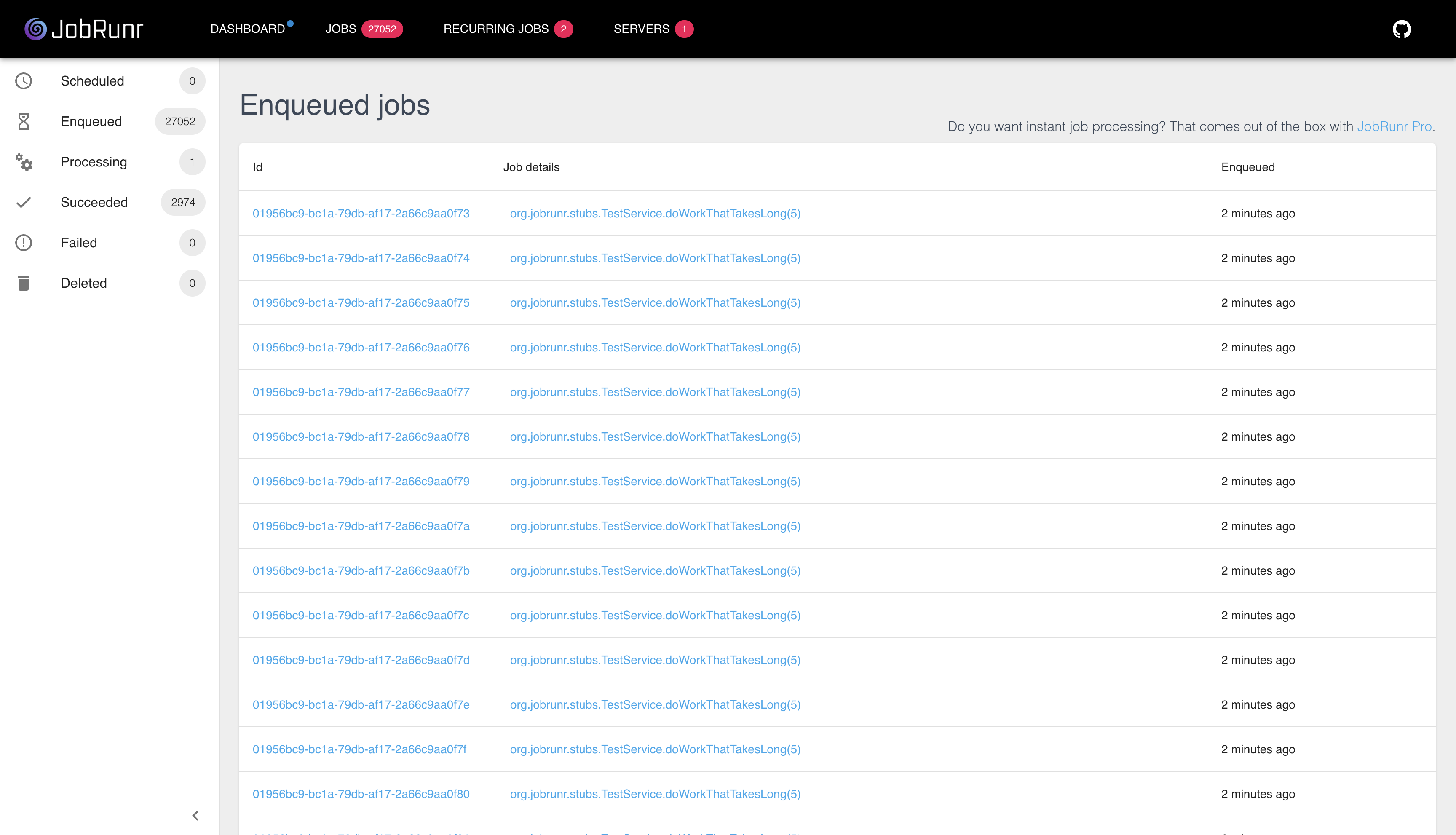
JobRunr vs Quartz, feature by feature
Quartz has earned two decades of trust and it still wins on business calendars. The rest, side by side.
| Quartz | JobRunr | |
|---|---|---|
| Creating a job | A Job class, a JobDetail and a Trigger | A Java 8 lambda |
| Dashboard | None, community projects only | Built in, for every job and server |
| Automatic retries | Refire logic you write yourself | 10 retries with smart back-off, out of the box |
| Clustering | Opt-in, needs extra configuration | On by default, servers coordinate through your database |
| Database tables | 11 | 5 |
| Throughput in our public benchmark | 145 jobs per second | 2,732 jobs per second |
| Virtual threads | Platform thread pools | Supported out of the box on JDK 21+ |
| Framework integrations | Spring Boot starter | Official Spring Boot, Quarkus and Micronaut integrations |
| Business calendars | Holiday and fiscal calendars built in | Cron with time zones, business-day rules live in your job code |
| License | Apache 2.0, free | LGPL 3.0, free for commercial use |
| Commercial option | No commercial edition or support contract | JobRunr Pro adds priority queues, workflows and support |
| Maintenance | Active again since IBM acquired the project | Actively developed by a dedicated team |
Where the 18x comes from
We enqueued 500,000 jobs on the same dedicated Hetzner server and the same Postgres 18 database, once with Quartz and once with JobRunr Pro, using identical thread pools and connection pools. Quartz processed 145 jobs per second. JobRunr Pro processed 2,732.
Quartz coordinates its cluster through row locks on a separate QRTZ_LOCKS table, so every job costs extra database round trips. eBay’s engineering team documented this exact bottleneck under heavy load. JobRunr takes the lock inside the fetch query itself, using FOR UPDATE SKIP LOCKED on Postgres, so your database spends its time processing jobs instead of managing locks.
To be fair to Quartz, the benchmark uses jobs that finish instantly, which is the worst case for scheduler overhead. If your jobs take half a second each, the gap shrinks because your own code becomes the bottleneck. The extra database load Quartz adds to every job stays either way.
Quartz
145
jobs per second
JobRunr Pro
2,732
jobs per second
“Decathlon processes 50 million scans a day on JobRunr.”
Read the Decathlon story →Keep Quartz when
- You maintain a legacy system in low-change mode, where any migration carries more risk than the pain it removes.
- You built years of custom listeners and plugins around Quartz internals and they still serve you well.
Move to JobRunr when
- You want to see your jobs. The dashboard alone is the reason many teams switch.
- Your database feels the scheduler load, or you process enough jobs that throughput matters.
- You run distributed workloads on Kubernetes or in the cloud and want clustering without configuration.
- You are tired of writing Job classes and want to enqueue a lambda and move on.
Migrate one job at a time
JobRunr and Quartz share no tables and no threads, so they run happily side by side in the same application. Most teams move their jobs over gradually and retire Quartz once the last trigger has fired.
Step 1
Add the dependency
Add jobrunr or the starter for your framework to your build. JobRunr creates its five tables on startup and stays out of Quartz’s way.
Step 2
Move a job
Pick one Job class and replace it with a lambda or a JobRequestHandler. Keep the Quartz version around until you trust the new one.
Step 3
Retire Quartz
When the last trigger has fired, remove the dependency and drop the 11 QRTZ_ tables from your database.
What each one costs
No surprises on either side.
Quartz
Free under Apache 2.0. You build and run everything around it yourself, which in practice means a homegrown UI, your own retry logic, your own alerting and the developer time all of that eats.
JobRunr
JobRunr OSS is free forever under LGPL 3.0, for companies too. JobRunr Pro is €850 per production cluster per month, or €9,000 per year. Startups with fewer than 10 people can apply for the €1,200 per year plan.
See the full pricing →Trusted by thousands of companies worldwide






FAQ
Questions Quartz users ask us
The things teams want to know before they switch, answered without the sales filter.

Try JobRunr yourself, no install required
Walk through 21 hands-on scenarios in our hosted demo and feel how JobRunr handles real-world workflows. Open it in your browser, no setup, no signup.
Launch the interactive demo