
Burst workers for your job queue, at spot prices, in your own AWS account.
When jobs start waiting, JobRunr Spot boots your app on the cheapest spot instance AWS has, drains the backlog, and gives the machine back. Your existing servers keep running like today. In our measured runs, 2.5 hours of backlog was gone in 8 minutes for $0.002.
below on-demand, measured on live price pairs for the same instance
jobs lost when we killed a spot node mid-run
from queue backlog to extra capacity processing jobs
to drain 2.5 hours of backlog
All numbers from our measured test day: 270 jobs, 4 experiments, one deliberately killed node. Read the full write-up.
Spot is cheap. Capturing the saving is hard.
AWS sells spare capacity at up to 90% off, yet almost nobody uses it for background jobs. Configure it once and JobRunr does the hard part, while your existing servers keep running like today.
- ✓ Spot prices move constantly: the broker tracks them live and picks the cheapest match across your regions. We measured a 9x spread for the same spec.
- ✓ Reclaims are a non-event: we killed a node mid-run, 17 jobs re-queued in 11 seconds, zero lost.
- ✓ Your queue is the scaling signal, not CPU: extra capacity was processing jobs 64 to 80 seconds after the queue backed up.
- ✓ No Terraform changes: no launch templates, no custom metrics. The spot worker is your existing Docker image.
- ✓ Runs in your own AWS account: your data, your VPC. We're the broker, not the host.
- ✓ Verifiable savings: the dashboard tracks your spot cost against the same instance on-demand, live.
// Configure once: JobRunr boots your Docker image on the
// cheapest spot instance whenever your job queue backs up
JobRunr.configure()
    .useStorageProvider(storageProvider)
    .useCostAware(usingStandardCostAwareConfiguration(
            new CostAwareAwsEC2ProviderConfiguration(accessKeyId, secretAccessKey, accountRegion, registryReaderRole),
            "url-to-your-docker-image")
        .andUsingRegions(new String[]{"eu-north-1", "eu-west-1"})
        .andSpotInstanceAmount(1, 5)
        .andScaleUpLatency(Duration.ofMinutes(1)))
    .initialize();
This shows the shape of the configuration API. Final method names may change based on what design partners tell us.
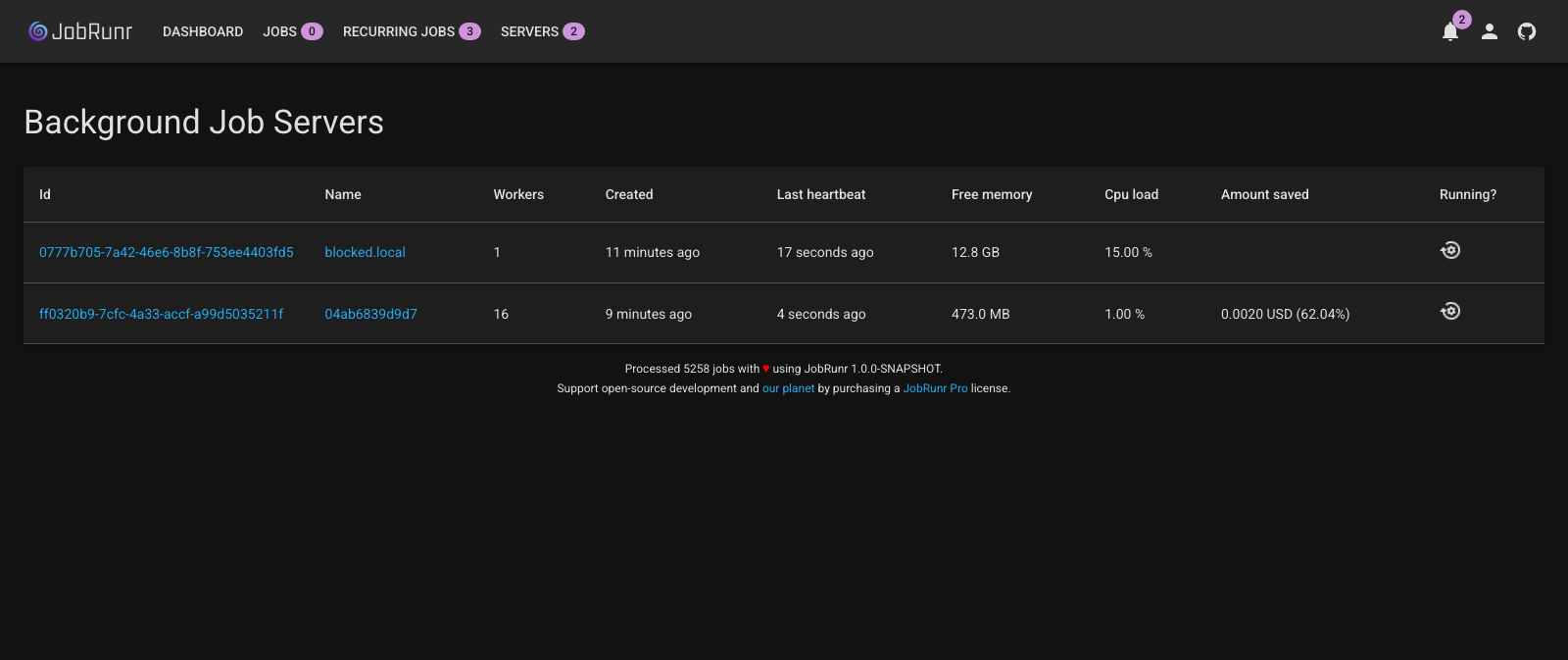
The dashboard during our test day: every spot node reports its live cost next to what the same hours would have cost on-demand.
What would Spot save you?
If Spot is not a fit for your queue, the calculator says so.
1. Where do your background jobs run today?
2. What shape is your workload?
3. Are your jobs safe to re-run?
4. Closest worker instance size, and how many?
5. How many hours a day are those workers actually busy? 6h
- ✓
- ✓
Price pairs from the 10,448 live spot prices we collected on our test day. The t3.small and t3.2xlarge pairs are measured, the sizes in between are interpolated. Your workload will differ, which is exactly what the beta is for. See the measured math
We killed a live node to prove the failover.
During a 40-job burst we terminated the spot instance while it was processing 17 jobs. No drain, no warning. That is harsher than a real reclaim, which gives you two minutes notice. Eleven seconds later, all 17 jobs were back in the queue. The cluster provisioned a replacement and all 40 jobs finished. Zero lost.
There is no magic here, and that is the point. JobRunr runs jobs at least once with automatic retries, whether a worker dies from a spot reclaim, a deploy, or a kernel panic. The one rule that stays yours is that jobs on spot must be safe to re-run.
Read the full chaos testWhen you don't need this
Spot is not for every queue, and pretending otherwise would cost us your trust. Four honest reasons to skip the waitlist.
You need sub-minute pickup at all times
A spot node takes about a minute to appear. If that minute hurts, keep one spot worker as a permanent floor with andSpotInstanceAmount(1, N), still at the spot discount, and burst the rest.
Your jobs can't be re-run
Keep them on your stable servers and set retries to 0. Spot is for retriable work, which is the same discipline Lambda and every retry-based system already asks of you.
If any of this sounds like you, the waitlist is the right place
JobRunr Spot is for the teams already feeling the cost.
You already run JobRunr
You have the cluster and the jobs. Trying Spot is a config block and a Docker image, not a migration. Your OSS or Pro setup stays exactly as it is.
Java teams with bursty batch work on AWS
PDF generation, ETL, report rendering, imports, transcoding. You're paying on-demand for capacity you only need in bursts.
Teams who tried spot and got burned
Sudden shutdowns killed your throughput. You missed an SLA. You quietly moved back to on-demand. We killed a node mid-run to prove the failover. Zero jobs lost.
Be one of the first 100 design partners
We're picking a small group of teams to shape the product before the September launch. You'll run it on your own AWS account, on your own workload, and you get direct input on the API, the pricing, and which providers we add next.
We'll reach out before the private beta opens. No spam, ever.
You're on the list.
We'll be in touch before the private beta opens. In the meantime, the best preparation is making your jobs safe to re-run: spot instances can disappear mid-job, and JobRunr simply runs the job again on another worker. Know another Java team burning money on AWS? Forward this page. Teams that bring a second team skip the line when we pick the 100 design partners.
From the team behind JobRunr. Trusted by





FAQ
Questions before you sign up?
What we know so far. Some of this will change based on what design partners tell us.
andSpotInstanceAmount(1, N), still at the spot discount, and burst the rest.