
On this page
Apache Grails sits on top of Spring Boot, so in theory you can drop in any Spring Boot library and call it done. Background jobs are not quite that simple.
JobRunr is a small Java library that handles fire-and-forget, scheduled, and recurring jobs, with automatic retries and a built-in dashboard. One dependency, no extra infrastructure: it stores jobs in your existing database.
Wiring it into Grails takes a little more than the Spring Boot starter promises. GORM owns the DataSource, so JobRunr’s auto-configuration can’t find it. Groovy closures also don’t compile to the same bytecode as Java lambdas, so JobRunr’s flagship BackgroundJob.enqueue(() -> ...) API does not work from Groovy. This guide covers both, then walks you through scheduled, recurring, and progress-tracking jobs.
A full runnable demo lives at jobrunr/example-grails. Clone it if you want to follow along.
Prerequisites
- Grails 8 (Spring Boot 4) or Grails 7.x (Spring Boot 3)
- JDK 17+ for Grails 7, JDK 25 for Grails 8 if you want the demo’s virtual-thread setup
- A SQL database (H2 in memory is fine for local development)
- Familiarity with Grails services,
build.gradle, andapplication.yml
1. Add the JobRunr dependency
Add the JobRunr starter that matches your Spring Boot major version. Grails 8 runs on Spring Boot 4, so you want the Spring Boot 4 starter. Pin Jackson explicitly because the Grails 8 BOM no longer pulls it in transitively and JobRunr’s JacksonJsonMapper needs it.
dependencies {
    // Grails 8 ships Spring Boot 4: use the SB4 starter.
    // On Grails 7.x, swap in 'jobrunr-spring-boot-3-starter' at the same version.
    implementation 'org.jobrunr:jobrunr-spring-boot-4-starter:8.5.1'
    implementation 'com.fasterxml.jackson.core:jackson-databind'
}
PitfallThe
jobrunr-spring-boot-3-starteris compiled against Spring Framework 6. Putting it on a Grails 8 (Spring Framework 7) classpath fails at bean wiring time. Always match the starter to your Spring Boot major version.
2. Wire JobRunr to GORM’s DataSource
Grails configures its DataSource through the dataSource: block in application.yml, not through the spring.datasource.* keys Spring Boot’s DataSourceAutoConfiguration looks for. JobRunr’s auto-configured StorageProvider depends on @ConditionalOnBean(DataSource.class), but GORM registers its DataSource late, via beanFactory.registerSingleton(...) inside HibernateGormAutoConfiguration rather than a normal @Bean. The interaction with Spring Boot 4’s stricter conditional evaluation is fragile enough that the safer default is to register the StorageProvider yourself.
Create src/main/groovy/your/package/jobrunr/JobRunrStorageConfig.groovy:
package your.package.jobrunr

import org.jobrunr.jobs.filters.JobFilter
import org.jobrunr.jobs.mappers.JobMapper
import org.jobrunr.server.BackgroundJobServer
import org.jobrunr.storage.StorageProvider
import org.jobrunr.storage.StorageProviderUtils.DatabaseOptions
import org.jobrunr.storage.sql.common.SqlStorageProviderFactory
import org.jobrunr.utils.mapper.jackson.JacksonJsonMapper
import org.springframework.context.annotation.Bean
import org.springframework.context.annotation.Configuration

import javax.sql.DataSource

@Configuration
class JobRunrStorageConfig {

    @Bean
    StorageProvider storageProvider(DataSource dataSource) {
        StorageProvider provider = SqlStorageProviderFactory.using(
            dataSource, null, DatabaseOptions.CREATE)
        provider.setJobMapper(new JobMapper(new JacksonJsonMapper()))
        return provider
    }

    @Bean
    JobFilterRegistrar jobFilterRegistrar(
            BackgroundJobServer backgroundJobServer, List<JobFilter> jobFilters) {
        return new JobFilterRegistrar(backgroundJobServer, jobFilters)
    }

    static class JobFilterRegistrar {
        JobFilterRegistrar(BackgroundJobServer server, List<JobFilter> filters) {
            server.setJobFilters(filters)
        }
    }
}
Three things matter in that class:
StorageProviderbean: built directly from the GORM-managedDataSource.setJobMapper(...)called eagerly: JobRunr’sRecurringJobPostProcessor(which processes@Recurringannotations) runs during Spring bean initialisation. Without an eager mapper you get aNullPointerExceptioninsideRecurringJobTable.JobFilterRegistrarbean: JobRunr OSS never auto-registersJobFilterbeans on theBackgroundJobServer; you wire them up yourself. Without this registrar any customApplyStateFilterorElectStateFilteris silently ignored.
Next, import the config and HibernateGormAutoConfiguration into your Application.groovy, and component-scan the src/main/groovy package so Spring picks up your @Component handlers:
@Import([JobRunrStorageConfig, HibernateGormAutoConfiguration])
@ComponentScan('your.package.jobrunr')
class Application extends GrailsAutoConfiguration {
    static void main(String[] args) {
        GrailsApp.run(Application, args)
    }
}
PitfallDo not put
@CompileStaticonApplication.groovy.GrailsAutoConfiguration’s lifecycle hooks (doWithSpring,doWithApplicationContext,doWithDynamicMethods) dispatch into Groovy closures and break the moment you statically compile them.
3. Configure JobRunr in application.yml
Grails uses YAML documents separated by ---. Drop the JobRunr block into its own document:
---
jobrunr:
    background-job-server:
        enabled: true
        poll-interval-in-seconds: 5
        worker-count: 4
    dashboard:
        enabled: true
        port: 8000
    jobs:
        default-number-of-retries: 10
    database:
        skip-create: false
For local development the H2 in-memory database is enough, as long as you keep the connection alive:
environments:
    development:
        dataSource:
            dbCreate: create-drop
            url: jdbc:h2:mem:devDb;DB_CLOSE_DELAY=-1;LOCK_TIMEOUT=10000;DB_CLOSE_ON_EXIT=FALSE
            driverClassName: org.h2.Driver
            username: sa
            password: ''
Pitfall
DB_CLOSE_DELAY=-1is required. Without it, H2’s in-memory database is destroyed when the last JDBC connection closes. JobRunr opens connections during startup to run migrations, then closes them, and by the time your first job runs the tables are gone (“Table JOBRUNR_RECURRING_JOBS not found”).
TipFor production swap H2 for PostgreSQL, MySQL, Oracle, SQL Server, or MongoDB. JobRunr discovers the database through the same
DataSourcebean, so no extra configuration is needed beyond your GrailsdataSource:block. See the storage configuration documentation for details.
4. Why Groovy needs the JobRequest pattern
JobRunr’s headline Java API takes a lambda:
BackgroundJob.enqueue(() -> myService.processOrder(orderId));
This does not work from Groovy. JobRunr uses ASM bytecode analysis to reconstruct the call from the lambda, and Groovy closures compile to a different bytecode shape than Java SAM lambdas. The framework rejects them with IllegalArgumentException: Please provide a lambda expression. There is no workaround at the language level.
JobRunr ships a second API for exactly this case: the JobRequest + JobRequestHandler pair. A JobRequest is a small serialisable value object that names the work; a JobRequestHandler is the Spring-managed bean that runs it. JobRunr serialises the request to its database, picks it up on any background worker, and dispatches it back to the handler. This is the pattern you will use for every JobRunr job in a Grails app.
5. Write your first job
A fire-and-forget order-processing job needs two classes.
The request is a plain Groovy class with a no-arg constructor for deserialisation:
package your.package.jobrunr

import org.jobrunr.jobs.lambdas.JobRequest

class OrderJobRequest implements JobRequest {

    Long orderId

    OrderJobRequest() {}
    OrderJobRequest(Long orderId) { this.orderId = orderId }

    @Override
    Class<OrderProcessingService> getJobRequestHandler() {
        return OrderProcessingService
    }
}
The handler is a regular Grails service. @Transactional from grails.gorm.transactions opens both a Hibernate session and a transaction, so GORM works exactly as it does inside a controller:
package your.package

import grails.gorm.transactions.Transactional
import org.jobrunr.jobs.annotations.Job
import org.jobrunr.jobs.lambdas.JobRequestHandler

@Transactional
class OrderProcessingService implements JobRequestHandler<OrderJobRequest> {

    @Override
    @Job(name = 'Process order', retries = 5, labels = ['order-processing'])
    void run(OrderJobRequest request) throws Exception {
        Order order = Order.get(request.orderId)
        order.status = 'PROCESSING'
        order.save(flush: true)
        // payment, fulfilment, shipping notifications, ...
        order.status = 'SHIPPED'
        order.save(flush: true)
    }
}
Enqueue the job from any controller or service. JobRunr’s Spring Boot starter exposes a JobRequestScheduler bean; Grails autowires it by field name:
class OrderController {

    JobRequestScheduler jobRequestScheduler

    def placeOrder() {
        Order order = new Order(/* ... */).save(flush: true)
        jobRequestScheduler.enqueue(new OrderJobRequest(order.id))
        redirect(action: 'index')
    }
}
PitfallPut
@Jobon therun()method, not on a delegated business method. JobRunr records the job as a call torun(Request)and never looks at private helpers you call from inside it.
6. Run it and watch the dashboard
./gradlew bootRun
The Grails app boots on http://localhost:8080 and JobRunr’s dashboard on http://localhost:8000/dashboard. The companion demo’s home page has a button for each scheduling pattern covered in the rest of this guide:
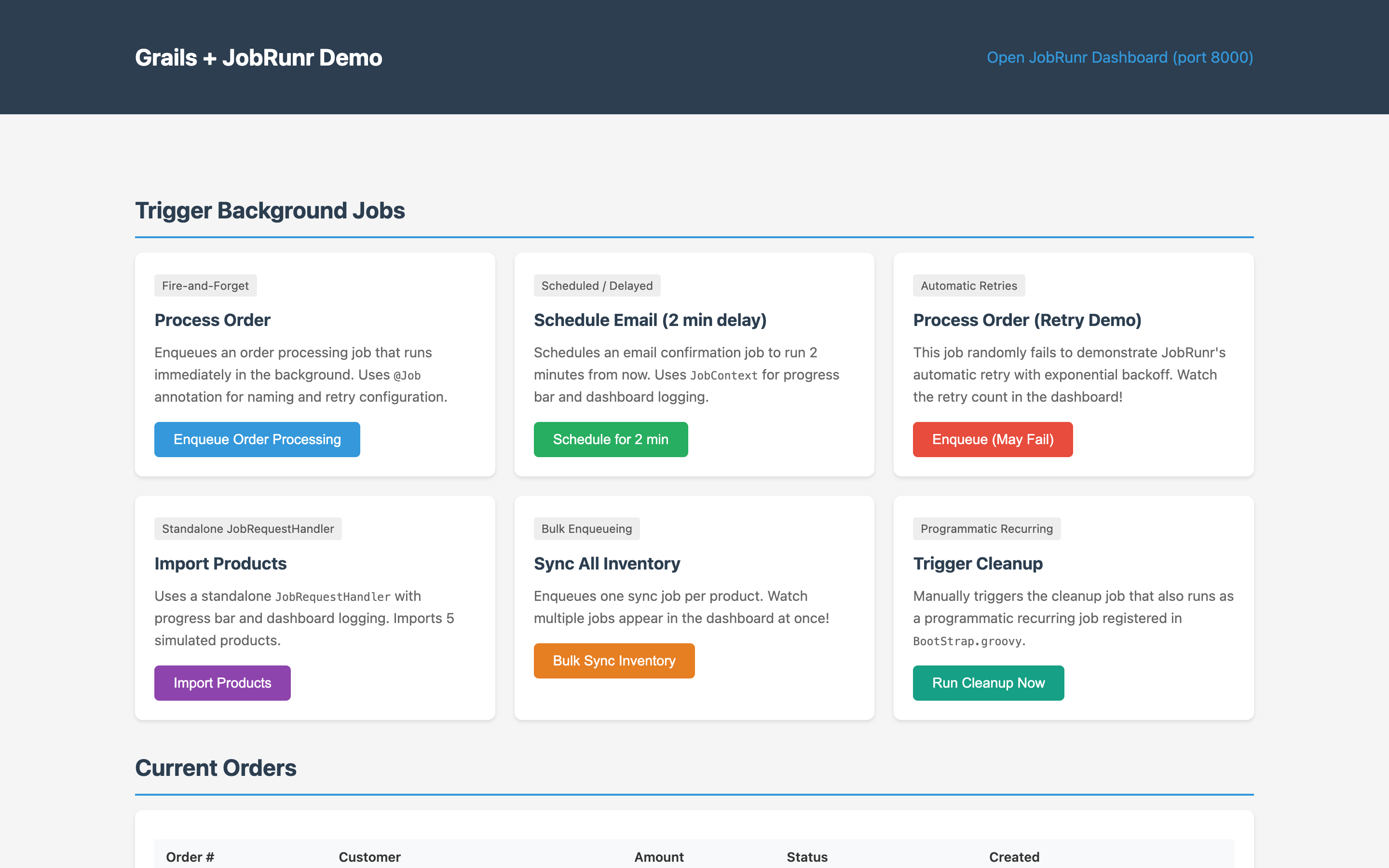
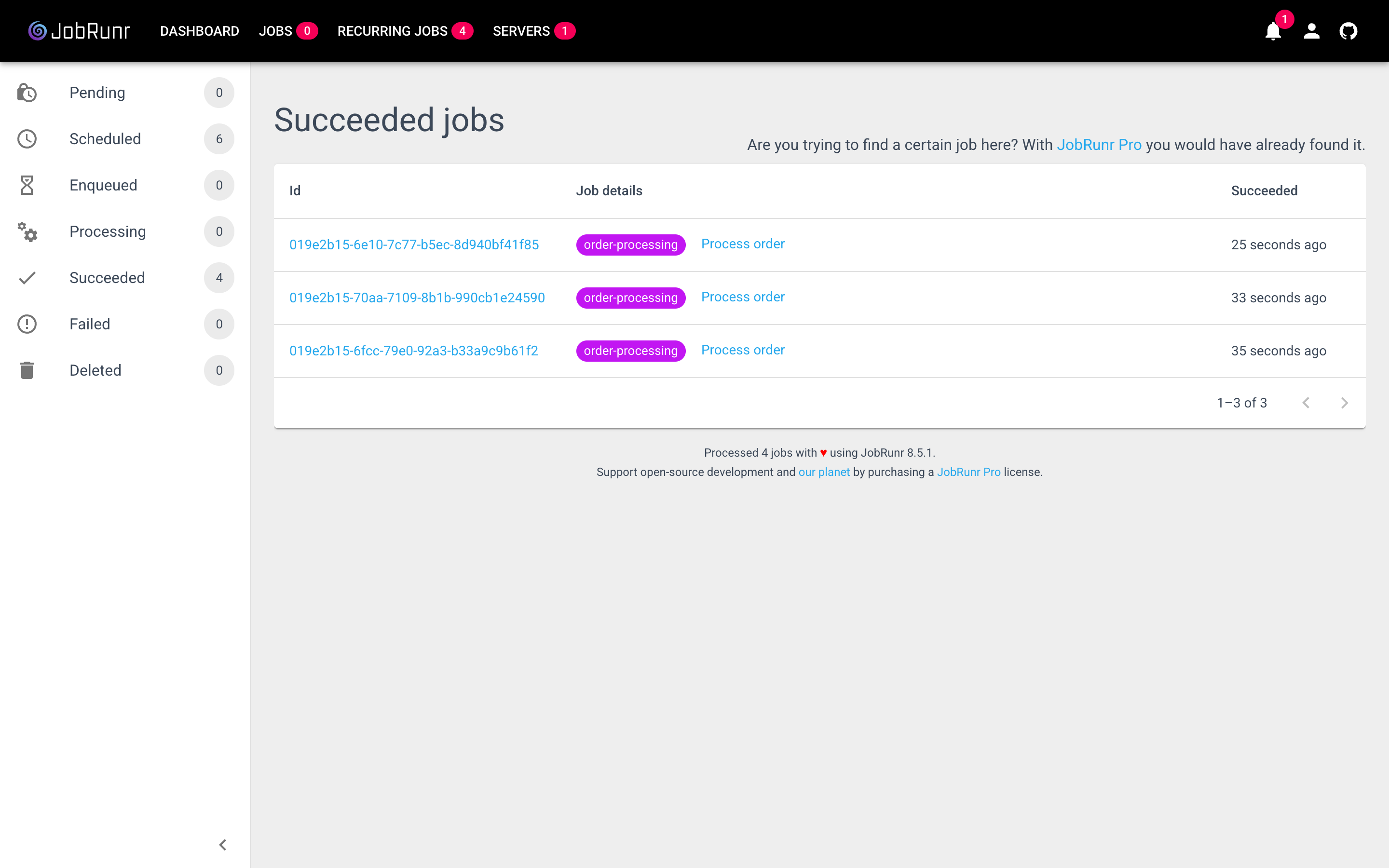
Trigger Enqueue Order Processing, then open the dashboard’s Jobs tab to watch the job move through Enqueued → Processing → Succeeded:
7. More patterns
The same JobRequestScheduler covers every common scheduling pattern. Pick the one you need; each links to the JobRunr documentation for the full API.
Scheduled jobs
Run a job at a specific instant. Useful for confirmation emails, reminders, or anything that should fire later in the same business process. See the scheduling-jobs documentation.
Instant runAt = Instant.now().plusSeconds(120)
jobRequestScheduler.schedule(runAt, new SendConfirmationRequest(orderId))
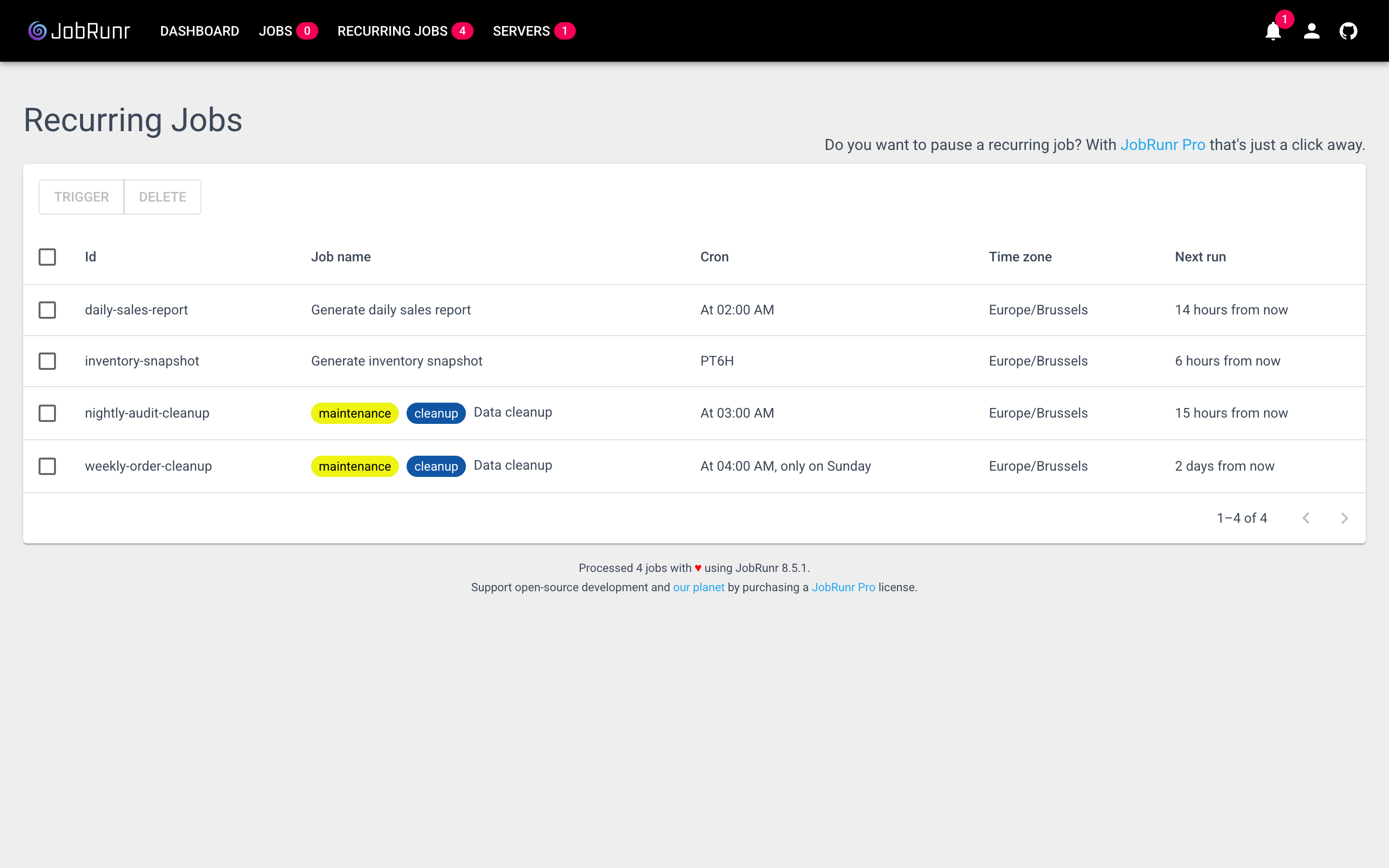
Recurring jobs (annotation-based)
Add @Recurring to a method on a Grails service. The annotation supports both CRON expressions and ISO-8601 intervals. The one Grails-specific catch: set static lazyInit = false so the bean is created at startup, otherwise RecurringJobPostProcessor runs before your service exists and the annotation is never scanned. See the recurring-jobs documentation.
class ReportGenerationService {
    static lazyInit = false

    @Recurring(id = 'daily-sales-report', cron = '0 2 * * *')
    @Job(name = 'Generate daily sales report')
    void generateDailySalesReport() { /* ... */ }

    @Recurring(id = 'inventory-snapshot', interval = 'PT6H')
    @Job(name = 'Generate inventory snapshot')
    void generateInventorySnapshot() { /* ... */ }
}
Recurring jobs (programmatic)
For dynamic schedules, register from BootStrap.groovy:
class BootStrap {
    @Autowired JobRequestScheduler jobRequestScheduler

    def init = { servletContext ->
        jobRequestScheduler.scheduleRecurrently(
            'nightly-audit-cleanup', '0 3 * * *',
            new CleanupJobRequest('audit-logs')
        )
    }
}
Both flavours show up side by side in the dashboard’s Recurring Jobs tab:
Progress bar and dashboard logging
Long-running jobs can stream a progress bar and log lines straight into the dashboard. Pull the JobContext from ThreadLocalJobContext inside your handler:
import org.jobrunr.server.runner.ThreadLocalJobContext
import org.jobrunr.jobs.context.JobContext

@Component
class ImportProductsJobRequestHandler implements JobRequestHandler<ImportProductsJobRequest> {

    @Override
    @Job(name = 'Import products', retries = 3)
    @Transactional
    void run(ImportProductsJobRequest request) throws Exception {
        JobContext context = ThreadLocalJobContext.jobContext
        def jobLogger = context.logger()
        def progressBar = context.progressBar(request.batchSize)

        jobLogger.info("Importing ${request.batchSize} products from ${request.sourceUrl}")
        (1..request.batchSize).each { int i ->
            // ... persist a Product ...
            jobLogger.info("Imported product ${i}")
            progressBar.incrementSucceeded()
        }
    }
}
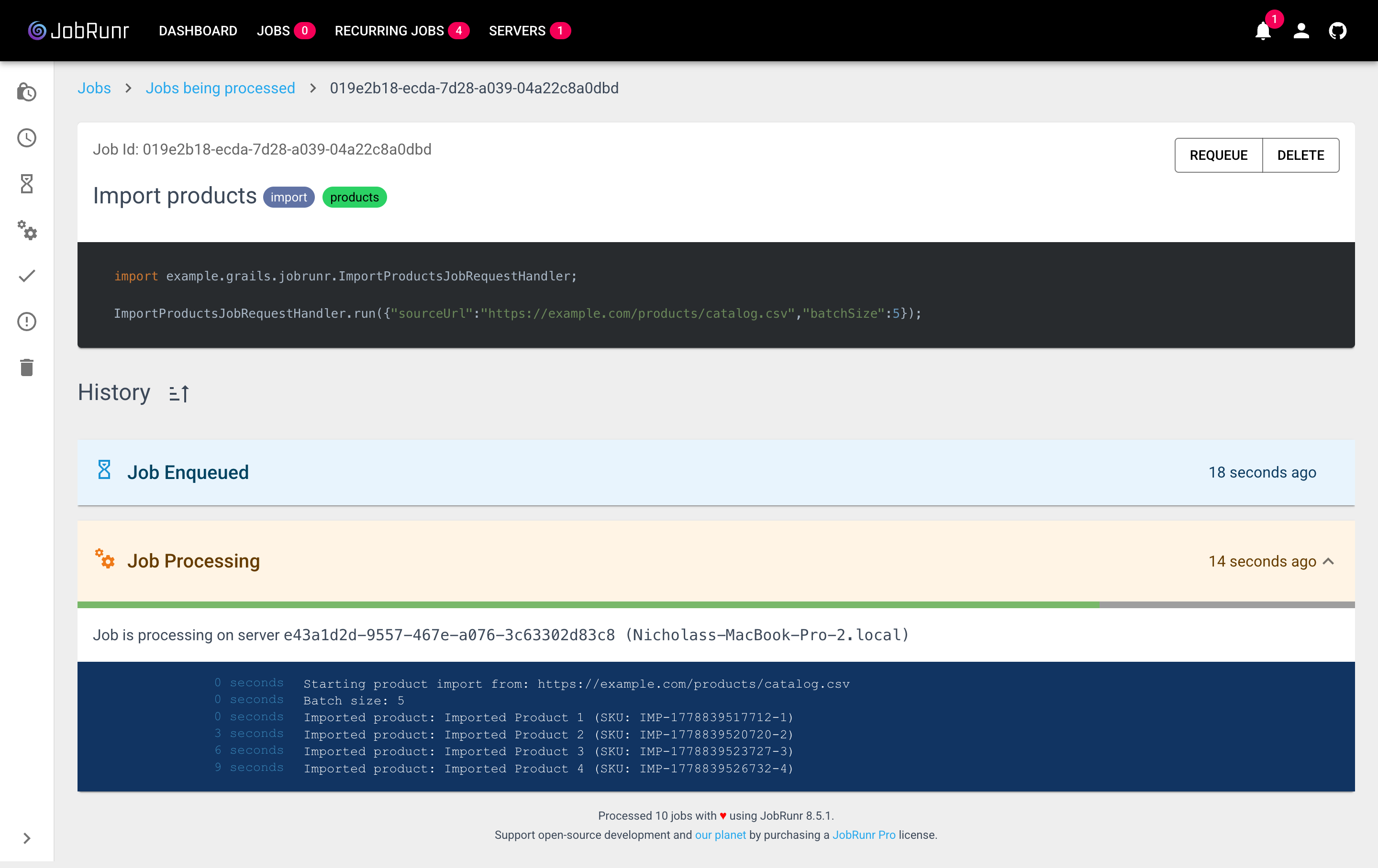
Retries with exponential backoff
When a job throws, JobRunr does not just retry immediately; it waits longer between each attempt (a few seconds, then minutes, then hours). The default is 10 attempts. When they are all exhausted the job lands in the dashboard’s Failed tab with its full stack trace, where you can inspect it and requeue manually.
Override the default per job:
@Job(name = 'Process order', retries = 5)
void run(OrderJobRequest request) { /* ... */ }
Or set the global default in application.yml with jobrunr.jobs.default-number-of-retries. One thing to watch: every retry re-runs your handler from the top, so any side effect that isn’t idempotent (sending email, charging a card) will happen again. Make the work idempotent or split the side effect into its own job. See the dealing with exceptions documentation for the full retry strategy.
8. Production considerations
- Switch to a persistent database. Replace the H2 dev
dataSourcewith PostgreSQL, MySQL, or any of the other supported storage backends; JobRunr discovers it through the same Grails-managedDataSource. - Lock down the dashboard. It binds to all interfaces on port 8000 with no authentication by default. In OSS you can set
jobrunr.dashboard.usernameandjobrunr.dashboard.passwordfor a single-user HTTP basic-auth gate, or front the dashboard with a reverse proxy that handles auth. For multi-user access, role-based authorization, or OpenID, JobRunr Pro ships dedicated authentication providers (see the Pro basic authentication guide and Pro OpenID guide). - Control schema migrations. If your DBA owns DDL, set
jobrunr.database.skip-create: trueand apply the migrations through your existing toolchain. See the Flyway and Liquibase guides.
What’s next?
- Clone the full demo: jobrunr/example-grails. Six end-to-end patterns (fire-and-forget, scheduled, two flavours of recurring, retries, progress bar, bulk enqueue, custom
ApplyStateFilter) plus a reference table of every Grails-specific pitfall. - Already on Spring Boot, Micronaut, or Quarkus? Use the matching starter and auto-configuration makes setup a one-liner. See the Spring Boot, Micronaut, and Quarkus guides.
- Save energy with Carbon Aware scheduling: Defer non-critical recurring jobs to greener moments on the grid. See the Carbon Aware documentation.
- Ready to scale? JobRunr Pro adds priority queues, batches, complex workflows, async job filters, and a multi-cluster dashboard.