
In the real world, not every job completes inside your JVM. Some jobs depend on external systems: a GPU finishing an AI inference, a human approving content, a payment provider confirming a transaction. Traditional background job schedulers force you to keep a worker thread alive while waiting for these external results, wasting resources and limiting scalability.
JobRunr Pro’s External Jobs solve this by decoupling the trigger (starting the work) from the completion signal (marking it done). The job is created and triggered by JobRunr, but its completion is signaled from outside: by a poller, a webhook handler, or even a human clicking a button.
Prerequisites
- JobRunr Pro 8.5.0 or later
- You already know how to configure JobRunr
- Basic understanding of the JobRunr job lifecycle (ENQUEUED → PROCESSING → SUCCEEDED)
How External Jobs Work
An External Job follows a slightly different lifecycle than a regular job:
- ENQUEUED: the job is created and placed on a queue
- PROCESSING: a worker picks up the job and executes the trigger method. This is where you start the external work (e.g., call a GPU API, send an email for approval)
- PROCESSED: the trigger method completes. The job is now parked, consuming no worker threads, no resources. It simply waits
- SUCCEEDED or FAILED: your code signals the job’s final outcome from outside
The key insight: between PROCESSED and the final state, the job is just a row in the database. It can wait seconds, minutes, hours, or even days, without blocking anything.
The External Jobs API
Creating an External Job uses the JobBuilder fluent API. BackgroundJob.create() returns the assigned JobId, so you never need to generate your own key:
import static org.jobrunr.scheduling.JobBuilder.anExternalJob;

var jobId = BackgroundJob.create(anExternalJob()
        .withName("Descriptive Job Name")
        .withLabels("category", "subcategory")
        .withQueue("high-prio")
        .withDetails(() -> myService.triggerExternalWork()));
The withDetails lambda defines the trigger method. This runs on a JobRunr worker thread and should start the external work, not wait for it to finish. Inside the trigger method, you can access the current job’s ID via ThreadLocalJobContext:
import org.jobrunr.server.runner.ThreadLocalJobContext;

public void triggerExternalWork() {
    UUID jobId = ThreadLocalJobContext.getJobContext().getJobId();
    // use jobId to correlate the external work with this job
}
When the external work completes, signal the job from anywhere in your application:
// On success
BackgroundJob.signalExternalJobSucceeded(jobId, "Work completed successfully");

// On failure
BackgroundJob.signalExternalJobFailed(jobId, "Work failed: reason");
That’s the entire API. Let’s see it in action with two real-world scenarios.
Scenario 1: GPU Video Generation with Polling
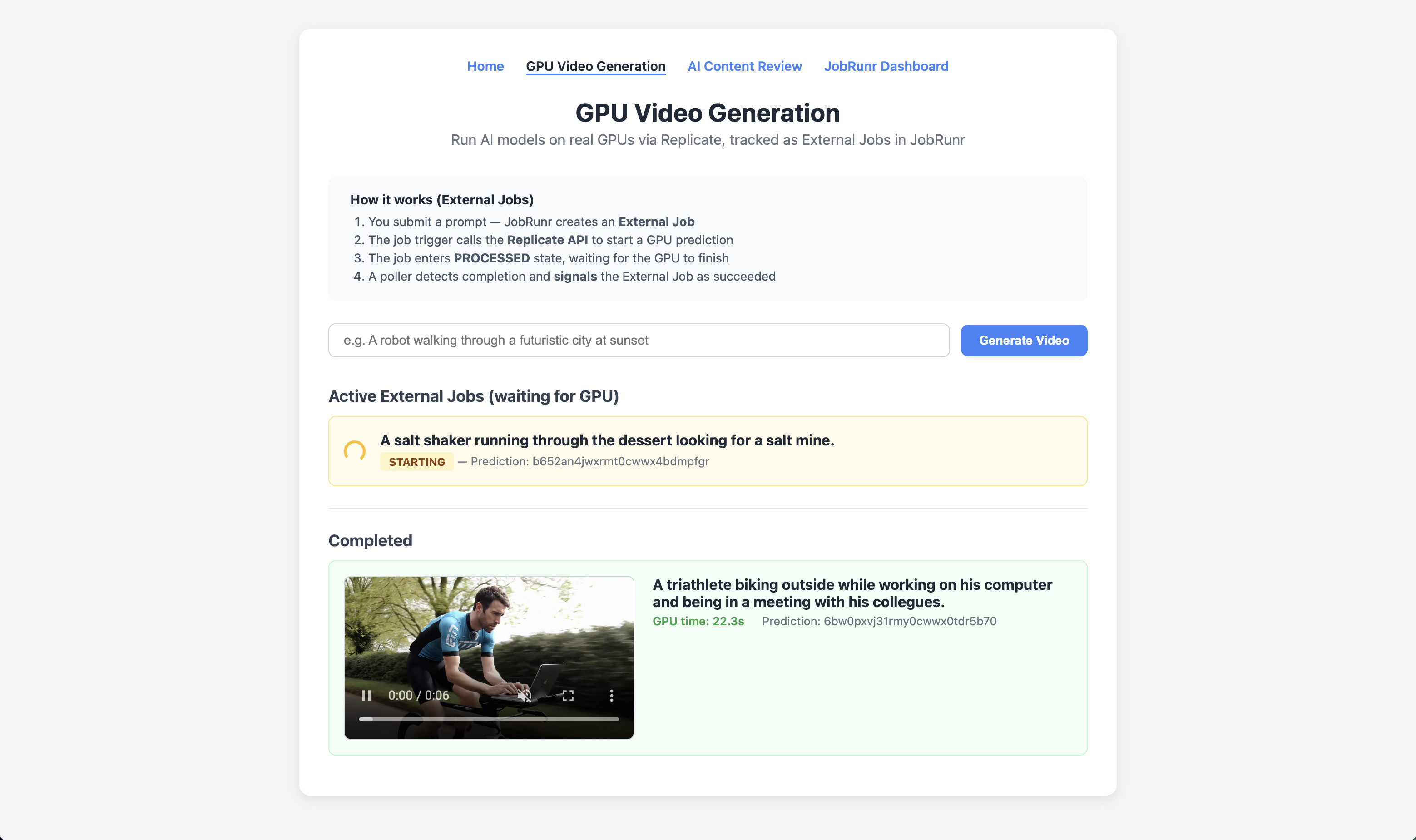
Imagine you’re building an application that generates AI videos using a GPU cloud provider. The GPU work takes 10 to 30 seconds, far too long to keep a worker thread waiting. Here’s how External Jobs handle this cleanly.
Step 1: Create the External Job
When a user submits a video prompt, create an External Job whose trigger calls the GPU API. Notice that we don’t generate our own job key. BackgroundJob.create() returns the assigned ID:
@Service
public class GpuJobService {

    private final ReplicateService replicate;
    private final Map<UUID, GpuJob> activeJobs = new ConcurrentHashMap<>();

    public GpuJob launch(String prompt) {
        var jobId = BackgroundJob.create(anExternalJob()
                .withName("GPU Video: " + prompt)
                .withLabels("gpu", "replicate")
                .withQueue("high-prio")
                .withDetails(() -> triggerPrediction(prompt)));

        UUID jobKey = jobId.asUUID();
        var job = new GpuJob(jobKey, prompt, null, "queued");
        activeJobs.put(jobKey, job);
        return job;
    }
}
Step 2: Implement the Trigger Method
The trigger starts the GPU prediction and returns immediately. The job transitions from PROCESSING to PROCESSED. Inside the trigger, ThreadLocalJobContext provides access to the current job’s ID:
/** Called by JobRunr when the External Job is picked up by a worker. */
public void triggerPrediction(String prompt) {
    var jobContext = ThreadLocalJobContext.getJobContext();
    UUID jobKey = jobContext.getJobId();

    var prediction = replicate.createPrediction(prompt);
    activeJobs.put(jobKey, new GpuJob(jobKey, prompt, prediction.id(), prediction.status()));
    ensurePollerRunning();
}
At this point, the worker thread is freed. The job sits in PROCESSED state while the GPU crunches away.
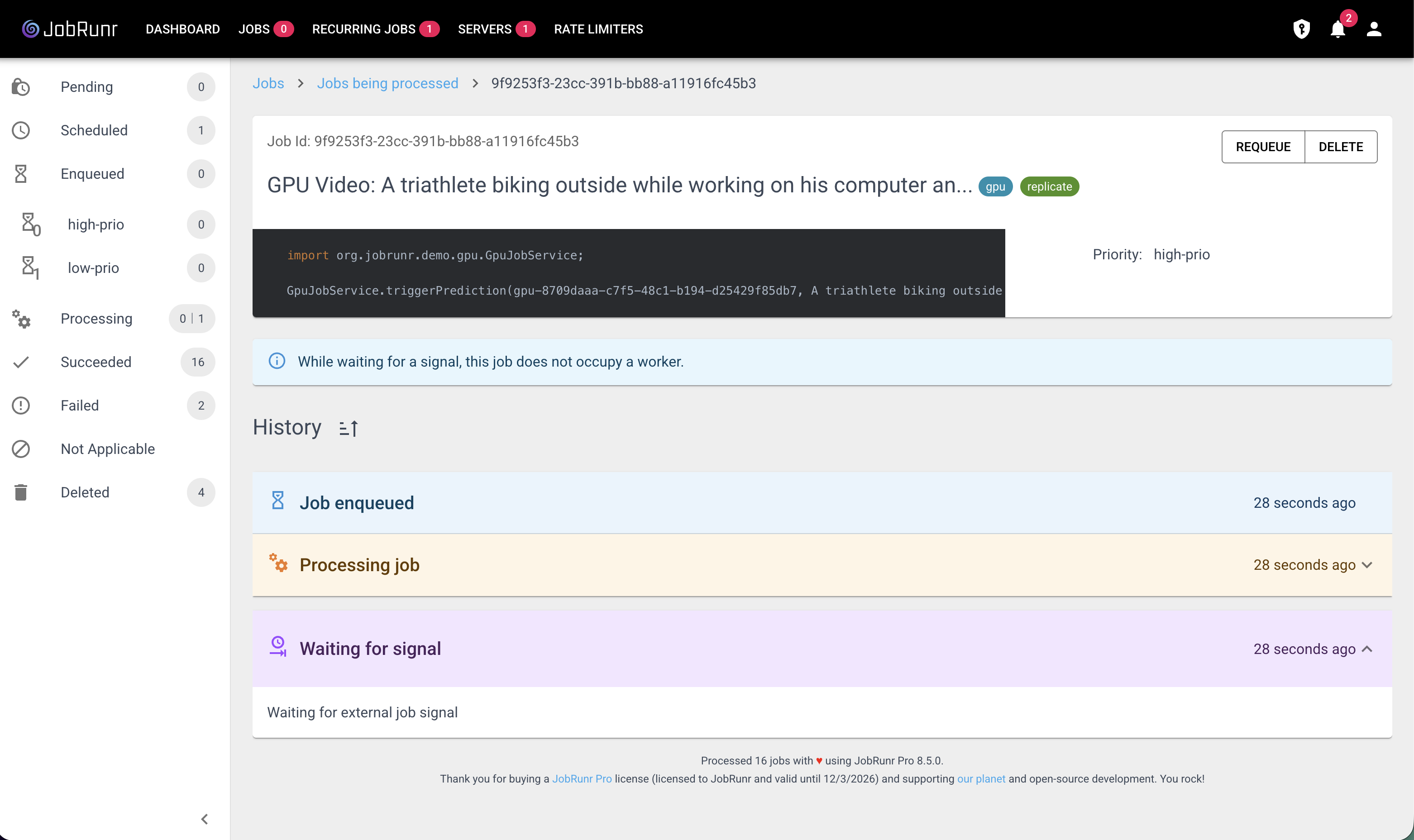
Step 3: Poll for Completion and Signal
A separate poller checks the GPU provider’s API and signals the External Job when the work finishes. The signal methods accept a UUID directly:
public void pollPredictions() {
    for (var entry : activeJobs.entrySet()) {
        UUID jobKey = entry.getKey();
        GpuJob job = entry.getValue();

        var prediction = replicate.getPrediction(job.predictionId());

        if (prediction.succeeded()) {
            BackgroundJob.signalExternalJobSucceeded(
                    jobKey,
                    "Video generated in %.1fs".formatted(prediction.predictTimeSeconds()));
            activeJobs.remove(jobKey);

        } else if (prediction.isTerminal()) {
            BackgroundJob.signalExternalJobFailed(
                    jobKey,
                    "Prediction failed: " + prediction.error());
            activeJobs.remove(jobKey);
        }
    }
}
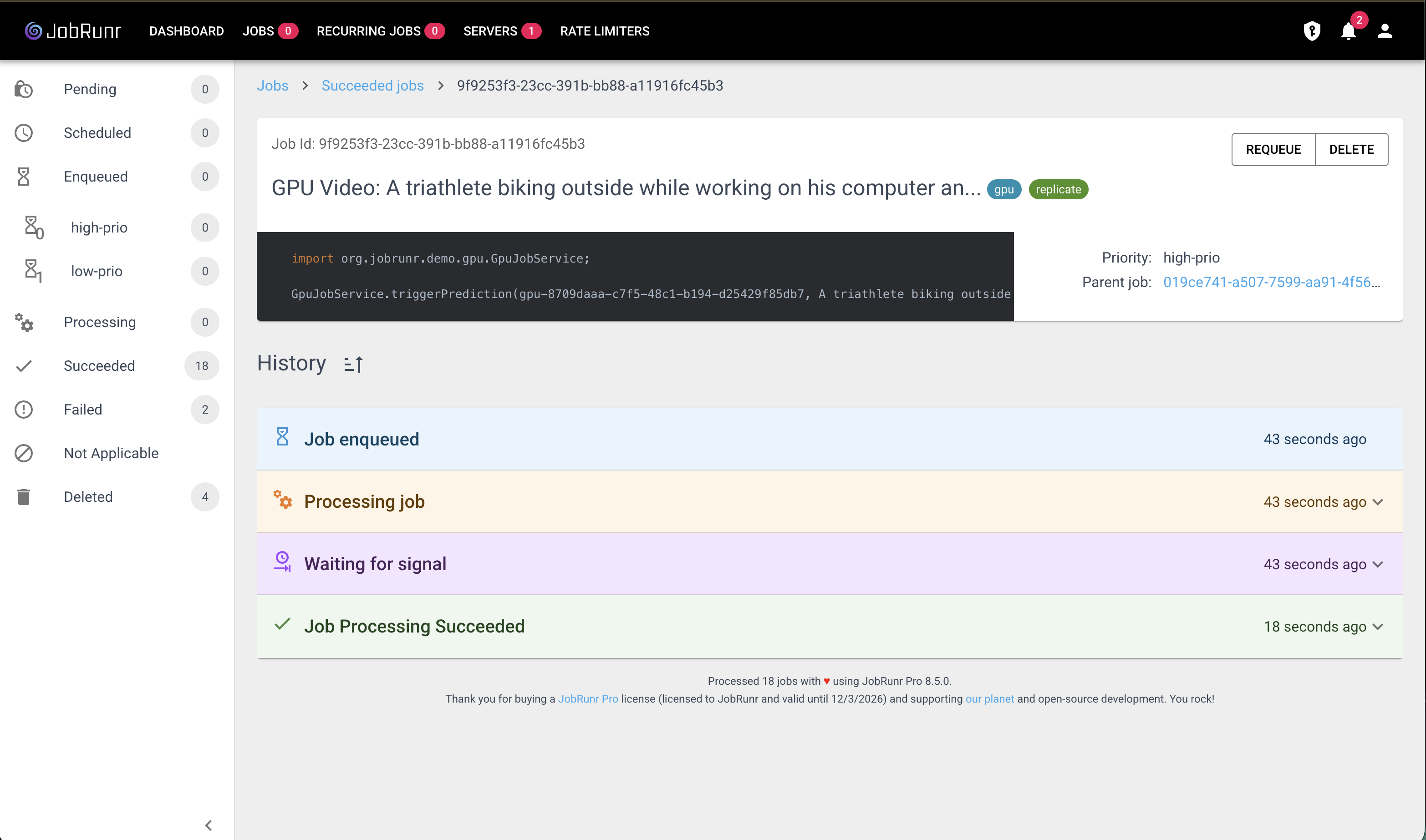
In production, you would typically use webhooks instead of polling. The GPU provider calls your endpoint when done, and your webhook handler signals the External Job. This is more efficient and eliminates the polling delay.
Scenario 2: Human-in-the-Loop Content Approval
Some workflows require a human decision before a job can complete. Consider a content moderation pipeline: AI generates marketing copy, but a human must approve it before publication. This could take minutes, hours, or even days, and no job scheduler should block a thread for that.
What makes this scenario interesting is that you can use JobRunr itself as the source of truth. Instead of maintaining a separate database table for approval requests, you store the generated content as job metadata and query the StorageProvider to list pending reviews. Labels let you filter approval jobs from other job types.
Step 1: Create the External Job
When a user requests AI-generated content, create an External Job. The trigger method receives a JobContext parameter (auto-injected by JobRunr) to store metadata on the job:
@Service
public class AiApprovalService {

    public void createReviewRequest(String productName) {
        BackgroundJob.create(anExternalJob()
                .withName("AI Content Review: " + productName)
                .withLabels("ai-review", productName)
                .withQueue("high-prio")
                .withAmountOfRetries(0)
                .withDetails(() -> analyzeContent(productName, JobContext.Null)));
    }
}
No database table, no entity, no repository. The job itself holds everything we need.
Step 2: The Trigger Generates Content and Stores It as Metadata
The trigger method runs the AI analysis and saves the results as job metadata via JobContext.saveMetadata(). When it completes, the job automatically enters PROCESSED state, parked and waiting:
/** Called by JobRunr. AI generates marketing copy and a confidence score. */
public void analyzeContent(String productName, JobContext jobContext) {
    String content = generateMarketingCopy(productName);
    double confidence = calculateConfidenceScore(content);
    String recommendation = confidence > 0.85 ? "PUBLISH" : "NEEDS_REVIEW";

    jobContext.saveMetadata("content", content);
    jobContext.saveMetadata("aiConfidence", confidence);
    jobContext.saveMetadata("aiRecommendation", recommendation);
}
The metadata is stored alongside the job in JobRunr’s database. You can access it later when querying jobs via the StorageProvider.
Step 3: List Pending Reviews via StorageProvider
To build the approval dashboard, query the StorageProvider for PROCESSED jobs with the ai-review label. The JobSearchRequest API lets you filter by state and label in a single call:
private final StorageProvider storageProvider;

public List<ReviewItem> getPendingReviews() {
    var request = aJobSearchRequest(StateName.PROCESSED)
            .withLabel("ai-review").build();
    return storageProvider.getJobList(request, Paging.AmountBasedList.descOnUpdatedAt(50))
            .stream()
            .map(job -> {
                String content = (String) job.getMetadata().get("content");
                double confidence = (double) job.getMetadata().get("aiConfidence");
                String recommendation = (String) job.getMetadata().get("aiRecommendation");
                String productName = job.getLabels().get(1);
                return new ReviewItem(job.getId(), productName, content, confidence, recommendation);
            })
            .toList();
}
This replaces the need for a custom database table entirely. JobRunr’s storage, labels, and metadata give you everything you need to power the approval UI.
Step 4: Human Signals the Job
When a human reviewer clicks “Approve” or “Decline” in your UI, signal the External Job using its UUID:
public void approve(UUID jobId) {
    BackgroundJob.signalExternalJobSucceeded(jobId, "Content approved by human reviewer");
}

public void decline(UUID jobId) {
    BackgroundJob.signalExternalJobFailed(jobId, "Content declined by human reviewer");
}
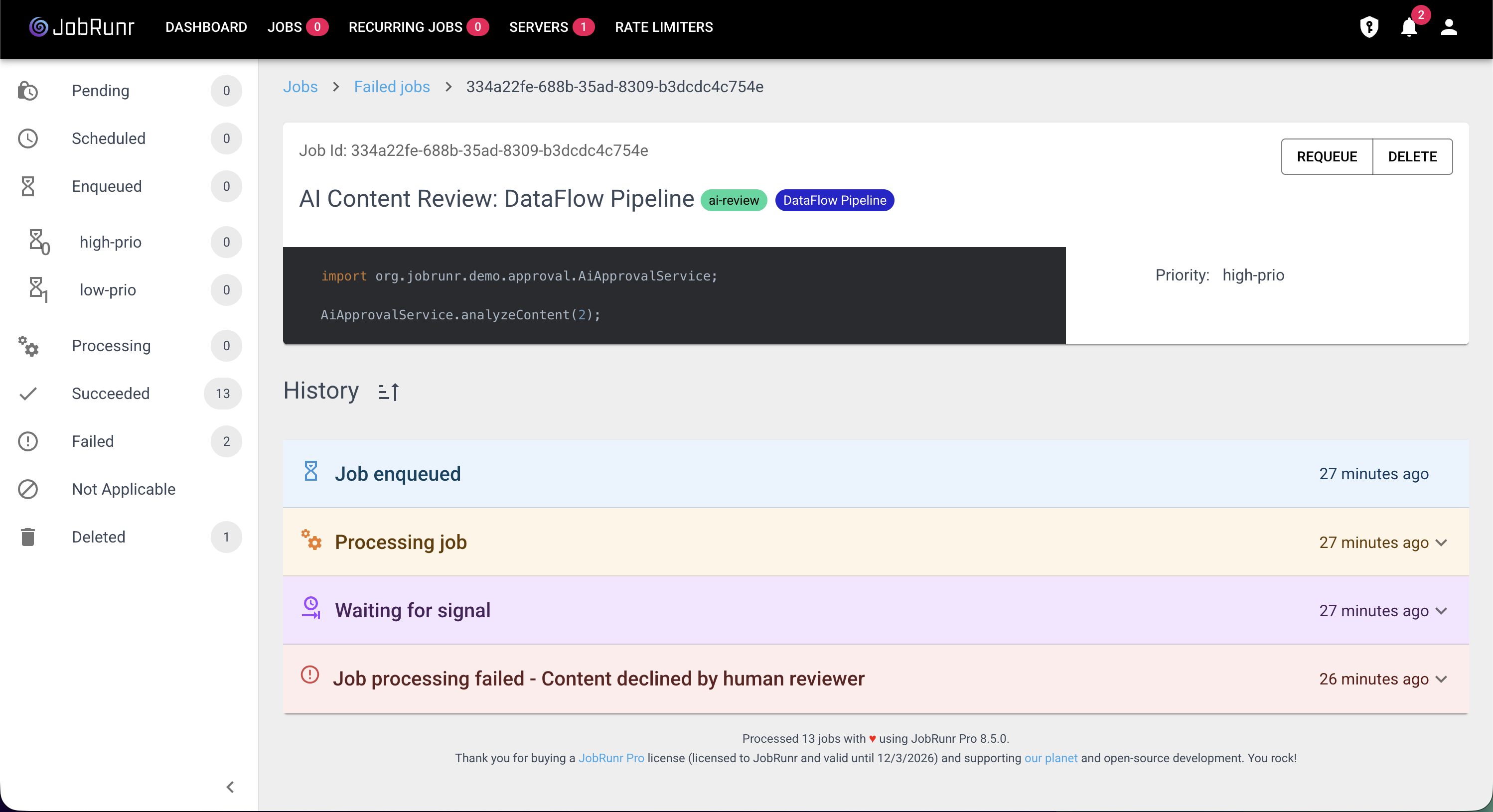
The job moved from PROCESSED to SUCCEEDED or FAILED, and during the entire waiting period, zero worker threads were consumed.
When to Use External Jobs
External Jobs are the right choice when:
- The work happens outside your JVM: GPU inference, third-party API callbacks, payment confirmations
- A human decision is required: content moderation, approval workflows, manual review queues
- The wait time is unpredictable: it could be seconds or days, and you don’t want to waste resources
- You need audit trail and visibility: the JobRunr dashboard tracks the full lifecycle from creation to completion
For work that executes entirely within your JVM, regular background jobs remain the better choice.
Polling vs. Webhooks
In the GPU example above, we used polling to detect completion. This works well for demos and simple setups, but in production you’ll likely want webhooks:
| Approach | Pros | Cons |
|---|---|---|
| Polling | Simple to implement, no public endpoint needed | Adds latency (up to poll interval), wastes API calls |
| Webhooks | Instant notification, no wasted calls | Requires a publicly accessible endpoint |
With webhooks, the external system calls your endpoint when done, and your webhook handler simply calls signalExternalJobSucceeded or signalExternalJobFailed. The External Job doesn’t care how it gets signaled, only that it eventually does.
Conclusion
External Jobs bring any external process under JobRunr’s umbrella. Whether it’s GPU inference, human approvals, third-party API callbacks, or payment confirmations, you get the same dashboard, the same monitoring, and the same retry/failure handling for work that happens outside your JVM. No worker threads are wasted, no timeouts are ticking, and the full job lifecycle is tracked and visible.
Combined with StorageProvider queries, labels, and job metadata, External Jobs can even replace custom database tables for workflows like approval queues. JobRunr becomes both the scheduler and the source of truth.
Resources
- A complete working example of External Jobs with GPU video generation and human-in-the-loop approval is available at https://github.com/iNicholasBE/external-jobs-demo.