
Most real jobs do more than one thing. Fulfilling an order means charging the customer, reserving stock, and sending a confirmation. Onboarding a user means creating an account, provisioning resources, and emailing a welcome message. These steps run one after another inside a single job.
So what happens when the job fails halfway through? A flaky API call throws on step two, the pod gets evicted, or the database blips. JobRunr retries the job, which is exactly what you want. But the retry runs the method again from the top, and now you have just charged the customer twice.
This is the problem durable executions solve. With JobRunr’s runStepOnce, each step records that it completed. When the job runs again, the steps that already succeeded are skipped, and execution resumes at the first step that did not. The customer is charged once, even though the job ran more than once.
Prerequisites
- JobRunr 8.0.0 or later
- You already know how to enqueue a job and configure JobRunr
- Basic understanding of the JobRunr job lifecycle (ENQUEUED → PROCESSING → SUCCEEDED), and that failed jobs are retried automatically
The problem: a retry repeats everything
Here is a typical fulfillment job. It charges the customer, reserves the stock, then sends a confirmation email.
public void fulfillOrder(String orderId) {
    paymentGateway.charge(orderId);       // step 1
    inventoryService.reserve(orderId);    // step 2
    emailService.sendConfirmation(orderId); // step 3
}
Now imagine reserve throws because the inventory service is briefly unavailable. JobRunr catches the exception, marks the job as failed, and schedules a retry with exponential back-off. That retry calls fulfillOrder again from the beginning, so charge runs a second time. The customer has now paid twice for one order.
You could try to guard every step with your own “have I done this already?” checks, stored in your own tables. That looks something like this:
public void fulfillOrder(String orderId) {
    OrderProgress progress = orderProgressRepository.findByOrderId(orderId);

    if (!progress.hasCompleted("charge-payment")) {
        paymentGateway.charge(orderId);
        progress.markCompleted("charge-payment");
        orderProgressRepository.save(progress);
    }
    if (!progress.hasCompleted("reserve-inventory")) {
        inventoryService.reserve(orderId);
        progress.markCompleted("reserve-inventory");
        orderProgressRepository.save(progress);
    }
    if (!progress.hasCompleted("send-confirmation")) {
        emailService.sendConfirmation(orderId);
        progress.markCompleted("send-confirmation");
        orderProgressRepository.save(progress);
    }
}
It works, but now you own an extra table, a repository, and a guard block around every step, and the three lines of business logic are buried in bookkeeping you get to repeat in every multi-step job you write. Durable executions give you that bookkeeping for free.
Durable execution with JobRunr
JobContext exposes two runStepOnce methods. The first runs a step with no return value, the second returns a value you can pass to the next step:
// Runs the task only if the step "step-id" has not completed yet.
void runStepOnce(String stepId, ThrowingRunnable task);

// Same, but returns a value (the result is stored and replayed on later runs).
<T> T runStepOnce(String stepId, ThrowingSupplier<T> task);
To use them, inject a JobContext when you enqueue the job. JobRunr supplies the real context at run time:
jobScheduler.enqueue(() -> fulfillOrder(orderId, JobContext.Null));
Then wrap each step in runStepOnce, giving every step a stable, unique id:
public void fulfillOrder(String orderId, JobContext jobContext) {
    jobContext.runStepOnce("charge-payment",     () -> paymentGateway.charge(orderId));
    jobContext.runStepOnce("reserve-inventory",  () -> inventoryService.reserve(orderId));
    jobContext.runStepOnce("send-confirmation",  () -> emailService.sendConfirmation(orderId));
}
That is the whole change. The job is now durable. If it fails at reserve-inventory and is retried, charge-payment is skipped and execution resumes at reserve-inventory.
ImportantThe step id is the identity of the step. Keep it stable across deployments and make sure it is unique within the job. If you rename a step id, JobRunr treats it as a brand new step that has never run.
How durable execution works under the hood
runStepOnce is built on JobRunr’s job metadata, which is stored in your database alongside the job. The mechanism is simple and worth understanding:
- Before running a step, JobRunr checks for a metadata entry named
jr_step_<stepId>. - If that entry exists and is
true, the step already completed, so JobRunr skips the task entirely. - If it does not exist, JobRunr runs the task. On success, it writes
jr_step_<stepId> = true. - If the task throws, the marker is not written. The exception is wrapped in a
StepExecutionExceptionand propagates, so the job fails and is retried. On the next run, the step runs again because it was never marked complete.
Because the markers live in the same database as the job, they outlive the process running it. When a step throws, JobRunr saves the job, markers and all, as it moves it to the failed state, so an ordinary retry always resumes precisely from the step that failed.
There is also a helper to query progress yourself:
boolean done = jobContext.hasCompletedStep("charge-payment");
CautionThere is a subtle difference in when the markers are saved for a job that is still running. JobRunr Pro writes the job state to the database the moment a step finishes, so even an abrupt crash (a killed pod, a lost node) resumes from exactly the last completed step. JobRunr OSS saves state on its normal poll interval, like any other job, so a hard crash in the window since the last save can re-run the step that had just finished. Retries on a thrown exception resume precisely in both. Either way, keep each step idempotent.
Watch a retried job resume in the dashboard
Let’s run the fulfillment job for real and make the inventory step fail on its first attempt. We use jobContext.logger() so each step writes a line to the JobRunr dashboard. The log line sits inside the step, so a skipped step produces no line. That makes the resume visible at a glance:
public void fulfillOrder(String orderId, JobContext jobContext) {
    var log = jobContext.logger();
    log.info("Fulfilling order " + orderId + " (attempt " + (jobContext.currentRetry() + 1) + ")");

    jobContext.runStepOnce("charge-payment", () -> {
        log.info("Step 'charge-payment': charging the customer");
        paymentGateway.charge(orderId);
    });

    jobContext.runStepOnce("reserve-inventory", () -> {
        log.info("Step 'reserve-inventory': reserving stock");
        inventoryService.reserve(orderId);
    });

    jobContext.runStepOnce("send-confirmation", () -> {
        log.info("Step 'send-confirmation': sending the confirmation email");
        emailService.sendConfirmation(orderId);
    });

    log.info("Order " + orderId + " fulfilled");
}
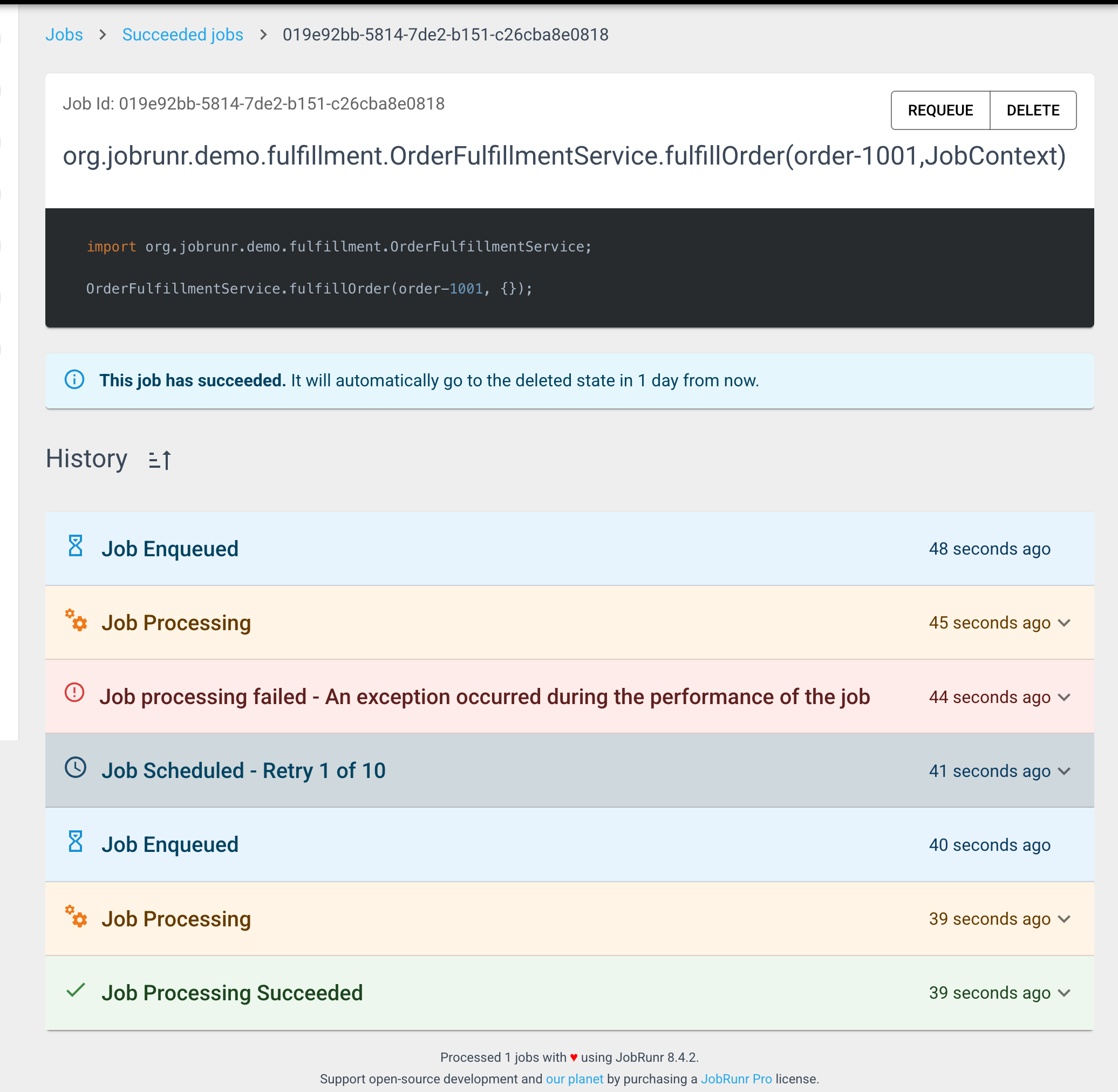
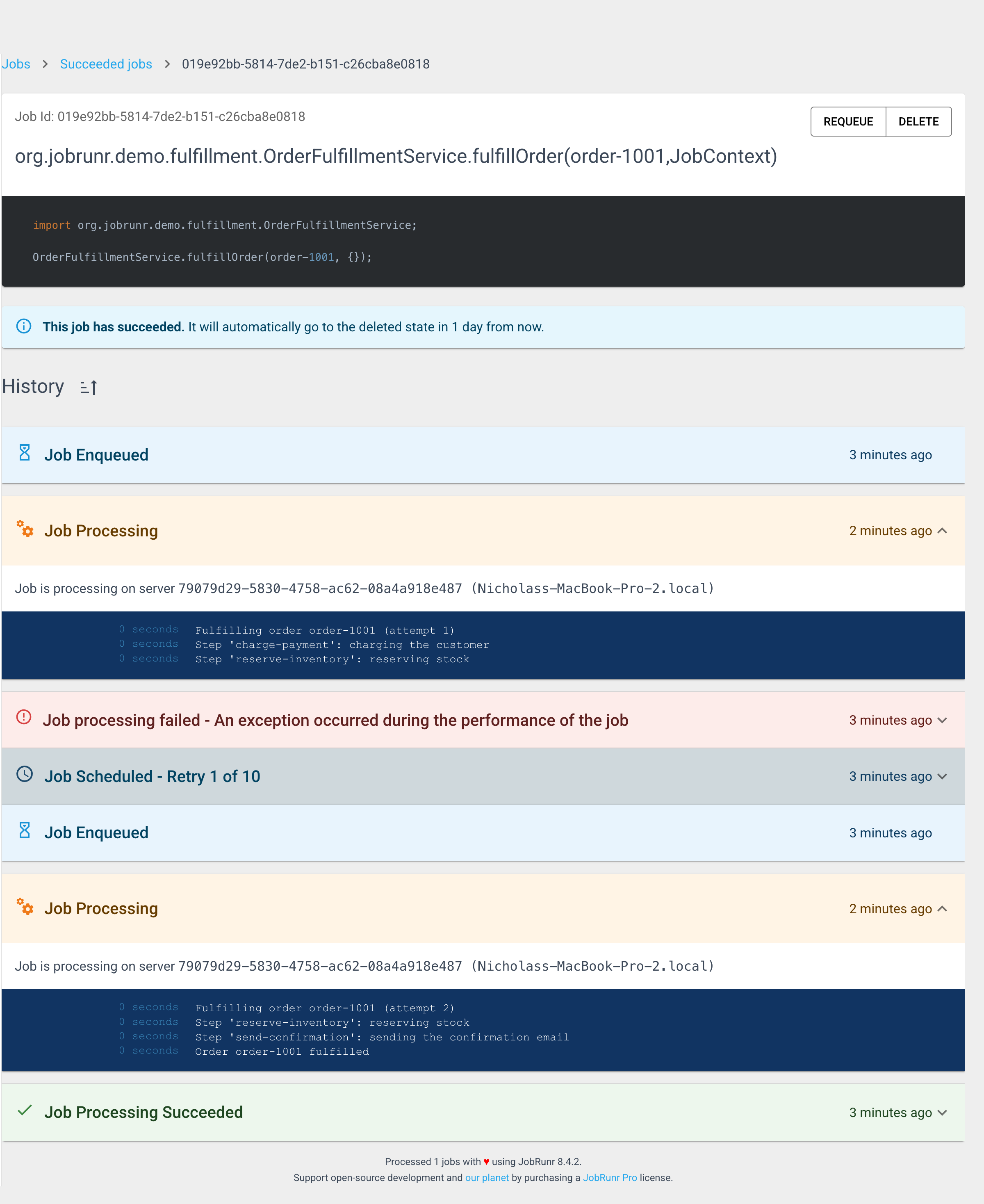
When we enqueue this job, the dashboard shows the full story. The first attempt charges the customer and then fails at reserve-inventory. JobRunr schedules a retry. The second attempt skips the charge entirely, resumes at reserve-inventory, sends the confirmation, and succeeds.
Open the two processing entries and the resume is unmistakable. Attempt 1 logs charge-payment and reserve-inventory before it fails. Attempt 2 logs only reserve-inventory and send-confirmation. The charge step never runs again.
Passing values between steps and control flow
When a step produces something the next step needs, use the runStepOnce overload that returns a value. JobRunr stores the result, so on a later run the stored value is replayed instead of recomputing it:
public void fulfillOrder(String orderId, JobContext jobContext) {
    String chargeId = jobContext.runStepOnce("charge-payment",
            () -> paymentGateway.charge(orderId)); // returns a charge reference

    jobContext.runStepOnce("reserve-inventory", () -> inventoryService.reserve(orderId));

    jobContext.runStepOnce("send-confirmation",
            () -> emailService.sendConfirmation(orderId, chargeId));
}
On a retry that skips charge-payment, the original chargeId is returned from the stored result, so the confirmation email still references the correct charge.
Replayed results do more than carry data forward: they also let you make control flow decisions that stay consistent across retries. Branch on the result of a step and every attempt takes the same path, because the branch is evaluated against the stored result, not a fresh call:
public void fulfillOrder(String orderId, JobContext jobContext) {
    PaymentResult payment = jobContext.runStepOnce("charge-payment",
            () -> paymentGateway.charge(orderId));

    if (payment.requiresManualReview()) {
        jobContext.runStepOnce("flag-for-review",
                () -> reviewService.flagForReview(orderId, payment.chargeId()));
        return;
    }

    jobContext.runStepOnce("reserve-inventory", () -> inventoryService.reserve(orderId));
    jobContext.runStepOnce("send-confirmation",
            () -> emailService.sendConfirmation(orderId, payment.chargeId()));
}
If this job fails at reserve-inventory and is retried, the if runs again, but against the replayed payment result, so the retry follows the exact branch the first attempt took. This determinism is what makes branching safe in a durable execution: base your decisions on stored step results, not on values that can change between attempts. Code outside a step re-runs on every attempt, so keep it free of side effects, and if a decision depends on something non-deterministic like the current time or a random draw, wrap that decision in its own runStepOnce so the outcome is recorded and replayed too. Jack Vanlightly’s Demystifying Determinism in Durable Execution is a great deep dive into why this matters.
Steps are exactly-once, but design them to be safe
Durable executions guarantee that a completed step is never run again. They do not make the currently running step safe on their own. If a step does two things and the job dies between them, the whole step re-runs on the retry, because it was never marked complete.
Keep each step as a single unit of work, and make the work inside a step idempotent where the outside world is involved. If charge-payment calls a payment provider, pass an idempotency key so a re-run of that step before it completed cannot double-charge. Durable executions and idempotent steps work together: runStepOnce removes repeated work across steps, and idempotency protects the step that was in flight when things broke. For a deeper look at designing idempotent jobs, see Why is Idempotence Important in Java Job Scheduling?.
A few more things worth knowing:
- Step ids must be stable and unique. Reusing an id across two different steps will mark the second one complete before it runs. Renaming an id makes JobRunr think it is a new step.
- Retries are configurable. By default JobRunr retries a failed job up to 10 times with exponential back-off. Durable executions make each of those retries cheap, because only the unfinished work runs.
- It is not a workflow engine.
runStepOncemakes a single job with multiple steps durable. For fan-out, branching, and coordinating many jobs, look at job chaining and batches in JobRunr Pro.
When to use durable executions
Reach for runStepOnce whenever a single job performs more than one step that you would not want to repeat:
- Money and inventory: charging, refunding, reserving stock, issuing credits
- External calls that are expensive or have side effects: sending email, calling a third-party API, kicking off a long computation
- Multi-system writes: updating two services where re-running the first on a retry would cause drift
For a job that does one thing, or where every operation is naturally idempotent, plain retries are already enough and you do not need to add steps.
Conclusion
Durable executions turn an ordinary multi-step job into one that survives failure. By wrapping each step in runStepOnce, you let JobRunr remember what has already happened and resume exactly where it left off. A retry no longer means starting over, it means continuing. The customer is charged once, the email is sent once, and a retry does not redo the work that already succeeded.
The mechanism is small, it runs on the database you already have, and it is part of JobRunr’s open-source core. Combined with idempotent steps, it gives you crash-proof jobs without a separate workflow engine.