
On this page
Every AI agent demo works perfectly. Then you run one in production: a user asks the agent to send a report every Monday. It says it will, but the schedule only ever lived in memory and quietly disappeared on the next deploy. Monday comes, nothing runs, and nobody finds out until the customer asks where their report is.
We learned this firsthand building ClawRunr, our open-source AI agent runtime in pure Java. The LLM was the easy part. The hard part was everything that has to happen reliably after the model decides what to do: schedule it, retry it, run it in the background, and actually know whether it worked.
That is not an AI problem. It is a background job problem, and almost nobody building agents talks about it.
The four things agents need that chatbots do not
A chatbot answers and forgets. An agent has to remember, wait, retry, and report. These are the four capabilities that separate a product from a demo.
1. Scheduling work for later
“Remind me tomorrow at 10.” The agent cannot hold that in memory and hope the process stays alive for the next eighteen hours. It needs durable scheduling that survives a restart, a deploy, or a crash.
With JobRunr that is one line. The job is serialized and persisted to your database, then executed at the right time.
BackgroundJob.schedule(
    LocalDate.now().plusDays(1).atTime(10, 0),
    () -> reminderService.send(userId, "Review the Q3 deck"));
If your server restarts between now and 10am tomorrow, the job is still there. It lives in your database, not in a variable that disappears on the next deploy.
2. Recurring work
“Every morning at 8.” Agents set up repeating tasks constantly. The naive version is an in-memory timer that dies the moment the process restarts. Then one morning the 8am summary silently does not run, and nobody notices until a customer asks where their report is.
A recurring job is declared once and owned by the scheduler from then on. In a Spring, Micronaut, or Quarkus application you can declare it right on the method:
@Recurring(id = "morning-email-summary", cron = "0 8 * * *")
@Job(name = "Summarize inbox")
public void summarizeInbox() {
    agentTaskRunner.run("summarize-emails");
}
Or imperatively, anywhere in your code:
BackgroundJob.scheduleRecurrently(
    "morning-email-summary", "0 8 * * *",
    () -> agentTaskRunner.run("summarize-emails"));
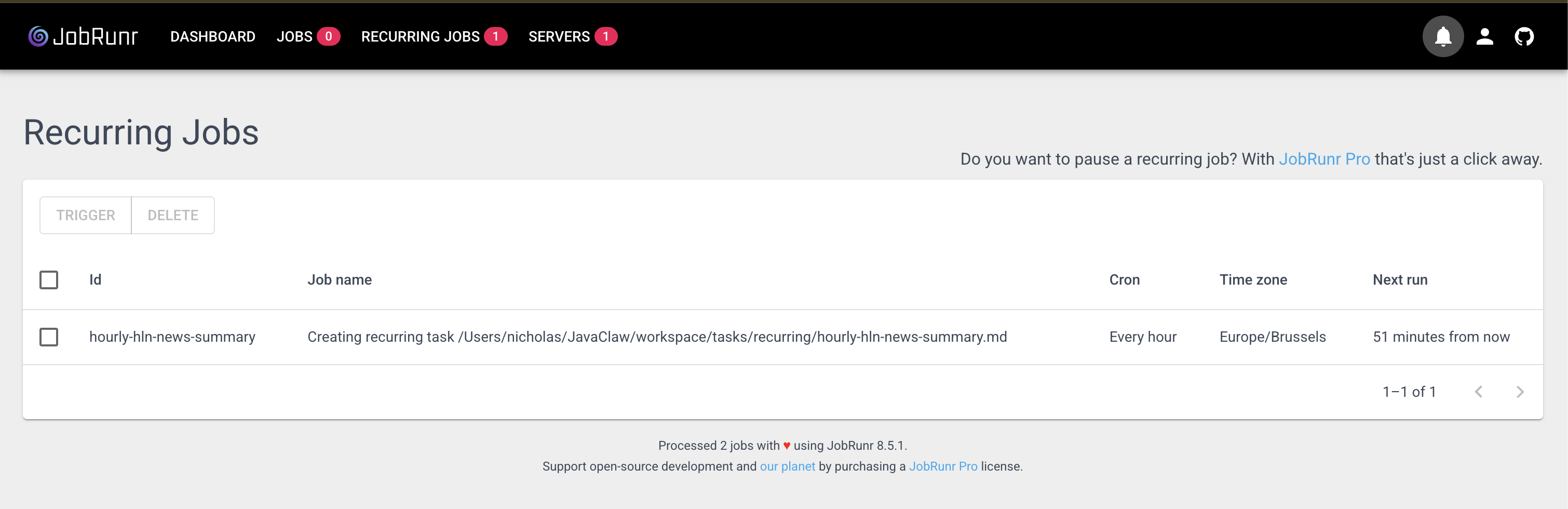
The schedule is stored. It runs whether or not the machine that created it is still around. In ClawRunr, this is exactly what happens when you ask the agent to do something every day: it writes a recurring job, and JobRunr owns the clock from then on.
3. Retries you do not have to write
LLM calls fail. APIs rate-limit you. Networks blip. A document is briefly locked. In a normal request you would throw an error and move on. In an agent, that means a task the user actually asked for just silently did not happen.
Agents need retries with back-off, by default, not as something you remember to bolt on. JobRunr retries failed jobs automatically: 10 attempts by default with an exponential back-off policy, tunable per job with @Job(retries = ...). When the attempts are exhausted, the job lands in the dashboard as FAILED with its full stack trace, where it stays until you deal with it. It is never silently dropped.
There is a catch, though: a retry re-runs your method from the top. If a multi-step task (summarize, embed, index, notify) runs as a single job, a failure on the last step re-runs and re-pays for every step that already succeeded. The fix is to give each step its own job and chain them, so only the failed step ever retries.
@Service
public class DocumentAnalysisAgent {

    private final LlmClient llm;
    private final VectorStore vectorStore;
    private final DocumentStore documentStore;
    private final NotificationService notifications;

    // constructor omitted

    // Each step runs only after the previous one has succeeded
    public void analyze(UUID documentId) {
        BackgroundJob
            .enqueue(() -> summarize(documentId))
            .continueWith(() -> embed(documentId))
            .continueWith(() -> announceComplete(documentId));
    }

    @Job(name = "Summarize document %0", retries = 5)
    public void summarize(UUID documentId) {
        String summary = llm.summarize(documentStore.content(documentId));
        documentStore.saveSummary(documentId, summary);
    }

    @Job(name = "Embed document %0", retries = 5)
    public void embed(UUID documentId) {
        float[] embedding = llm.embed(documentStore.content(documentId));
        vectorStore.upsert(documentId, embedding);
    }

    @Job(name = "Notify analysis complete for %0", retries = 5)
    public void announceComplete(UUID documentId) {
        notifications.notifyComplete(documentId);
    }
}
continueWith is part of JobRunr Pro. Each step is still its own retryable job, and a later step only runs once the previous one has succeeded, so a failure retries that single step instead of the whole pipeline. You still want each step to be safe to repeat (why idempotence matters in Java job scheduling).
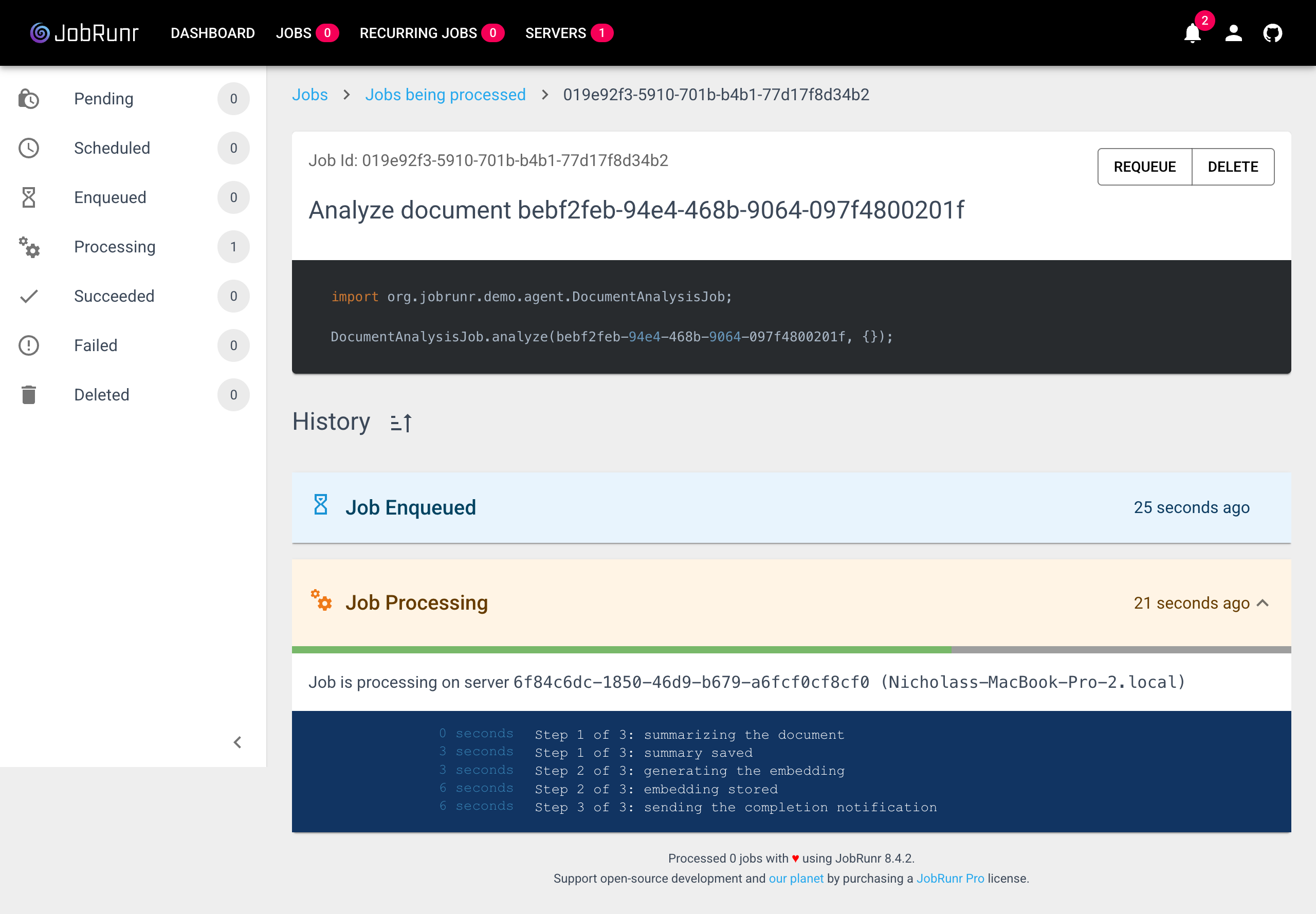
You can also watch a job move through its steps live in the dashboard. Here the document analysis job has finished summarizing and embedding and is on its final step, with a progress bar showing two of three steps done. When something fails, you can see exactly where it was.
JobRunr also covers a couple of layers for you: it claims each job atomically, so the same job is never processed twice at once even across a cluster, and if you enqueue with your own JobId it will not create a duplicate job for that id.
4. Visibility
Here is the question that exposes most agent demos: when a scheduled task fails at 3am, do you find out from a dashboard, or from your customer?
An agent that runs work in the background is useless if you cannot see what it ran, what succeeded, what failed, and why. This is the part that never makes the demo video, because demos do not have a 3am.
JobRunr ships with a dashboard at localhost:8000 that shows every job the agent has scheduled, every retry, every failure with its stack trace, and every recurring job with when it last ran. You stop guessing what your agent is doing. You can just look.
All of this runs on the database you already have, with no message broker, no separate queue, and no cron daemon to babysit. And it scales the way agent work wants to: agent jobs spend almost all their time waiting on the model, a vector store, or an API, and on JDK 21 and up JobRunr runs them on virtual threads by default, so a worker waiting on a three-second LLM call releases its carrier thread instead of hogging it. Hundreds of concurrent agent jobs cost you very little.
Try it
The clearest way to see this in practice is to look at how we wired it into ClawRunr, where natural-language requests turn straight into scheduled, retried, monitored jobs.
ClawRunr (the agent): clawrunr.io
JobRunr (the engine): jobrunr.io
Want to go deeper on the hardest reliability problem we touched on above, making retries safe so an agent never does the same thing twice? Read Why is idempotence important in Java job scheduling?.
Building AI agents in Java? JobRunr gives you durable scheduling, automatic retries, and a job dashboard with a single dependency and no extra infrastructure. See the 5-minute intro.