On this page
JobRunr and JobRunr Pro v9 have arrived!
Background jobs are often a black box, with v9 we want to open the box for you.
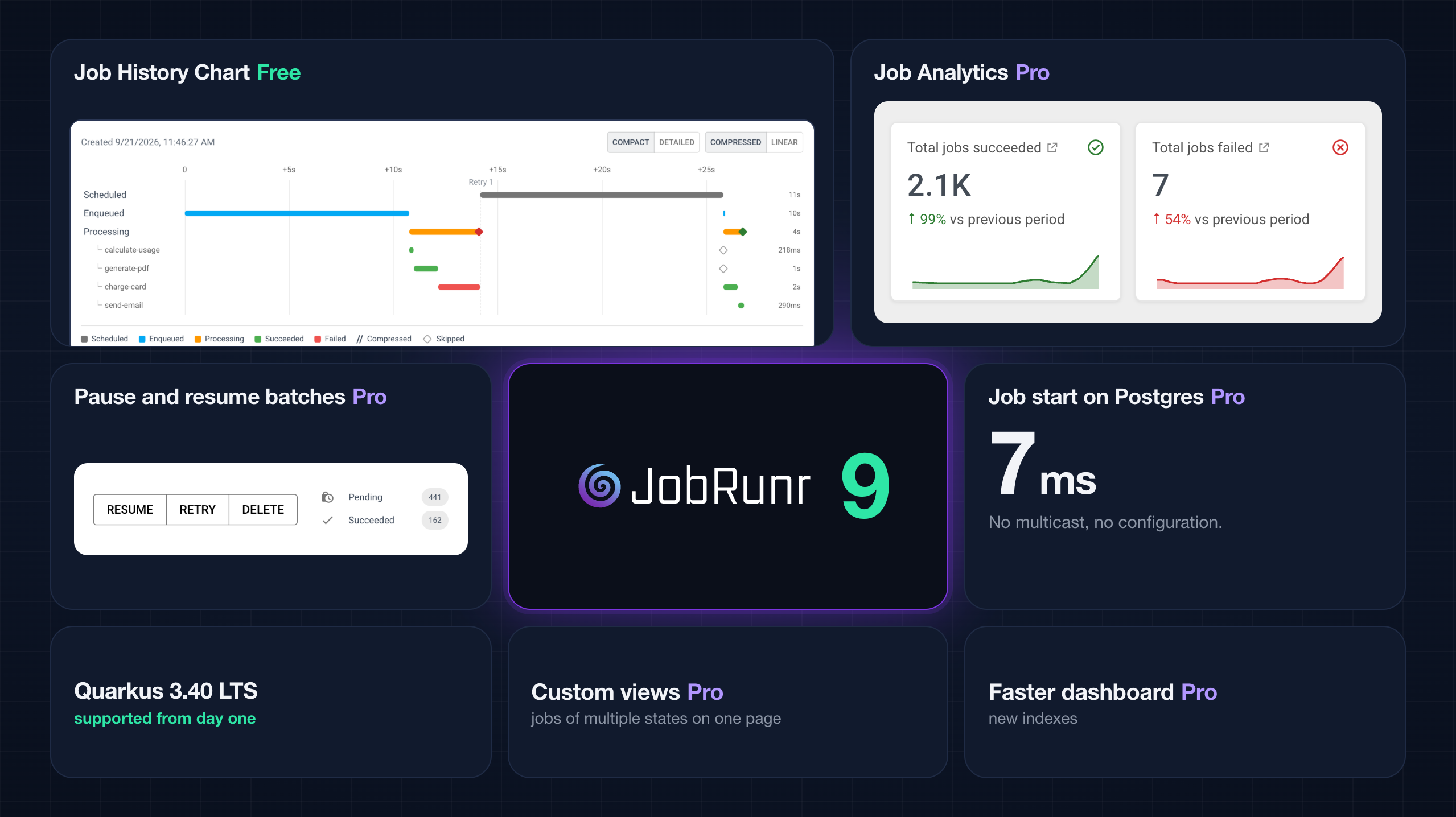
- See which step failed. The new job history Chart draws every attempt of a job on a timeline, down to the individual steps of a durable job.
- Find the job behind a slowdown. Job Analytics in JobRunr Pro shows volume, retries and processing time per job type, server and exception.
- Stop a run without losing work. JobRunr Pro can now pause a batch job halfway and resume it later.
- Start jobs within milliseconds. On Postgres, JobRunr Pro now does this with zero configuration and without UDP multicast.
To upgrade from JobRunr v8.x, follow the JobRunr v9 migration guide and review the breaking changes further down. Most applications only need the version bump.
Watch v9 live on Thursday 1 October
The Example: A Monthly Invoice Run
Our demo application sends the monthly invoices for 600 customers. Every invoice is a durable job, which is a job that remembers which of its steps already finished. You get that by wrapping each step in runStepOnce. When the job is retried, a step that completed is not executed again.
@Job(name = "Invoice %1 for %0", retries = 5)
public void generateInvoice(String customerId, String period, JobContext jobContext) throws Exception {
    String invoiceId = "INV-" + period + "-" + customerId;

    long usage = jobContext.runStepOnce("calculate-usage", () -> calculateUsage(customerId, period));
    String pdf = jobContext.runStepOnce("generate-pdf", () -> generatePdf(invoiceId, usage));
    String chargeId = jobContext.runStepOnce("charge-card", () -> paymentProvider.charge(customerId, invoiceId));
    jobContext.runStepOnce("send-email", () -> sendInvoiceEmail(customerId, pdf, chargeId));
}
JobRunr v9 Features
See Which Step Failed With the Job History Chart
Open a job in the dashboard and the History section now has two modes. Timeline is the list of states you already know. Chart is new and shows the life of the job as a Gantt chart, with a row per state and a row per durable step.
To get a clean picture we first ran a single invoice, for customer CUST-0042, while the payment provider was down:
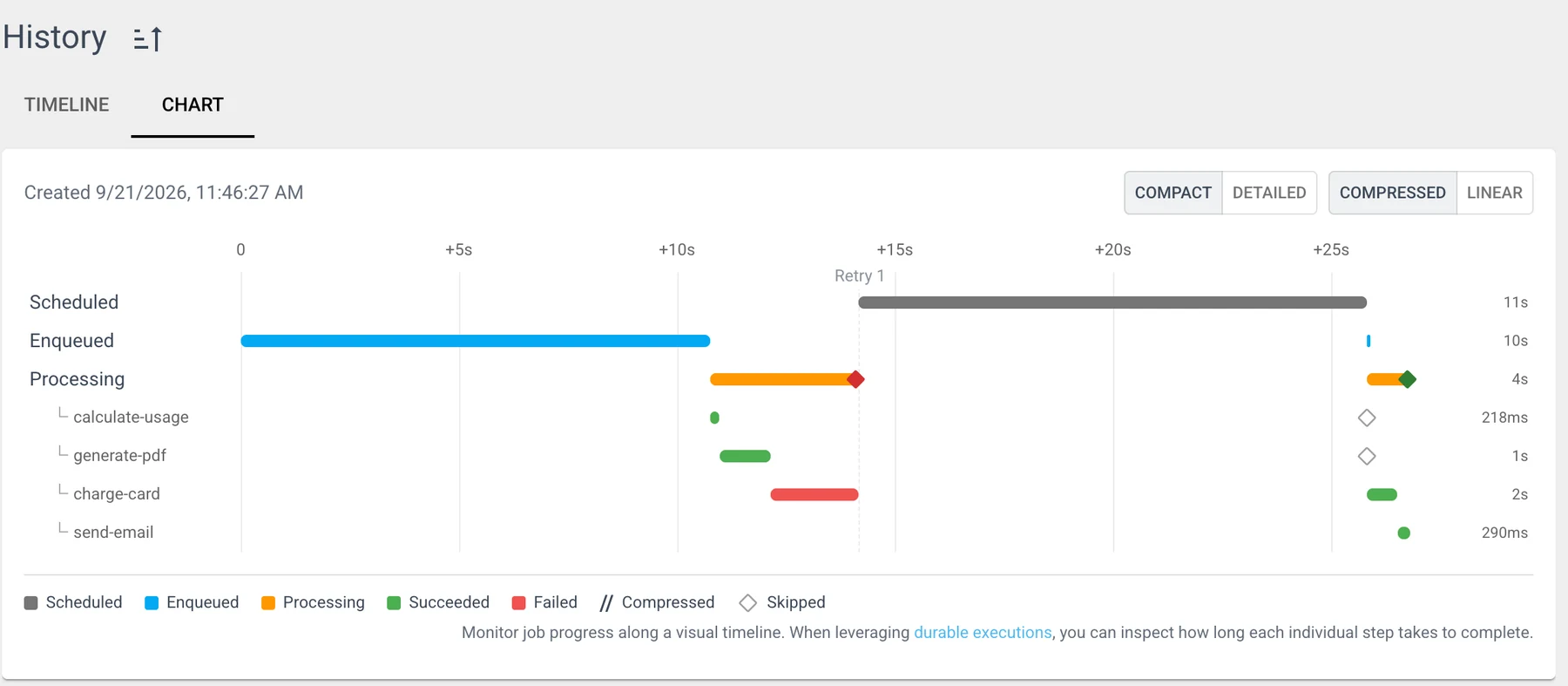
Read it from left to right. On the first attempt calculate-usage took 218 ms and generate-pdf a second. Then charge-card hit the timeout after 2 seconds and the attempt failed, which is the red bar. JobRunr scheduled retry 1 of 5, and in the meantime we switched the provider back on. On the retry the two hollow diamonds tell you that calculate-usage and generate-pdf were skipped. charge-card went through in 697 ms according to the step log, send-email took 290 ms, and the retry needed less than a second of processing in total. The customer got one PDF and one charge.
What else you should know about the Chart:
- It works for every job, durable or not. For a plain job you see per attempt how long it was scheduled, how long it sat in the queue and how long it was processing. So you can see whether a job is slow or was just waiting for a worker.
CompactandDetailedswitch between a summary and every single state.CompressedandLineardecide whether long waiting periods are squeezed together.- Step durations and step outcomes also show up in the classic Timeline.
runStepOnceguarantees that a completed step never runs again. A step that is running at the moment your JVM dies can run again, so a side effect inside a step still deserves an idempotent call. The demo passes the invoice id to the payment provider as idempotency key.
The Chart is available in JobRunr OSS and JobRunr Pro, and there is nothing to configure.
JobRunr Pro Find the Job Behind a Slowdown With Job Analytics
When Prometheus shows the queue slowing down, Job Analytics is where you look up which job causes it.
It lives on the home page of the JobRunr Pro dashboard. You pick a time period, here the last 7 days, and get six numbers. Each of them comes with a small sparkline and a comparison with the previous period:

83,442 jobs ran that week and 3.7K of them failed. The failures went down by 5% compared to the previous period, but the retries went up by 11%. Those are the arrows you want to notice before your users do.
Below the numbers, the Job processing trend shows how many jobs succeeded and failed over the period, and the breakdown splits them by state, by server or by job signature:
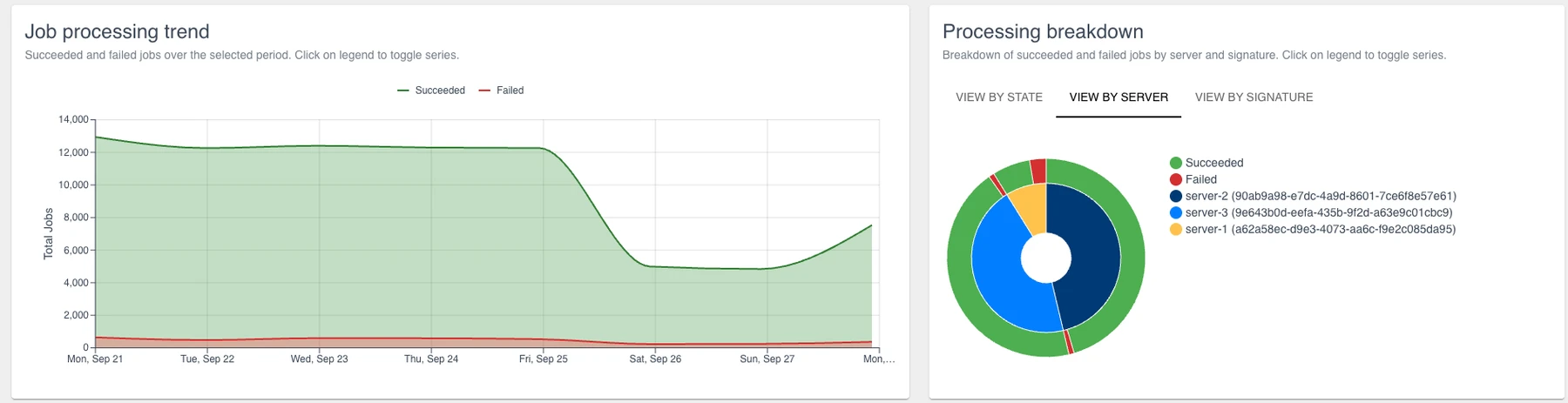
You can spot the weekend right away: about 12,000 jobs a day during the week and about 5,000 on Saturday and Sunday. In the server view the outer ring shows succeeded against failed, and the inner ring shows how the work was spread over the servers. Here server-1 picked up far less work than the other two.
The table at the bottom answers the question you came for:
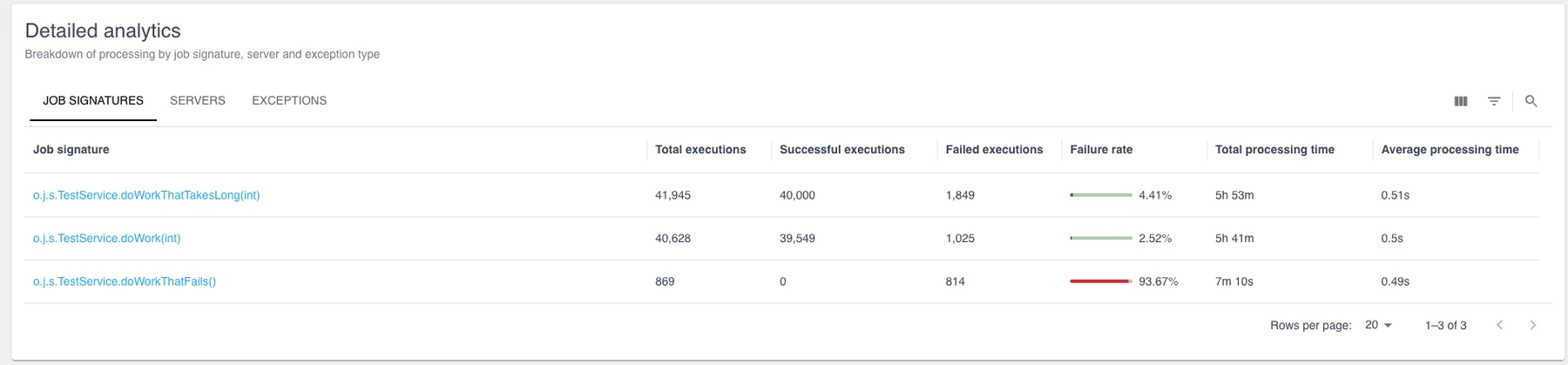
TestService.doWorkThatFails() did not succeed once in 869 executions, so that one is easy to spot. The table also shows the one that is easy to miss. TestService.doWorkThatTakesLong(int) fails only 4.41% of the time, but over 41,945 executions that adds up to 1,849 failures, more than the other two methods together.
Click a job signature and you get a page for that job alone, with processing time split into succeeded and failed attempts, the fastest and the slowest run one click away from the actual job, and a tab with the exceptions that were thrown, how often and when last.
JobRunr Pro Pause and Resume a Batch Job Without Losing Work
Until v9, a batch job that started going wrong left you two options: let it burn through its retries, or delete it and clean up by hand afterwards. Most teams end up writing their own kill switch and a cleanup script for this.
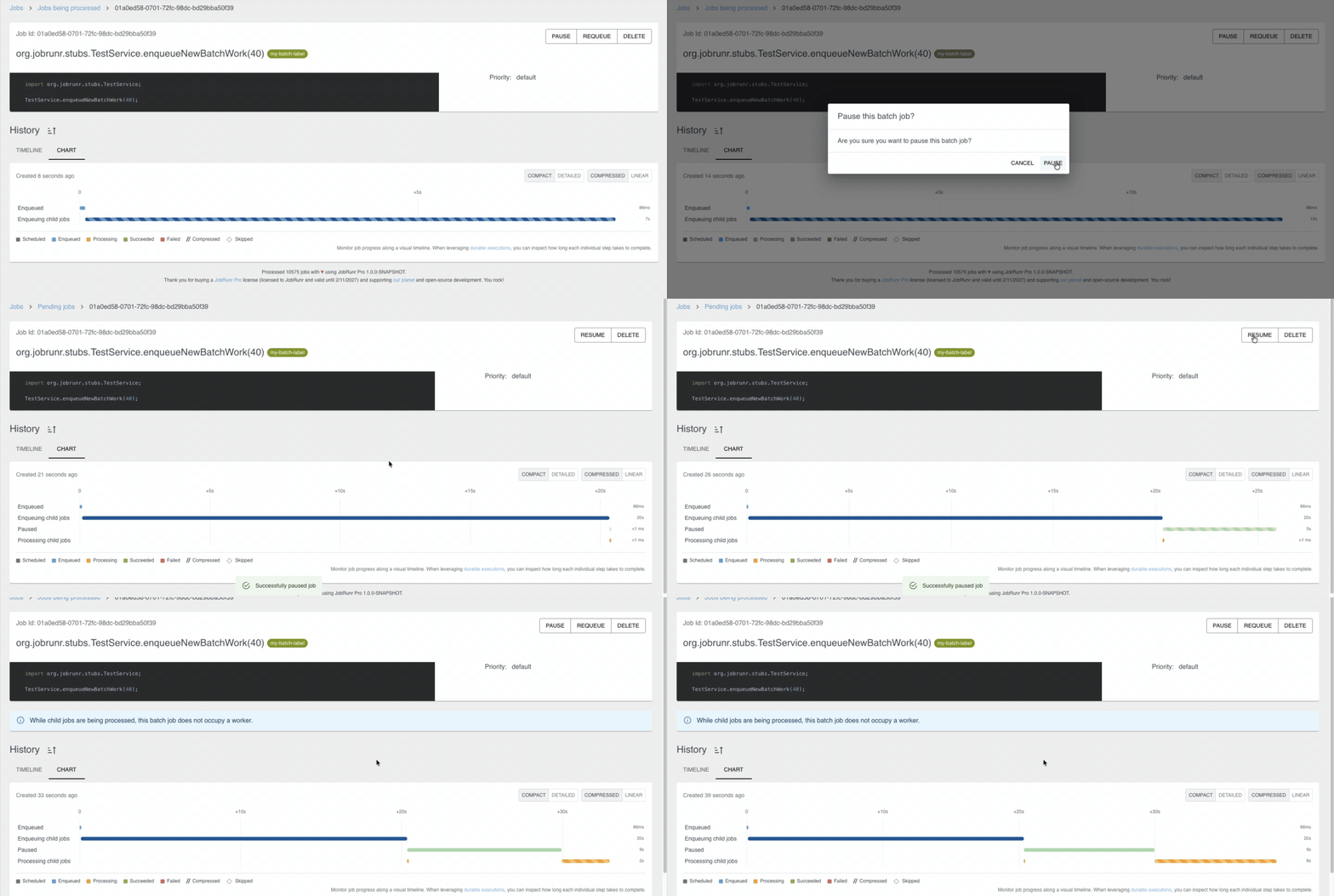
In JobRunr Pro v9 a batch job has a Pause button, and a Resume button next to it:
The run itself is an ordinary batch with one child job per customer:
public JobId startMonthlyInvoiceRun(String period, int customers) {
    return jobScheduler.startBatch(() -> createInvoiceJobs(period, customers));
}

@Job(name = "Monthly invoice run %0")
public void createInvoiceJobs(String period, int customers) {
    jobScheduler.enqueue(
            IntStream.rangeClosed(1, customers).mapToObj(i -> "CUST-%04d".formatted(i)),
            customerId -> generateInvoice(customerId, period, JobContext.Null));
}
Besides the buttons in the dashboard there is a REST API, with POST /jobs/{batchJobId}/pause and POST /jobs/{batchJobId}/resume, and you can pause from your own code. That is handy when your monitoring already knows the payment provider is down. Create a BatchJobManager once:
@Bean
public BatchJobManager batchJobManager(StorageProvider storageProvider, EventTransport eventTransport) {
    return new BatchJobManager(storageProvider, eventTransport);
}
And use it wherever you need it:
batchJobManager.pauseBatchJob(batchJobId);   // unstarted invoices wait, running ones finish
batchJobManager.resumeBatchJob(batchJobId);
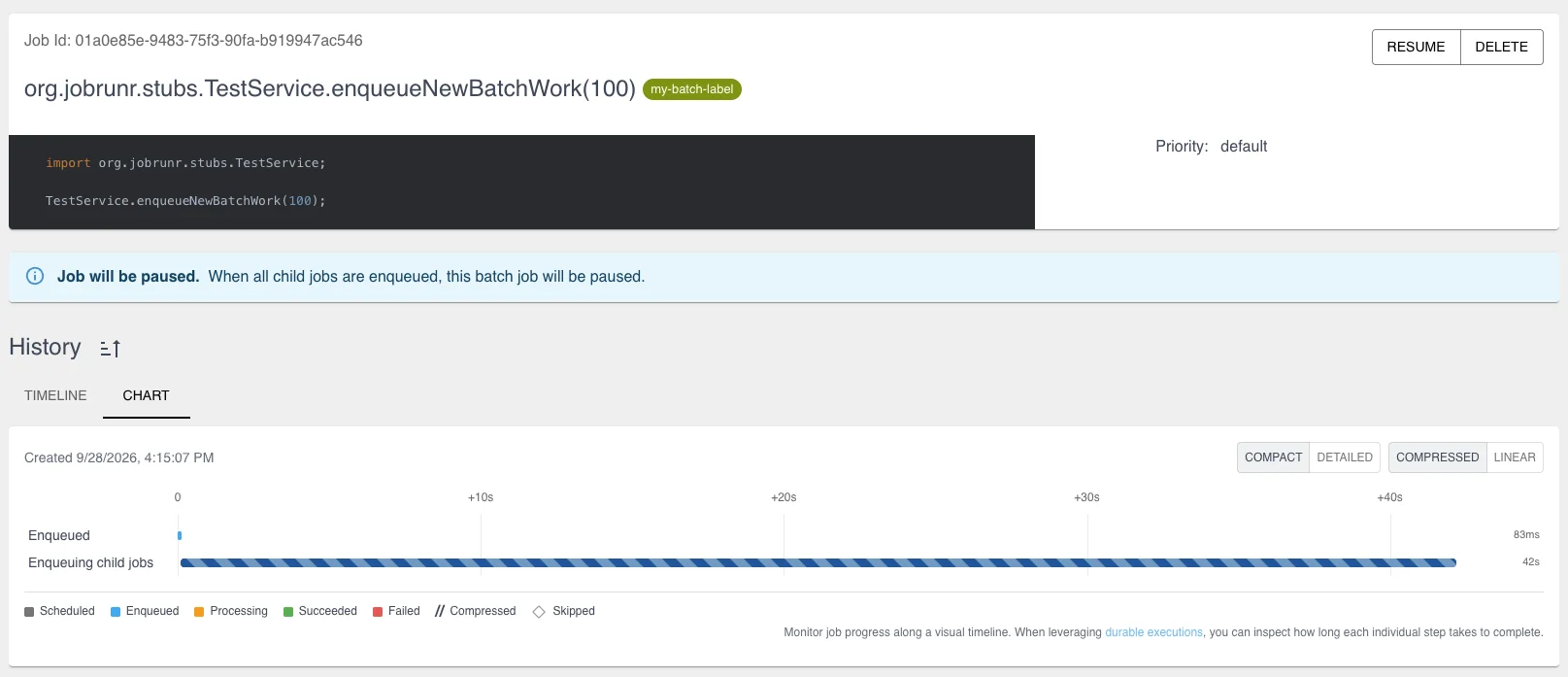
Pausing does not interrupt child jobs that are already processing. If you press Pause while the batch job is still creating its child jobs, the dashboard tells you the job will be paused, and JobRunr pauses it as soon as all child jobs are enqueued.
JobRunr Pro Jobs Start Within Milliseconds on Postgres, With Nothing to Configure
JobRunr Pro has offered instant job processing for a while through UDP multicast. That works well where multicast is allowed, but plenty of cloud networks and Kubernetes clusters block it, and several of you told us that your servers quietly fell back to polling.
For v9 we rebuilt this part as an EventBus with pluggable transports. UDP multicast is still there and PostgreSQL LISTEN/NOTIFY is new. If your StorageProvider runs on Postgres, JobRunr Pro picks it automatically. You do not need a bean, a property or a firewall ticket for your platform team, because the notification travels through the database you already have.
On Postgres a job now starts a few milliseconds after it is created, instead of somewhere in the next poll interval. We measured the time between ENQUEUED and PROCESSING for 20 empty jobs, enqueued 1.5 seconds apart on an idle server:
| Setup | Median | Max |
|---|---|---|
Postgres with LISTEN/NOTIFY, zero configuration | 7 ms | 19 ms |
| Polling every 15 seconds, because multicast was not delivered | 7.7 s | 14.5 s |
In practice a user who clicks “Export” sees the export start right away. To be fair, if multicast worked on your network, v8 was just as fast. The gain is for everyone on Postgres where it did not.
Three notes for Postgres users. Every server keeps one extra connection open to listen on. Polling stays in place as a safety net, so a missed notification delays a job by at most one poll interval. And LISTEN needs a real session, so behind PgBouncer in transaction mode the listener needs a direct connection to Postgres.
If you want to choose the transport yourself, provide an EventTransport:
@Bean
EventTransport eventTransport(DataSource dataSource) {
    return new PostgresEventTransport(dataSource);
}
The jobrunr.multicast-group-address property is gone. If you used it, configure a MulticastEventTransport instead. The migration guide shows how to register an EventTransport in every framework.
And More!
- Quarkus 3.40 LTS from day one. JobRunr 9 comes out on the same day as Quarkus 3.40 LTS, and the JobRunr Quarkus extension supports the new LTS from the first hour.
- Micronaut 5. JobRunr and JobRunr Pro v9 require Micronaut 5, and support for Micronaut 4 has been removed. Nothing changes for Spring Boot and Quarkus users.
- A restore-friendly stats view on MySQL and MariaDB. The
jobrunr_jobs_statsview is now created withSQL SECURITY INVOKER, so restoring a database dump into another environment no longer trips over the view. - A warning for large job arguments. Large job arguments slow JobRunr down, so the dashboard and the server logs now warn you when a serialized job gets too big. The dashboard warns first, at a lower threshold. See our best practices for how to keep them small.
- Amazon DocumentDB on Micronaut. The Micronaut integration now autoconfigures Amazon DocumentDB, like the other frameworks already did.
- JobRunr Pro Custom views in the dashboard. Save a filter as a custom view, similar to a bookmark, and for the first time show jobs of multiple states on one page.
- JobRunr Pro Permanently delete deleted jobs from the dashboard. Users with the
canDeleteJobsaccess rule can now do this from the job page and from the Deleted overview. - JobRunr Pro A faster dashboard. New indexes speed up the job pages on several databases.
- JobRunr Pro Retention settings in one place. The
DeleteFilteris now a default filter and the retention properties moved fromjobrunr.background-job-server.*tojobrunr.jobs.*. The old keys keep working until v10. - JobRunr Pro Kotlin Exposed v1. The Exposed transaction plugin now requires Exposed v1.
What Is Free and What Is Pro
| New in v9 | JobRunr OSS | JobRunr Pro |
|---|---|---|
| See every attempt and every durable step in the job history Chart | ✅ | ✅ |
| Micronaut 5 support | ✅ | ✅ |
| MySQL and MariaDB stats view fix | ✅ | ✅ |
| Find the job behind a slowdown with Job Analytics | ✅ | |
| Pause a failing batch run and resume it later | ✅ | |
| Jobs start within milliseconds on Postgres, no network changes | ✅ | |
| Faster dashboard on large job tables | ✅ | |
| Custom views in the dashboard | ✅ |
Want the Pro half on your own jobs?
jobrunr for jobrunr-pro, add your license key and the code in this post stays the same. A good first exercise in a test environment: break one of your own batch runs on purpose, pause it from the dashboard, fix the cause and resume.Upgrading to JobRunr v9
The JobRunr v9 migration guide walks you through every change, with examples for the Fluent API, Spring Boot, Quarkus and Micronaut.
You have some work to do if you are on Micronaut 4, if you configured a custom multicast address in JobRunr Pro, if you use the Kotlin Exposed transaction plugin, if you still call an API that we deprecated in v8, or if you extend JobRunr Pro internals such as the SmartQueue or the job states. Everybody else changes the version to 9.0.0. JobRunr Pro users find the release in our private Maven repository.
WarningJobRunr v9 is the last open source version that supports Java 8. If you need Java 8 on later versions, that is available in JobRunr Pro.
<dependency>
    <groupId>org.jobrunr</groupId>
    <artifactId>jobrunr</artifactId>
    <version>9.0.0</version>
</dependency>
implementation 'org.jobrunr:jobrunr:9.0.0'
Breaking Changes
The most common ones are below. The v9 migration guide: Breaking Changes has the complete list and how to deal with each change.
- The APIs that were deprecated in v8 have been removed. Use
JobRunrConfiguration#useMetricsinstead ofuseMicroMeter, andJobBuilder#withJobLambdaandRecurringJobBuilder#withJobLambdainstead ofwithDetails. - JobRunr Pro The Pro APIs deprecated in v8 are gone too. Use
withPriorityQueueinstead ofwithQueueon theJobSearchRequestBuilderandRecurringJobSearchRequestBuilder, andJobServerFilter#getProgressAsRatioinstead ofgetProgress. - Micronaut 4 is no longer supported. Upgrade your application to Micronaut 5 before you move to JobRunr v9.
- The JobRunr test fixtures now require JDK 17 or higher.
- JobRunr Pro The property
jobrunr.multicast-group-addressand the methoduseMulticastAddressare gone. Configure anEventTransportinstead, or nothing at all when you run on Postgres. - JobRunr Pro Several constructors now accept an
EventTransportor anEventBus. This only matters when you create aBackgroundJobServer,JobScheduler,JobRequestSchedulerorJobRunrDashboardWebServerby hand. - JobRunr Pro Kotlin Exposed needs to be on v1.
- JobRunr Pro
SmartQueueis renamed toJobPrefetchQueue, andConcurrentJobModificationPolicyis removed without a replacement. - JobRunr Pro Upgrade the Multi-Cluster Dashboard together with your clusters, unless they already run 8.7 or higher.
JobRunr Pro users, the new dashboard indexes are created by database migrations the first time v9 starts. As with 8.8.0, that takes time and I/O on a very large jobs table, so plan the first boot of a busy production cluster accordingly.
Try It on Your Own Jobs
Upgrade to v9, open the job that worries you most and switch its history to Chart. It is free, and we would love to hear what you find via GitHub Discussions.
Job Analytics, pausing a batch and instant processing on Postgres need JobRunr Pro. Ask for a trial license and rehearse this incident in a test environment with one of your own batch runs.
Want to see all of this live first? Join the launch webinar on Thursday 1 October at 12:30 CEST on LinkedIn or YouTube. If that time does not work for you, the replay stays available on YouTube.
Thanks to all our contributors, and thanks to you for trying out the new version.
Full changelog available here: 👉 GitHub Release Notes 9.0.0