On this page
Your user clicks “Generate Report”. The API returns 202 Accepted in 50 milliseconds. Behind the scenes, a background job picks up the request, queries three databases, builds a 200-page PDF, and emails it. Fifteen minutes later the user opens their mailbox and… nothing.
What went wrong? Without observability, the answer is: we have no idea.
This is just one scenario among many. Background jobs come in all shapes: processing payments, syncing data between systems, resizing images, sending notifications, running nightly batch imports. They don’t always originate from an HTTP request either, a recurring job cleaning up expired sessions, a message-driven job triggered by a queue, or a scheduled report running at 2 AM all share the same fundamental challenge. They are asynchronous by nature, running on a different thread, sometimes on a different server, often minutes or hours later. When they break, there’s no user staring at a loading spinner to tell you about it. The failure is silent, and the first sign of trouble is usually an angry support ticket the next morning.
This article digs into why observability is essential for background job processing in Java, walks through the tools and techniques that make it possible, and shows how we built JobRunr with observability as a core principle.
What makes background jobs so hard to observe?
For synchronous endpoints, most Java developers have a decent observability setup. Spring Boot Actuator exposes metrics, each request produces a trace, and when something fails, there’s a stack trace in the logs tied to the request. All of this happens more or less automatically.
Background jobs? They get none of this for free.
Here’s what makes them particularly tricky:
- No request context (or a disconnected one). A job triggered by an API call loses the original trace context unless you propagate it explicitly. A job triggered by a cron schedule never had one to begin with. Either way, your logs are just lines lost in a sea of output.
- Delayed execution. A job enqueued at 2 PM might not run until 3 PM. Correlating the trigger event with the actual execution is not straightforward.
- Retries mask systemic issues. A job that fails twice but succeeds on the third attempt ends up in the “succeeded” count. Without visibility into those intermediate failures, you won’t notice the underlying problem until it gets worse.
- Logical failures don’t throw exceptions. A job can complete without errors yet produce the wrong result—a report from stale data, a payment with the wrong amount. The scheduler says “succeeded”, but the outcome is wrong.
Observability is how you go from “the job ran” to “the job ran correctly, in the expected time, using the expected resources, and produced the right outcome.”
The Java observability landscape today
Java has a mature observability ecosystem. The key building blocks are:
- SLF4J + Logback/Log4j2 for logging. SLF4J’s MDC (Mapped Diagnostic Context) lets you attach contextual information to every log line on a thread, which turns out to be essential for background jobs.
- Micrometer for metrics. A vendor-neutral facade that lets you instrument once and export to any backend (Prometheus, Datadog, New Relic). It’s the default metrics library in Spring Boot.
- OpenTelemetry for distributed tracing (and increasingly, all telemetry). Born from the merger of OpenTracing and OpenCensus, it’s now the CNCF standard. Its Java agent enables zero-code instrumentation.
- Micrometer Observation API unifies metrics and tracing into a single abstraction. One observation generates both a timer metric and a trace span. Spring Boot 3 adopted this as the foundation for Spring Observability.
The bottom line: you can now instrument once and get correlated metrics, logs, and traces exported to any backend. That’s powerful, but it still requires some thought when applied to background jobs.
The three pillars of observability, applied to background jobs
Observability rests on three pillars: logs, metrics, and traces. Each answers a different question, and you really need all three for background jobs.
To make this concrete, let’s use a running example throughout: a generateMonthlyInvoice background job that queries an orders database, calculates totals, generates a PDF, and sends it by email.
Logs: what happened?
Logs tell the story of what a job did. For background jobs, structured logging with contextual information is essential, because without it, you’re reading a novel with no character names.
The challenge is that background jobs run on worker threads. If you rely on plain logger.info("Processing invoice"), that message shows up without any context about which invoice, which customer, or which job execution triggered it.
This is where SLF4J’s MDC (Mapped Diagnostic Context) comes in. MDC lets you attach key-value pairs to the current thread, so every log statement on that background thread automatically includes them:
public void generateMonthlyInvoice(String customerId, YearMonth period) {
    MDC.put("customerId", customerId);
    MDC.put("period", period.toString());
    try {
        log.info("Starting invoice generation");
        List<Order> orders = orderRepository.findByCustomerAndPeriod(customerId, period);
        log.info("Found {} orders", orders.size());

        Invoice invoice = invoiceService.generate(orders);
        log.info("Invoice generated, total: {}", invoice.getTotal());

        emailService.send(customerId, invoice);
        log.info("Invoice sent successfully");
    } catch (Exception e) {
        log.error("Invoice generation failed", e);
        throw e;
    } finally {
        MDC.clear();
    }
}
With a structured logging encoder (JSON via Logback or Log4j2), every log line now includes the customerId and period fields. The difference is stark. Without MDC, two concurrent jobs produce interleaved logs with no way to tell them apart:
14:23:01 INFO  Starting invoice generation
14:23:01 INFO  Starting invoice generation
14:23:02 INFO  Found 47 orders
14:23:02 INFO  Found 12 orders
// Which line belongs to which customer?
With MDC, every line carries its context. You can filter your log aggregator by customerId=ACME-123 and instantly see the full timeline:
14:23:01 INFO  [customerId=ACME-123, period=2026-01] Starting invoice generation
14:23:02 INFO  [customerId=ACME-123, period=2026-01] Found 47 orders
14:23:03 INFO  [customerId=ACME-123, period=2026-01] Invoice generated, total: €4,230.00
WarningMDC uses
ThreadLocalunder the hood. If your job scheduler runs jobs on a thread pool, stale MDC values from a previous job can leak into the next one. Always clear the MDC in afinallyblock.
Metrics: is it healthy?
Metrics answer the big-picture questions: How many invoices did we generate today? What’s the average generation time? How many failed?
With Micrometer, adding metrics to a background job is fairly straightforward:
@Component
public class InvoiceJobService {

    private final MeterRegistry meterRegistry;
    private final Counter invoicesGenerated;
    private final Counter invoicesFailed;

    public InvoiceJobService(MeterRegistry meterRegistry) {
        this.meterRegistry = meterRegistry;
        this.invoicesGenerated = meterRegistry.counter("invoices.generated");
        this.invoicesFailed = meterRegistry.counter("invoices.failed");
    }

    public void generateMonthlyInvoice(String customerId, YearMonth period) {
        Timer.Sample sample = Timer.start(meterRegistry);
        try {
            // ... generation logic ...
            invoicesGenerated.increment();
        } catch (Exception e) {
            invoicesFailed.increment();
            throw e;
        } finally {
            sample.stop(meterRegistry.timer("invoices.generation.duration"));
        }
    }
}
This gives you three essential signals:
- Throughput: How many invoices per minute (success vs failure)?
- Duration: Is generation slowing down? A P99 jump from 5s to 30s could indicate a database problem before any job actually fails.
- Error rate: A sudden spike in failures—even if jobs are being retried successfully—is a warning sign that something is off.
These metrics feed into dashboards (Grafana, Datadog) and trigger alerts. That’s especially important for background work where there’s no user watching the response time. If you’re already using Spring Boot, monitoring background jobs is straightforward: Actuator exposes Micrometer metrics at /actuator/metrics, so your job health data sits right next to your HTTP and JVM metrics.
Traces: where did it go?
Distributed tracing shows the end-to-end journey of a single job execution across async boundaries. For our invoice job, a trace would show something like:
Job enqueued (by API handler) → Job picked up by worker → Database query (200ms) → PDF generation (1.2s) → Email sent via SMTP (800ms)
Without tracing, you know the job took 2.5 seconds. With tracing, you know the PDF generation is the bottleneck. That’s a very different debugging experience.
OpenTelemetry’s Java SDK lets you create spans manually:
public void generateMonthlyInvoice(String customerId, YearMonth period) {
    Span span = tracer.spanBuilder("generateMonthlyInvoice")
        .setAttribute("customer.id", customerId)
        .setAttribute("invoice.period", period.toString())
        .startSpan();

    try (Scope scope = span.makeCurrent()) {
        List<Order> orders = fetchOrders(customerId, period);  // auto-instrumented DB call
        Invoice invoice = generatePdf(orders);                 // child span
        sendEmail(customerId, invoice);                        // child span
    } catch (Exception e) {
        span.setStatus(StatusCode.ERROR, e.getMessage());
        span.recordException(e);
        throw e;
    } finally {
        span.end();
    }
}
The real power comes from context propagation. If the original API request that enqueued the job had a trace ID, and you propagate it to the background job, you can see the entire flow: from the user clicking “Generate Report” through the API, into the queue, and across background processing—all in a single trace in Jaeger or your observability backend of choice.
The boilerplate problem
If you’ve been reading the code examples carefully, you probably spotted a pattern: every single job method needs a try/catch/finally block, MDC setup and teardown, timer management, span creation, and error recording. That’s a lot of cross-cutting concern for what should be a simple business method.
Annotations like Spring’s @Timed, OpenTelemetry’s @WithSpan, or automatic context propagation for Executors each help with individual pieces, but they still end up cluttering methods, especially when you need to add more tags.
This is where the choice of job scheduling framework matters. A framework that treats observability as a first-class concern can handle much of this automatically, letting developers focus on the actual business logic.
How JobRunr makes background jobs observable
Observability has been a core principle in JobRunr from the start. The goal: background jobs should be at least as observable as synchronous operations. Here’s what that looks like in practice.
A Dashboard out of the box
JobRunr ships with a built-in Web UI that provides immediate visibility into all background jobs. One property is all it takes to enable it:
JobRunr.configure()
  // ... other config
  .useDashboard()
jobrunr.dashboard.enabled=true
jobrunr:
  dashboard:
    enabled: true
The dashboard shows:
- Job states in real-time: Enqueued, Processing, Succeeded, Failed—with full history
- Detailed failure information: The complete exception and stack trace for any failed job, right there in the browser
- Automatic retry tracking: Every retry attempt is logged with its timestamp and outcome
- Recurring job overview: All recurring jobs with their cron schedule, time zone, next run time, and the ability to trigger or delete them
- Server health: All background job servers, their resource usage, and worker pool status
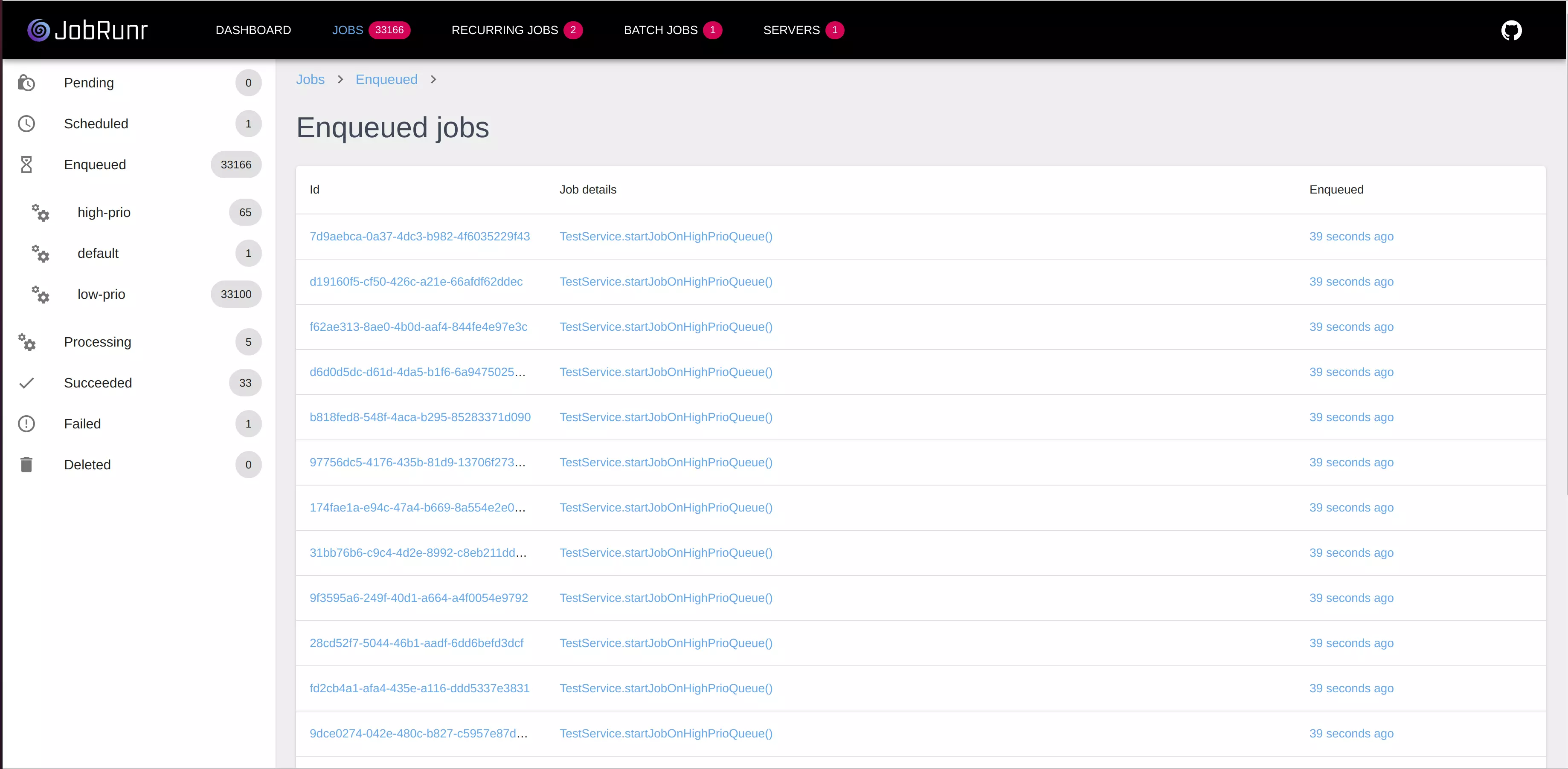
For our invoice example, if a job fails because the SMTP server is down, the dashboard shows the failure with the exact exception, plus the entire retry history. No digging through log files required.
Readable job names
A job called io.acme.InvoiceService.generateMonthlyInvoice is not very helpful when investigating an incident. JobRunr lets you give jobs meaningful, searchable names using the @Job annotation:
@Job(name = "Generate invoice for customer %0, period %1")
public void generateMonthlyInvoice(String customerId, YearMonth period) {
    // ...
}
The %0 and %1 placeholders are replaced with actual argument values. In the dashboard, instead of a cryptic method signature, you see “Generate invoice for customer ACME-123, period 2026-01”.
MDC support: context that follows the job
JobRunr handles MDC propagation natively. Any MDC variables set when the job is enqueued are automatically restored when the job executes, even if it runs on a different server hours later.
// At enqueue time (e.g., in your API controller)
MDC.put("request.correlationId", correlationId);
jobScheduler.enqueue(() -> invoiceService.generateMonthlyInvoice(customerId, period));
And the generateMonthlyInvoice could be simplified by removing the explicit MDC setup:
// In the job method, the MDC is automatically populated
@Job(name = "Generate invoice for %X{request.correlationId}")
public void generateMonthlyInvoice(String customerId, YearMonth period) {
    log.info("Processing invoice");
    // Log output includes request.correlationId automatically!
}
Every log line produced by a background job can now be correlated back to the original request that created it, without the developer having to manually propagate context.
Live logging and progress tracking
For long-running jobs, knowing that a job is “processing” is not enough. You want to know what it’s doing right now. JobRunr provides a dashboard logger and progress bar:
public void generateMonthlyInvoice(String customerId, YearMonth period, JobContext jobContext) {
    List<Order> orders = orderRepository.findByCustomerAndPeriod(customerId, period);
    jobContext.logger().info("Found %d orders to process", orders.size());

    JobDashboardProgressBar progressBar = jobContext.progressBar(orders.size());
    for (Order order : orders) {
        processOrderLine(order);
        progressBar.incrementSucceeded();
    }

    jobContext.logger().info("Invoice generated successfully");
}
These log messages and the progress bar appear live in the dashboard. When someone asks “Where is my report?”, you can look at the dashboard and answer: “It’s 73% done, currently processing order lines.”
Micrometer metrics: plug into your existing stack
JobRunr integrates natively with Micrometer, which means its metrics flow directly into whatever monitoring backend you already use—be it Prometheus, Datadog, or New Relic.
JobRunr.configure()
  // ... other config
  .useMicroMeter(new JobRunrMicroMeterIntegration(meterRegistry))
  // ...
  .initialize();
jobrunr.background-job-server.metrics.enabled=true
jobrunr.jobs.metrics.enabled=true
jobrunr:
  background-job-server:
    metrics:
      enabled: true
  jobs:
    metrics:
      enabled: true
This exposes metrics like job counts by state (jobrunr.jobs.by-state), server resource usage (CPU, memory), and worker pool size. If you’re using Spring Boot Actuator, these metrics appear at /actuator/metrics alongside the rest of your application metrics. For a deeper dive, check out our observability metrics guide.
JobRunr Pro goes further with job timing metrics:
JobRunr.configure()
  // ... other config
  .useMicroMeter(new JobRunrMicroMeterIntegration(meterRegistry, /* publishJobTimings */ true))
  // ...
  .initialize();
jobrunr.jobs.metrics.micrometer-timers.enabled=true
jobrunr:
  jobs:
    metrics:
      micrometer-timers:
        enabled: true
This adds counters and timers for each job type: total runs, in-progress duration, succeeded/failed execution time—all tagged with your job attributes (name, method signature, labels, etc.). You get Grafana dashboards that show exactly how long each type of background job takes and how often it fails, without writing a single line of instrumentation code.
TipThis JobRunr Pro feature removes the need for annotating methods with Spring Boot’s
@Timed. If you’re not using JobRunr Pro, your existing annotations will still work since JobRunr runs inside your JVM application.
OpenTelemetry and distributed tracing
JobRunr Pro integrates with both OpenTelemetry and Micrometer’s Observation API for distributed tracing:
JobRunrPro
  .configure()
  // ... other config
  .useTracing(JobRunrOpenTelemetryTracingConfiguration.usingOpenTelemetryTracing(tracer))
  .useDashboard(usingStandardDashboardConfiguration()
    .andIntegration(new JaegerObservabilityIntegration("http://localhost:16686/"))
  )
  // ...
  .initialize();
jobrunr.jobs.metrics.otel-observability.enabled=true
jobrunr.dashboard.integrations.observability.jaeger.root-url=http://localhost:16686/
jobrunr:
  jobs:
    metrics:
      otel-observability:
        enabled: true
  dashboard:
    integrations:
      observability:
        jaeger:
          root-url: http://localhost:16686/
With this enabled, every job execution produces a trace span. The trace ID is visible directly in the JobRunr dashboard, and clicking it takes you to Jaeger where you can see the full execution timeline—including any downstream HTTP calls or database queries made by the job.
This bridges the gap between “the job failed” (visible in the JobRunr dashboard) and “how it failed” (visible in the distributed trace showing the events leading to the timeout on the third-party payment API).
TipSimilarly to Micrometer, if you’re not using JobRunr Pro, OpenTelemetry’s
@WithSpanannotation and the Java agent’s automatic instrumentation will still work for jobs running inside your JVM.
Both the metrics and tracing integrations are particularly valuable in enterprise environments where teams already have an observability stack in place. JobRunr’s telemetry data flows straight into those existing dashboards and alerting rules, making background jobs part of the same monitoring workflow as the rest of your infrastructure.
Job filters: custom observability hooks
JobRunr’s filter system lets you hook into job lifecycle events for custom observability needs. For example, sending a Slack notification when a critical job fails:
@Component
public class InvoiceJobMonitor implements JobServerFilter {

    private final SlackNotificationService slack;

    public InvoiceJobMonitor(SlackNotificationService slack) {
        this.slack = slack;
    }

    @Override
    public void onProcessingSucceeded(Job job) {
        if ("Generate monthly invoice".equals(job.getJobName())) {
            slack.notify("#billing", "Monthly invoice generated successfully.");
        }
    }

    @Override
    public void onFailedAfterRetries(Job job) {
        FailedState failedState = (FailedState) job.getJobState();
        slack.notify("#on-call", "Invoice generation failed permanently: " + failedState.getExceptionMessage());
    }
}
Filters are regular Spring/Micronaut/Quarkus beans, so they can inject any service. This is useful for sending alerts, updating external dashboards, or triggering compensating actions when a critical job fails.
NoteIn JobRunr Pro, when using a supported framework (Micronaut, Quarkus or Spring Boot), JobFilters are configured automatically for you. For JobRunr OSS, you’ll need to wire in the JobFilters yourself.
One-click issue creation
When a job fails permanently, someone needs to fix the root cause. JobRunr Pro can create a GitHub or Jira issue directly from the dashboard with one click, pre-populated with the exception, stack trace, and job details.
Observability doesn’t come for free
Observability is essential, but every metric, trace span, and log line consumes CPU, memory, and I/O. In the JVM, high-volume instrumentations (e.g., JDBC, Redis) can produce thousands of spans per second, and tagging metrics with unbounded values like user_id or raw URLs causes cardinality explosion, overwhelming your time-series database and spiking costs. Observability tools can consume over 25% of infrastructure spend, and over 90% of collected telemetry data is likely never read.
The guideline: only instrument what you intend to monitor. Keep high-cardinality identifiers in logs and traces, not in metrics. Use adaptive sampling (capture all errors, sample successful requests). And regularly prune dashboards nobody looks at, metrics nobody queries, and alerts nobody acts on. If an alert has no clear action, delete it.
With JobRunr, you can start with just the built-in dashboard, which queries your existing database for jobs already stored there. It has already proven a great productivity tool for various development teams.
Conclusion
Background jobs are the quiet workhorses of modern Java applications. They process payments, generate reports, synchronize data, and send notifications. When they work, nobody notices. When they fail, everyone notices—eventually.
Observability is not optional for production background job processing. Structured logs with MDC context, Micrometer metrics for health monitoring, and distributed traces for debugging are the minimum. But a job scheduling framework that integrates all of this natively—rather than forcing you to bolt it on—turns observability from a chore into a default.
That’s exactly why we built JobRunr the way we did. From the built-in Dashboard to MDC propagation, from Micrometer integration to OpenTelemetry tracing, everything is designed so that you never have to wonder what your background jobs are doing. Because the worst kind of failure is the one you don’t know about.