
Say hi to JobRunr v8.5.0 and JobRunr Pro v8.5.0! This release brings simplified Kotlin support, faster startup times, and several bug fixes in the open-source edition. JobRunr Pro 8.5.0 adds two highly requested features: External Jobs and Dashboard Audit Logging.
Let’s explore what’s new.
External Jobs (Pro)
An ExternalJob is a job that requires feedback from an external process to determine the success of the Job. This breaks the usual JobRunr flow where JobRunr marks a job as completed as soon as the method finishes.
This new feature is very handy for:
- Serverless computation: trigger a Lambda or Cloud Function and wait for a callback
- Long-running third-party workflows: AI pipelines, video transcoding, payment processing
- Human-in-the-loop approvals: wait for a manual sign-off before marking a job as complete
Until now, you would have to build your own state-tracking mechanism alongside JobRunr. External Jobs eliminate that entirely.
How it works
An ExternalJob breaks the usual JobRunr flow. Instead of marking a job as succeeded when the method returns, the job enters a PROCESSED state and waits for an external signal.
Here is the lifecycle:
- Create the external job: the method runs and the job moves to PROCESSED (waiting for signal)
- External process does its work: completely outside of JobRunr
- Signal the outcome: call
signalExternalJobSucceededorsignalExternalJobFailedto resolve the job
Creating an External Job
Use the anExternalJob() builder to create one:
JobProId jobId = BackgroundJob.create(anExternalJob()
        .withDetails(() -> paymentService.initiatePayment(orderId)));
The paymentService.initiatePayment() method runs as usual, but when it finishes, the job does not move to SUCCEEDED. Instead, it enters the PROCESSED state and waits for your signal.
You can also use the full builder API for more control:
JobProId jobId = BackgroundJob.create(anExternalJob()
        .withName("Process payment for order %s".formatted(orderId))
        .withLabels("payments", "order-" + orderId)
        .withDetails(() -> paymentService.initiatePayment(orderId)));
Signaling the outcome
When the external process completes, signal JobRunr with the result:
// Signal success
BackgroundJob.signalExternalJobSucceeded(jobId.asUUID());

// Signal success with a result attached
BackgroundJob.signalExternalJobSucceeded(jobId.asUUID(), "Payment confirmed: TXN-12345");

// Signal failure (the job will be retried according to your retry policy)
BackgroundJob.signalExternalJobFailed(jobId.asUUID(), "Payment declined by provider");

// Signal failure with the root cause exception
BackgroundJob.signalExternalJobFailed(jobId.asUUID(), "Payment timeout",
        new PaymentTimeoutException("No response within 30s"));
This signal can come from anywhere: a webhook endpoint, a message consumer, a scheduled check, or even another JobRunr job.
Tracking progress
For external jobs that produce many child tasks or go through multiple stages, you can report progress while the job waits:
BackgroundJob.signalExternalJobProgress(jobId.asUUID(),
        new JobDashboardProgress(totalItems, succeededItems, failedItems));
This progress is visible in the JobRunr Dashboard, giving your team full visibility into the external process.
Dashboard support
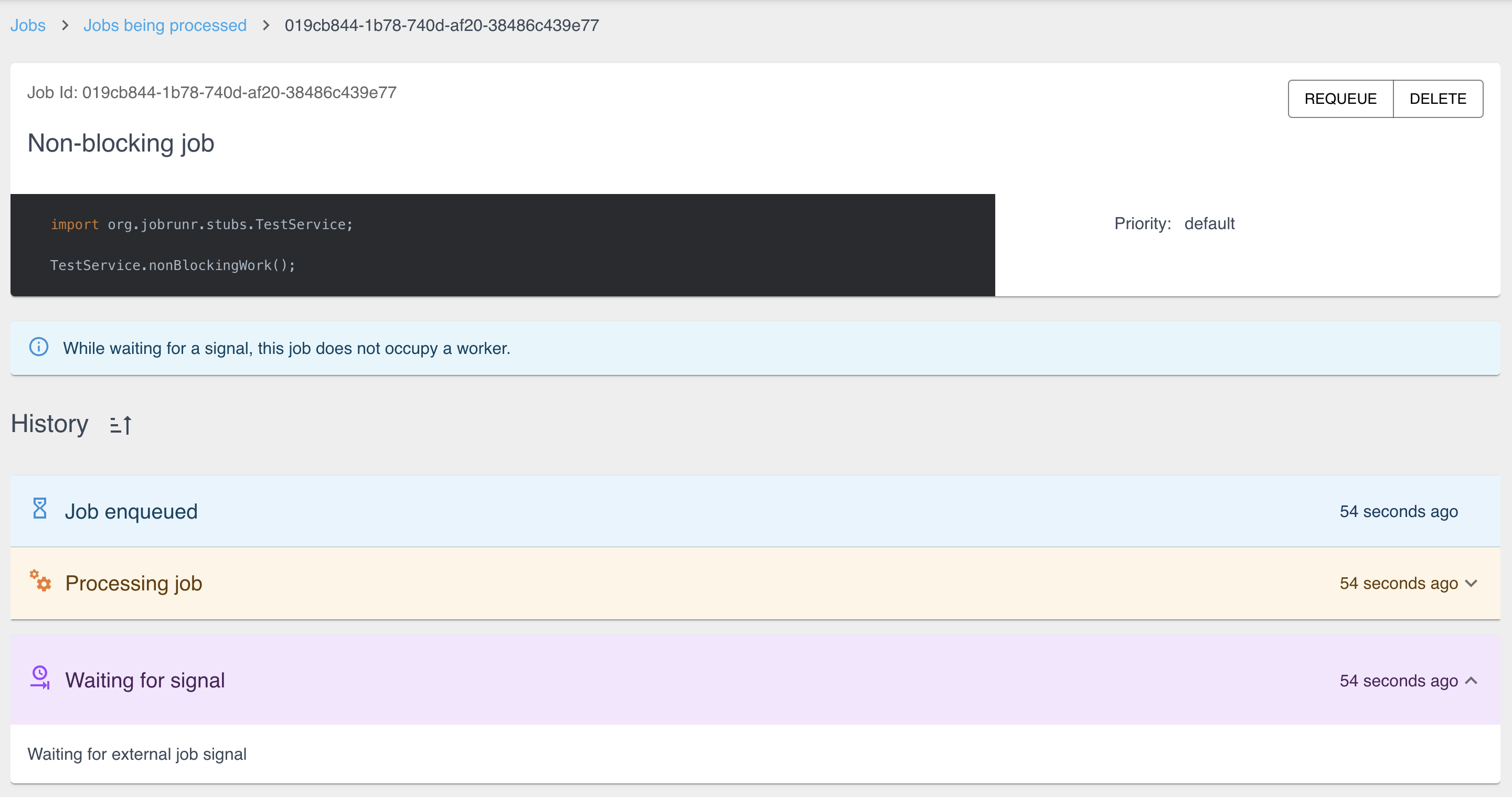
The dashboard has been updated to show External Jobs in their waiting state. When a job is in the PROCESSED state waiting for a signal, the dashboard displays a clear “Waiting for external job signal” message instead of the usual processing indicator. This makes it easy to distinguish between batch jobs waiting for children and external jobs waiting for a callback.
Recurring External Jobs
You can also schedule recurring external jobs using the builder pattern:
BackgroundJob.createRecurrently(aRecurringExternalJob()
        .withId("nightly-data-sync")
        .withCron("0 2 * * *")
        .withDetails(() -> syncService.triggerExternalSync()));
Each occurrence will create an external job that waits for its signal before being marked as complete.
Recurring Batch Jobs
While we were at it, v8.5.0 also adds support for Recurring Batch Jobs. You can now schedule batch jobs on a recurring basis using the new aRecurringBatchJob() builder.
A real-world example: webhook-driven payment processing
Here is how you might integrate External Jobs in a Spring Boot application with a payment provider that sends webhooks:
@Service
public class OrderService {

    public void processOrder(String orderId) {
        // Create an external job with a deterministic ID based on the order
        BackgroundJob.create(anExternalJob()
                .withId(JobId.fromIdentifier("order-" + orderId))
                .withName("Process payment for order %s".formatted(orderId))
                .withDetails(() -> paymentService.initiatePayment(orderId)));
    }
}

@Service
public class PaymentService {

    public void initiatePayment(String orderId) {
        // Call the payment provider API
        paymentProvider.charge(orderId, amount);
        // The job will now wait for the webhook callback
    }
}

@RestController
public class PaymentWebhookController {

    @PostMapping("/webhooks/payment")
    public ResponseEntity<Void> handlePaymentWebhook(@RequestBody PaymentEvent event) {
        // Reconstruct the job ID from the order ID, no need for a separate job ID store
        UUID jobId = JobId.fromIdentifier("order-" + event.getOrderId());

        if (event.isSuccessful()) {
            BackgroundJob.signalExternalJobSucceeded(jobId, event.getTransactionId());
        } else {
            BackgroundJob.signalExternalJobFailed(jobId, event.getFailureReason());
        }

        return ResponseEntity.ok().build();
    }
}
The beauty of this approach: you get all of JobRunr’s built-in retry logic, dashboard visibility, and state management without building any of it yourself.
Dashboard Audit Logging (Pro)
For teams running JobRunr in production, especially in regulated industries, knowing who did what in the dashboard is essential.
JobRunr Pro v8.5.0 introduces audit logging for the dashboard. Every action performed by a dashboard user is now logged, including accessing job details, changing job states, and navigating between tabs.
State-changing actions are logged at INFO level:
INFO  o.j.dashboard.DashboardAuditLogger - User(id='user@jobrunr.io', username='user@jobrunr.io') accessed the server overview
INFO  o.j.dashboard.DashboardAuditLogger - User(id='user@jobrunr.io', username='user@jobrunr.io') changed the state of 2 job(s)
Access actions (like viewing individual job details) are logged at DEBUG level to keep your logs clean:
DEBUG o.j.dashboard.DashboardAuditLogger - User(id='user@jobrunr.io', username='user@jobrunr.io') accessed Job(id='019cb439-5093-7c7a-89a6-e05354c091f1', jobName='...')
This works seamlessly with JobRunr Pro’s existing Single Sign-On integration, so the logged user identity comes directly from your identity provider.
Simplified Kotlin Support
We have changed how Kotlin support packages are released. Instead of maintaining multiple modules with the Kotlin version baked into the artifact name (e.g. jobrunr-kotlin-2.0-support, jobrunr-kotlin-2.1-support), there is now a single artifact:
<dependency>
    <groupId>org.jobrunr</groupId>
    <artifactId>jobrunr-kotlin-support</artifactId>
    <version>8.5.0</version>
</dependency>
implementation 'org.jobrunr:jobrunr-kotlin-support:8.5.0'
The package targets Kotlin 2.2 as its baseline, which JobRunr will stay on for the foreseeable future. It also supports Kotlin 2.1 and has already been tested against 2.3.
Note for JobRunr Pro users: the packages are prefixed with
jobrunr-pro, givingjobrunr-pro-kotlin-support.
This means less maintenance overhead on our side and a more predictable dependency for you. No more guessing which Kotlin support artifact matches your Kotlin version.
Faster Startup Times
Thanks to a community contribution from @tan9, JobRunr now checks applied database migrations in a single query instead of running individual queries per migration file.
The impact is significant, especially for databases with higher per-query overhead like Oracle:
| Scenario | Before | After |
|---|---|---|
| Steady state (all migrations applied) | 17+ individual SELECT queries | 1 single SELECT |
| Oracle round-trips | ~68+ (connection + autocommit + query + close per migration) | ~2 |
| Fresh install | No change | No change |
This is a classic N+1 query optimization. On every startup, runMigrations() previously called isMigrationApplied() for each migration file individually. Now it loads all applied migrations in one batch and checks against an in-memory cache. PR #1489
Bug Fixes
- StepExecutionException fix. Resolved an issue with step execution in certain edge cases. PR #1488
- GraalVM Native Image with Jackson 3. Fixed
FailedStatedeserialization when running as a GraalVM Native Image with Jackson 3. PR #1501
Pro Bug Fixes
- OpenID Authentication. Fixed
OpenIdUnauthenticatedExceptionwhen the access token is null. PR #798 - OpenID Redirect Loop. Fixed too many redirects on OpenID session expiration. PR #810
- RateLimiter Validation. Fixed validation logic for rate limiters. PR #806
How to Upgrade
Simply update your dependency version to 8.5.0 in Maven or Gradle:
<dependency>
    <groupId>org.jobrunr</groupId>
    <artifactId>jobrunr</artifactId>
    <version>8.5.0</version>
</dependency>
implementation 'org.jobrunr:jobrunr:8.5.0'
Stay tuned for more updates, and don’t forget to share your feedback with us!
Full changelog available here: