

On this page
Ten thousand emails need to go out and nobody is going to watch a spinner while it happens. That is where every Java team meets the same fork in the road. Create threads by hand, hand the work to a thread pool, or switch on Java virtual threads and trust the JDK to sort it out.
The question got sharper with JDK 21, and sharper again with JDK 24, when the blocker everybody warned about, pinning inside synchronized blocks, was removed by JEP 491. That fix is carried into JDK 25, which is the LTS most teams will actually deploy.
We have skin in this game. JobRunr, the Java background job framework, has used virtual threads by default on JDK 21 and later since version 7, across millions of production jobs. That gives us opinions, and opinions are cheap. So we built a benchmark harness, ran it on dedicated server hardware, and published all of it so you can disagree with it precisely. The harness runs every job through a bare ExecutorService as well as through a job framework, so the threading conclusions hold whatever you run your jobs on.
The whole article in one table:
| Your workload | The call | What we measured | The risk |
|---|---|---|---|
| I/O bound, JDK 24 or 25 | Switch on virtual threads, then raise the worker count | Up to 7x on sustained load, 11x on bursts | Your database becomes the new ceiling |
| I/O bound, JDK 21 to 23 | Audit synchronized around blocking calls first | The same gains once pinning is gone | Pinning costs 7x in the wrong direction |
| CPU bound | Stay on a platform pool sized near your core count | Nothing | Busy carriers stall the jobs queued behind them |
| Rate limited downstream | Match workers to the quota, not to the hardware | Nothing | More workers buys retries, not throughput |
Why new Thread() still breaks production apps
A Java background thread you create with new Thread() breaks production because it has no brakes. Every one is a request the JVM cannot refuse, so a traffic spike becomes an OutOfMemoryError rather than a queue. Virtual threads make threads cheap, and cheap threads do not give you back the brakes.
Three things go wrong, and only the first is about memory.
Resource exhaustion. A platform thread on x86_64 HotSpot reserves a megabyte of stack address space by default. Those pages are committed lazily, so an idle thread costs tens of kilobytes resident and what stops you first is usually thread creation limits and native allocation failures rather than heap.
Scheduling overhead. Long before that, the kernel spends a growing share of its time moving threads on and off cores instead of running your code.
No management at all. This one survives the move to virtual threads. A Java background thread you start by hand has no backpressure, no retry, no timeout, no record that it ever ran, and no way to drain cleanly when the pod shuts down. It dies silently on an exception and takes your email with it, and making it cheaper only lets you create more of them before you notice.
Virtual threads fix the cost of waiting. They do not fix not having a job system.
Java thread pools: the ExecutorService baseline
A thread pool fixes half the problem. You decide the maximum number of threads once and tasks queue when every thread is busy, so threads stop being the thing that runs out. Be precise about the other half, because Executors.newFixedThreadPool queues into an unbounded LinkedBlockingQueue, which trades an OutOfMemoryError made of threads for one made of queued tasks. Real backpressure needs a bounded queue and a rejection policy, which is what the example below builds.
What is left is a sizing decision nobody can make for you, because it depends entirely on whether your jobs think or wait.
Executors gives you three shapes worth knowing:
newFixedThreadPool(n)caps concurrency atnand queues the rest, which makes it the sane default for a server.newCachedThreadPool()creates threads on demand and reuses idle ones for 60 seconds. Good for bursty short tasks, and we use one for the dashboard’s HTTP traffic. It has no upper bound, so under sustained load it fails exactly likenew Thread().newSingleThreadExecutor()runs everything in submission order on one thread.
Sizing comes down to one ratio. CPU bound work wants roughly one thread per core. For I/O bound work the classic formula is threads = cores × (1 + waitTime / computeTime).
Apply that to a job that calls an API for 200 ms and spends 5 ms on CPU and it asks for about 41 threads per core. On an eight core box that is 328 platform threads for a single workload, which is precisely where this model gets expensive. The formula is right and the answer is uncomfortable, and that tension is the whole reason virtual threads exist.
The baseline, complete and runnable:
import java.util.List;
import java.util.concurrent.ArrayBlockingQueue;
import java.util.concurrent.ExecutorService;
import java.util.concurrent.ThreadPoolExecutor;
import java.util.concurrent.TimeUnit;

public class EmailDispatcher implements AutoCloseable {

    private final ExecutorService executor;

    public EmailDispatcher(int poolSize) {
        // A bounded queue plus CallerRunsPolicy is what actually applies
        // backpressure. Executors.newFixedThreadPool queues without limit.
        this.executor = new ThreadPoolExecutor(
                poolSize, poolSize, 0L, TimeUnit.MILLISECONDS,
                new ArrayBlockingQueue<>(10_000),
                new ThreadPoolExecutor.CallerRunsPolicy());
    }

    public void dispatchAll(List<String> recipients) {
        for (String recipient : recipients) {
            // execute() rather than submit(): submit() parcels any exception into
            // a Future nobody reads, which is exactly how background work fails
            // silently. execute() lets the uncaught exception handler see it.
            executor.execute(() -> send(recipient));
        }
    }

    private void send(String recipient) {
        // Blocking call to your mail provider. This is where the thread waits.
        System.out.println("sending to " + recipient + " on " + Thread.currentThread());
    }

    @Override
    public void close() throws InterruptedException {
        executor.shutdown();
        if (!executor.awaitTermination(30, TimeUnit.SECONDS)) {
            executor.shutdownNow();
        }
    }

    public static void main(String[] args) throws Exception {
        int poolSize = Runtime.getRuntime().availableProcessors() * 8;
        try (EmailDispatcher dispatcher = new EmailDispatcher(poolSize)) {
            dispatcher.dispatchAll(List.of("ada@example.com", "grace@example.com"));
        }
    }
}
Note the close() method. Shutting a pool down and waiting for it is the part people forget, and it is the difference between a clean rolling deploy and a batch of half finished work.
Java 21 virtual threads: what actually changes
A virtual thread is scheduled by the JVM rather than the operating system, and it only occupies an OS thread while actually running your code. The moment it blocks on a socket, a database call or a java.util.concurrent lock, it unmounts from its carrier thread and something else runs there. For work that mostly waits, that changes the arithmetic completely.
The mechanics matter, because every surprise later follows from them. Virtual threads run on a small pool of platform threads called carriers, sized by default at availableProcessors and tunable with jdk.virtualThreadScheduler.parallelism. A virtual thread’s stack lives on the heap and grows with call depth, so creating one costs a few hundred bytes instead of a megabyte of reserved address space. Not everything unmounts, though. Blocking file I/O keeps hold of its carrier, and the scheduler compensates by temporarily adding carriers, which it never does for pinning, and that is why the pinning section below hurts. JEP 444 is the specification.
In code the change is almost insultingly small:
import java.util.concurrent.ExecutorService;
import java.util.concurrent.Executors;

public class ExecutorChoice {

    public static ExecutorService platformThreads() {
        // One OS thread per pool slot, bounded, expensive, time sliced by the kernel.
        return Executors.newFixedThreadPool(64);
    }

    public static ExecutorService virtualThreads() {
        // One virtual thread per task, unbounded, cheap, unmounts whenever it blocks.
        return Executors.newVirtualThreadPerTaskExecutor();
    }

    public static void main(String[] args) {
        try (ExecutorService executor = virtualThreads()) {
            executor.submit(() -> System.out.println(
                    Thread.currentThread() + " virtual=" + Thread.currentThread().isVirtual()));
        }
    }
}
The job code above and below that line does not change. That is the selling point, and it is why this deserves measuring rather than assuming.
The napkin version, clearly labelled as illustration. Take a job that calls an API for 200 ms, reads the database for 50 ms, writes back for 50 ms, and spends 5 ms on CPU. Run 1,000 of those through 10 platform threads and each thread handles 100 jobs at roughly 300 ms apiece, so you wait about 30 seconds. Give each job a virtual thread and the waiting overlaps, so the floor drops towards the duration of a single job.
That arithmetic is correct and it is not what happens, because real systems have connection pools, real frameworks write job state to a database, and real APIs push back.
The Java virtual threads benchmark: what we measured
Virtual threads roughly doubled throughput at JobRunr’s own default settings, and raising the worker count took it to about eleven times the platform thread baseline. The gain is larger than most people expect, and it stops at precisely the point where something other than threads becomes your constraint.
The setup
- Machine under test. Hetzner CCX33, 8 dedicated vCPU, 32 GB, Ubuntu 24.04. Dedicated cores, because a benchmark on shared vCPU measures your neighbours.
- Everything else on a second machine. Postgres 16 and the stub API sit on a separate box over a private network, so the database never competes for the cores we are measuring.
- The job. Read a customer row, call an API, write the result back. The call is real blocking socket I/O through
java.net.http.HttpClienton HTTP/1.1 with its default executor, against a stub that sleeps 200 ms. - The configurations. JobRunr’s platform default of 64 workers, its virtual default of 128, and virtual threads at 1,000.
- The rest. JobRunr 8.8.1, Temurin JDK 21 and 25,
-Xms1g -Xmx4gon G1, a 50 connection application pool plus 100 more for JobRunr’s own bookkeeping, a 5 second poll interval, Postgres durability untouched. Three runs per cell, cold JVM, its own warmup.
The harness, the raw JSON and the scripts that built the machines are in the benchmark repository.
Throughput on I/O bound jobs
Medians of three runs on JDK 21.
| Jobs | Configuration | Processing window | Jobs per second | p99 latency | Peak OS threads |
|---|---|---|---|---|---|
| 1,000 | Platform threads, 64 workers | 4.5 s | 220 | 248 ms | 138 |
| 1,000 | Virtual threads, 128 workers | 3.5 s | 287 | 248 ms | 85 |
| 1,000 | Virtual threads, 1,000 workers | 0.4 s | 2,410 | 398 ms | 91 |
| 10,000 | Platform threads, 64 workers | 40.1 s | 250 | 247 ms | 147 |
| 10,000 | Virtual threads, 128 workers | 21.4 s | 466 | 248 ms | 75 |
| 10,000 | Virtual threads, 1,000 workers | 3.6 s | 2,760 | 375 ms | 76 |
| 100,000 | Platform threads, 64 workers | 398.5 s | 251 | 246 ms | 117 |
| 100,000 | Virtual threads, 128 workers | 214.0 s | 467 | 247 ms | 74 |
| 100,000 | Virtual threads, 1,000 workers | 58.2 s | 1,718 | 287 ms | 93 |
The processing window runs from the first job starting to the last one finishing, which is the part the threading model controls. End to end is a little longer, because the server waits up to one poll interval before noticing work. Read the 1,000 job rows as bursts, since a sub-second measurement multiplied into a per-second rate flatters everybody.
JDK 25 reproduced the same shape, with platform threads identical and the thousand worker configuration about 18 percent faster at a hundred thousand jobs, 2,030 against 1,718. The full table is in the repository.
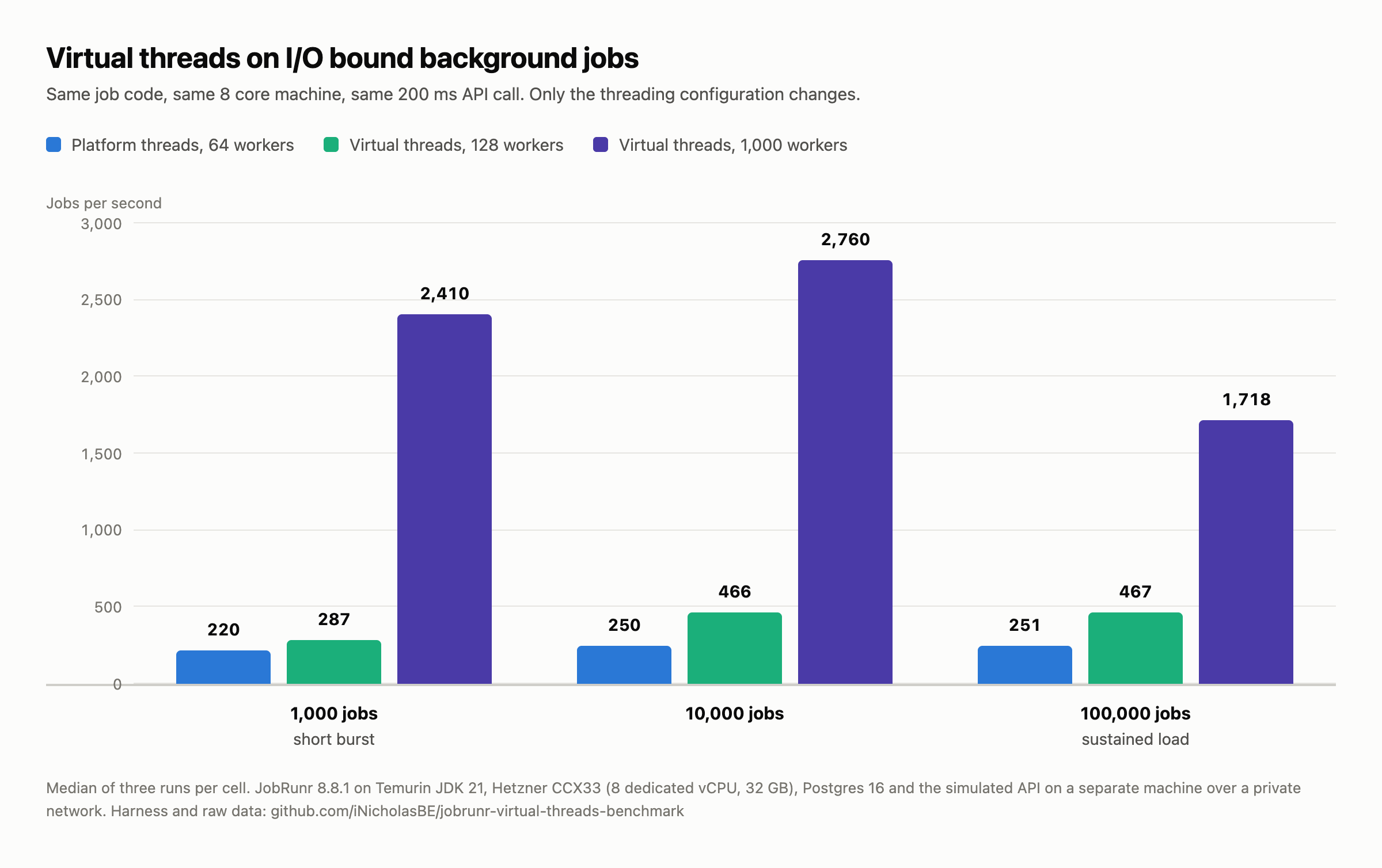
Four things stand out.
Changing the thread type alone bought roughly a doubling, at 64 platform workers against 128 virtual ones. Both are JobRunr’s defaults, so that is what one setting is worth.
The worker count is where the rest lives. A thousand workers took 100,000 jobs from 398 seconds to 58. A thousand platform threads would be a capacity plan rather than a config line, and removing that constraint is what the JDK did.
The advantage shrinks as the run gets longer, from about eleven times at ten thousand jobs to seven at a hundred thousand. The connection queue points at the database as the new constraint, but we did not instrument the second machine well enough to prove it.
And it costs predictability. The three platform runs at 100,000 jobs finished in 397.9, 398.5 and 399.0 seconds. The three thousand worker runs finished in 54.4, 58.2 and 68.5. That matters before you point a nightly batch window at it.
On identical hardware, with no change to a single line of job code, JobRunr cleared 100,000 I/O bound jobs in 58 seconds on virtual threads against 6 minutes and 38 seconds on its platform thread default.
Two things the table does not show. We could not measure a memory difference at all, because a 1 GB starting heap dominates resident memory and hides whatever the thread stacks were doing, so treat that as an experiment we did not run rather than a finding. And the identical job bodies on a bare ExecutorService with no persistence reached 3,965 jobs per second against JobRunr’s 2,760, so durability, retries and visibility cost roughly 30 percent at that concurrency and under 5 percent on platform threads.
When Java virtual threads make things slower
Java virtual threads make background jobs slower in three specific situations: CPU bound work, a synchronized block around a blocking call on JDK 21 through 23, and workloads already limited by a connection pool or an API quota. All three are measurable, so we measured them rather than warning you about them.
CPU bound jobs get no benefit
A virtual thread only helps when it can step off its carrier, and a job doing arithmetic never blocks. It holds its carrier for the whole computation, so the ceiling stays where it always was, at the number of cores you own. Virtual threads are also not time sliced, so a long CPU bound job keeps its carrier until it finishes.
Two thousand image resize jobs, each about 180 ms of pure CPU on this machine.
| 2,000 CPU bound jobs | Jobs per second | p50 latency | p99 latency |
|---|---|---|---|
| ExecutorService, fixed pool of 8 | 44.0 | 180 ms | 199 ms |
| ExecutorService, virtual threads | 44.1 | 179 ms | 207 ms |
| JobRunr, platform threads, 8 workers | 42.6 | 174 ms | 212 ms |
| JobRunr, platform threads, 64 workers | 43.6 | 1,430 ms | 1,749 ms |
| JobRunr, virtual threads, 128 workers | 34.7 | 179 ms | 242 ms |
The first two rows are the cleanest answer in the whole benchmark. With no framework in the way, a fixed pool of eight platform threads and one virtual thread per task finished the same work at the same speed, 44.0 against 44.1 jobs per second, because the work never blocks and the machine has eight cores either way.
The last two rows are the warning. Oversizing a platform pool to 64 leaves throughput alone and multiplies p50 latency by eight, because the same eight cores now timeshare between 64 jobs. Running 128 CPU bound jobs on virtual threads was almost 20 percent slower than running 8, since each holds its carrier for the full 180 ms and sixteen times as much work in flight costs memory and collection without buying parallelism.
The practical consequence looks like a bug the first time you meet it. When every carrier is busy with CPU work, jobs the server already picked up sit in the dashboard marked as processing while doing nothing. They are queued behind a carrier that is not coming back.
Pinning, and why the JDK version matters more than it looks
A virtual thread cannot unmount while it holds a monitor. On JDK 21 through 23 that means any synchronized block around a blocking call nails the virtual thread to its carrier for the whole call, and your worker count stops mattering because the real limit becomes the number of carriers.
The harness runs the identical job with the call inside a synchronized block, striped across 4,096 locks so what gets measured is pinning rather than lock contention. We then ran exactly that on both JDKs.
| 5,000 jobs | Workers | Calls the API saw at once | Jobs per second | p99 latency | Pinning events |
|---|---|---|---|---|---|
| JDK 21, plain blocking call, virtual threads | 128 | 128 | 462 | 253 ms | 0 |
JDK 21, inside synchronized, virtual threads | 128 | 8 | 33 | 6,799 ms | 4,990 |
JDK 21, inside synchronized, platform threads | 64 | 64 | 238 | 247 ms | 0 |
JDK 25, inside synchronized, virtual threads | 128 | 128 | 477 | 252 ms | 0 |
On JDK 21 a synchronized block around a blocking call cut Java virtual thread throughput from 462 to 33 jobs per second and pushed p99 latency from 253 ms to 6,799 ms, leaving a plain platform thread pool seven times faster than virtual threads for identical code. The same code on JDK 25 ran at 477 jobs per second with zero pinning events, so JEP 491 is worth about fourteen times the throughput on this workload and costs you a version number.
The third column is the mechanism. Every virtual row configured 128 workers, and the stub API saw 128 calls at once in all of them except the pinned run, where it saw exactly 8. Eight is the carrier count on this machine, so the worker count had become decoration.
One caveat on the fix. JEP 491 covers synchronized and Object.wait(), not native frames, so a JNI call can still pin you. If you are staying on JDK 21, a ReentrantLock lets the virtual thread unmount while it waits. That removes the pinning and not the mutual exclusion, so a hot lock still serialises your jobs, it just stops burning a carrier:
import java.util.concurrent.locks.ReentrantLock;

public class RemoteAccountSync {

    public interface RemoteApi {
        String fetch(String accountId) throws Exception;
    }

    private final ReentrantLock lock = new ReentrantLock();
    private final RemoteApi remoteApi;

    public RemoteAccountSync(RemoteApi remoteApi) {
        this.remoteApi = remoteApi;
    }

    // The synchronized version of this method pins the virtual thread to its
    // carrier for the entire remote call on JDK 21 through 23. This one does not.
    public String sync(String accountId) throws Exception {
        lock.lock();
        try {
            return remoteApi.fetch(accountId);   // the virtual thread can unmount here
        } finally {
            lock.unlock();
        }
    }
}
Find yours with Java Flight Recorder, because the list is usually shorter than the one you were dreading. The event carries a default 20 ms threshold, so lower it or short pins stay invisible, and print the events rather than counting them, because you want the stack trace:
java -XX:StartFlightRecording=filename=pinning.jfr,settings=profile,\
jdk.VirtualThreadPinned#enabled=true,jdk.VirtualThreadPinned#threshold=0ms \
  -jar your-app.jar

jfr print --events jdk.VirtualThreadPinned pinning.jfr | head -60
The older -Djdk.tracePinnedThreads flag was removed in JDK 24, so JFR is now the way.
A thousand workers cannot use fifty connections
This one catches people who did everything else right. Virtual threads make it trivial to have a thousand jobs in flight, and each still needs a database connection. What decides your throughput is not the pool size though. It is whether the connection is held across the slow call.
Every row below ran the same 5,000 jobs with 1,000 workers on JDK 25.
| Application pool | Connection held across the call | Connection released first |
|---|---|---|
| 10 connections | 41 jobs per second | 2,921 jobs per second |
| 25 connections | 102 | 2,717 |
| 50 connections | 204 | 2,623 |
| 100 connections | 406 | 2,626 |
The left column is arithmetic rather than measurement. It is the pool size divided by the time each job holds its connection, about 245 ms here, because holding a connection across the call caps concurrency at the pool whatever the worker count says. The right column barely moves, because a job that needs its connection for the millisecond it spends querying can share ten of them between a thousand workers.
At a pool of 10, those two ways of writing the same job differ by 71 times the throughput. The pool is not the ceiling. Holding it across a network call is.
import javax.sql.DataSource;
import java.sql.Connection;
import java.sql.PreparedStatement;
import java.sql.ResultSet;

public class CustomerSyncJob {

    private final DataSource dataSource;

    public CustomerSyncJob(DataSource dataSource) {
        this.dataSource = dataSource;
    }

    // Wrong. The connection stays checked out for the whole 200 ms call, so
    // concurrency can never exceed the pool size no matter how many workers run.
    public void syncHoldingConnection(int customerId) throws Exception {
        try (Connection connection = dataSource.getConnection()) {
            String externalId = readExternalId(connection, customerId);
            String payload = callApi(externalId);            // pool held hostage
            writeResult(connection, customerId, payload);
        }
    }

    // Right. Two short checkouts around a long call the pool never sees.
    public void syncReleasingConnection(int customerId) throws Exception {
        String externalId;
        try (Connection connection = dataSource.getConnection()) {
            externalId = readExternalId(connection, customerId);
        }
        String payload = callApi(externalId);
        try (Connection connection = dataSource.getConnection()) {
            writeResult(connection, customerId, payload);
        }
    }

    private String readExternalId(Connection connection, int customerId) throws Exception {
        try (PreparedStatement statement =
                     connection.prepareStatement("select external_id from customer where id = ?")) {
            statement.setInt(1, customerId);
            try (ResultSet resultSet = statement.executeQuery()) {
                resultSet.next();
                return resultSet.getString(1);
            }
        }
    }

    private void writeResult(Connection connection, int customerId, String payload) throws Exception {
        try (PreparedStatement statement = connection.prepareStatement(
                "update customer set payload_size = ?, synced_at = now() where id = ?")) {
            statement.setInt(1, payload.length());
            statement.setInt(2, customerId);
            statement.executeUpdate();
        }
    }

    private String callApi(String externalId) throws Exception {
        return externalId;   // your HTTP client goes here
    }
}
The rule is simple. Size the pool for the time you spend talking to the database rather than for the number of workers you configured, and never hold a connection across a network call you do not control.
Setting it up with JobRunr (or any framework)
If you are on JDK 21 or later with a job framework, you are probably already on virtual threads without having chosen to. What is left to decide is the worker count, and the defaults are conservative compared to what an I/O bound workload absorbs.
JobRunr, the Java background job framework, picks the thread type from the JDK it finds: virtual threads at availableProcessors × 16 on 21 and later, platform threads at availableProcessors × 8 before that.
Check what availableProcessors actually returns before you tune anything, because in a container it reports the cgroup quota. A pod limited to 500 millicores sees one processor, which means one carrier thread and sixteen default workers, with every pinning consequence above multiplied accordingly. -XX:ActiveProcessorCount overrides it when the limit is lying to you.
# application.yml
jobrunr:
  background-job-server:
    enabled: true
    thread-type: VirtualThreads   # the default on JDK 21 and later
    worker-count: 1000            # only if your pool and downstream can take it
                                  # leave it out for availableProcessors * 16
Do not paste that worker count without reading the next sentence. In our own 1,000 worker runs, up to 923 threads were queued on a 50 connection pool at once while mean usage never reached 14 of the 50 connections, because the queries were sub-millisecond and the queue drained as fast as it formed. With HikariCP’s default 30 second connectionTimeout and queries that are not sub-millisecond, that same queue becomes SQLTransientConnectionException.
The same thing without Spring Boot:
import org.jobrunr.configuration.JobRunr;
import org.jobrunr.server.configuration.BackgroundJobServerThreadType;
import org.jobrunr.server.configuration.DefaultBackgroundJobServerWorkerPolicy;
import org.jobrunr.storage.StorageProvider;

import static org.jobrunr.server.BackgroundJobServerConfiguration.usingStandardBackgroundJobServerConfiguration;

public class JobRunrSetup {

    public static void start(StorageProvider storageProvider) {
        JobRunr.configure()
                .useStorageProvider(storageProvider)
                .useBackgroundJobServer(usingStandardBackgroundJobServerConfiguration()
                        .andBackgroundJobServerWorkerPolicy(
                                new DefaultBackgroundJobServerWorkerPolicy(
                                        1000, BackgroundJobServerThreadType.VirtualThreads)))
                .initialize();
    }
}
How to pick the number:
- I/O bound jobs, external calls, webhooks, syncs. Start at the default and go up in multiples until throughput flattens. Where it flattens tells you which resource you ran out of.
- Rate limited downstreams. Match the worker count to what the other side accepts. A thousand concurrent jobs against an API allowing 100 requests per second produces 900 retries, not more throughput. If those retries must be safe to repeat, that is a question about idempotence rather than threads, and JobRunr Pro’s rate limiters cap concurrency per service instead of making you guess one global number.
One pattern to avoid regardless of framework. Parallel streams inside a job look like free concurrency and are not:
import java.util.List;
import java.util.UUID;

public class BatchJob {

    // The common ForkJoinPool is sized for CPU work and shared with the entire
    // JVM. Blocking inside it starves everything else that uses it.
    public void processBatch(List<UUID> ids) {
        ids.parallelStream().forEach(this::processItem);
    }

    public void processItem(UUID id) {
        // one unit of work. Public because a job framework invokes it reflectively.
    }
}
Enqueue one job per item instead. JobRunr writes them in batches, and each one then gets its own virtual thread, its own retries and its own row in the dashboard:
import org.jobrunr.scheduling.BackgroundJob;

import java.util.List;
import java.util.UUID;

public class BatchEnqueuer {

    public void processBatch(List<UUID> ids) {
        BatchJob job = new BatchJob();
        BackgroundJob.enqueue(ids.stream(), id -> job.processItem(id));
    }
}
The virtual threads configuration page has the rest of the knobs.
What this means for your infrastructure bill
Java virtual threads cut infrastructure cost by doing the same I/O bound work on fewer machines. The same 100,000 jobs took 6 minutes and 38 seconds on the platform thread configuration and 58 seconds on the tuned virtual thread one, on a single eight core box. One machine now does roughly seven machines’ worth of that work. On the Hetzner CCX33 this benchmark ran on, that is one box at about 140 euro a month rather than seven of them.
The engineering cost is the part worth telling your team. This is a JDK version and a configuration value, not a rewrite. It rolls back in one line, and the pinning audit that de-risks it is a single JFR command.
Two honest limits. It applies only to jobs that wait, so a CPU bound pipeline sees none of it. And the ceiling moved rather than vanished, most likely onto the database, which is the expensive thing to scale.
Migration path
Moving an existing job workload onto virtual threads is a configuration change rather than a rewrite. Do it in this order.
- Get to JDK 21, and prefer JDK 25. Virtual threads start at 21 and the pinning fix lands in 24, which for most shops means JDK 25, the LTS that carries it.
- Turn them on and change nothing else. Keep your current worker count. This tells you whether the switch alone is safe, and on I/O bound work it usually already pays.
- Raise the worker count in multiples and watch the downstream, not the JVM. When throughput flattens, look at your connections, your API quotas and your p99 before you look at threads.
- Audit for pinning with JFR before you trust the numbers.
- Leave CPU bound jobs on a separate server with a small platform pool.
Frequently asked questions
What is the difference between virtual threads and platform threads?
A platform thread wraps an operating system thread. The kernel schedules it, it reserves about a megabyte of stack address space, and it stays tied up while it waits. A virtual thread is scheduled by the JVM, keeps its stack on the heap, and releases the OS thread when it blocks on a socket, a database call or a lock, so you can run far more of them than you have cores. Both are Thread instances running the same code, and Thread.currentThread().isVirtual() tells them apart.
How many virtual threads can Java handle?
Millions, in the sense that creation and memory stop being the limit. In practice the limit moves to whatever they wait on, usually a connection pool, an API quota or a database. Oracle’s guide suggests you are unlikely to benefit below around 10,000 virtual threads. Our numbers put the threshold far lower, because 128 concurrent jobs already gave nearly double the throughput of a 64 thread pool.
When should you not use virtual threads?
Java virtual threads do not help in three cases. CPU bound jobs gain nothing, because a thread doing arithmetic never releases its carrier. On JDK 21 through 23 a synchronized block around a blocking call pins the thread, which cost us seven times the throughput. And when the real constraint is a connection pool or an API quota, more workers only lengthen the queue.
Do virtual threads speed up CPU bound jobs?
No. If your job compresses video, resizes images or crunches numbers, virtual threads will not make it faster, and running many at once makes latency worse while throughput stays flat. They multiply your ability to wait, not your ability to compute.
How do I enable virtual threads in Spring Boot?
Set spring.threads.virtual.enabled=true in application.properties, which moves Spring’s executors and the servlet container onto virtual threads from Spring Boot 3.2 onwards. That covers Spring’s threads, not your job framework’s workers. JobRunr picks its thread type from the JDK, so on 21 and later it already uses virtual threads regardless, and jobrunr.background-job-server.thread-type overrides it.
How do I implement a background job processor in Java?
You need somewhere durable to record the work, a worker loop that picks it up, and a retry policy for failures, because in memory queues lose everything on restart. Most teams take an existing framework rather than build persistence, retries, scheduling and a dashboard themselves. The five minute intro shows what that looks like, and we compared the modern alternatives to Quartz if you are still choosing.
The takeaway
Measure your own workload, because the number that matters is not ours. It is where your throughput flattens and which resource put the ceiling there. Virtual threads are a large and genuinely free win for jobs that spend their time waiting, and close to nothing for jobs that do not.
The harness that produced every number above is on GitHub, including the workloads that made virtual threads look bad. If you want the configuration reference rather than the reasoning, the virtual threads documentation is the shorter read, and JobRunr itself is open source.