
TipJust looking to generate a cron expression? Try our Cron Expression Generator to quickly build and test cron schedules.
Running code on a schedule is one of those things that sounds simple until you actually try to do it right. Every hour, every day at midnight, every Monday at 9am. In Linux you’d just add a line to crontab and forget about it.
In Java, you have more options than you probably want. Some are built into the language, some come from frameworks, and some are designed for distributed environments.
In this guide, we’ll cover:
- Cron expression basics: the syntax and common patterns
- ScheduledExecutorService: Java’s built-in option for simple intervals
- Spring @Scheduled: annotation-based scheduling in Spring Boot
- Quartz Scheduler: the traditional enterprise choice
- JobRunr: a modern approach with persistence and dashboards
- Comparison table: feature comparison at a glance
- Practical scenarios: weekday-only jobs, timezone handling, month-end processing
By the end, you’ll know which approach fits your situation and how to implement it.
The Basics: What is a Cron Expression?
A cron expression defines when something should run. The format comes from Unix cron:
┌───────────── second (0-59) [optional in some implementations]
│ ┌───────────── minute (0-59)
│ │ ┌───────────── hour (0-23)
│ │ │ ┌───────────── day of month (1-31)
│ │ │ │ ┌───────────── month (1-12)
│ │ │ │ │ ┌───────────── day of week (0-6, Sunday=0)
│ │ │ │ │ │
* * * * * *
Examples:
0 * * * *= every hour at minute 00 9 * * *= every day at 9:00 AM0 9 * * 1= every Monday at 9:00 AM0 0 1 * *= first day of every month at midnight*/15 * * * *= every 15 minutes
Java cron libraries understand this format. Some extend it with seconds, some use slightly different syntax for day of week. We’ll cover the differences.
Option 1: ScheduledExecutorService
Java’s built in option. No external dependencies.
ScheduledExecutorService executor = Executors.newScheduledThreadPool(1);

// Run every hour
executor.scheduleAtFixedRate(
    () -> System.out.println("Running hourly task"),
    0,
    1,
    TimeUnit.HOURS
);

// Run every day at fixed delay
executor.scheduleWithFixedDelay(
    () -> cleanupOldFiles(),
    0,
    24,
    TimeUnit.HOURS
);
Simple and built-in, but no cron expressions, no persistence, and if a task throws an exception the schedule stops. Fine for trivial cases.
Option 2: Spring @Scheduled
If you’re using Spring Boot, the @Scheduled annotation is convenient.
@Component
public class ScheduledTasks {

    @Scheduled(cron = "0 0 9 * * *")
    public void dailyReportAt9am() {
        generateReport();
    }

    @Scheduled(fixedRate = 60000)
    public void everyMinute() {
        checkHealth();
    }

    @Scheduled(cron = "0 0 0 * * MON")
    public void everyMondayMidnight() {
        weeklyCleanup();
    }
}
Enable it in your configuration:
@EnableScheduling
@SpringBootApplication
public class Application {
    public static void main(String[] args) {
        SpringApplication.run(Application.class, args);
    }
}
Spring cron format: 6 fields (second, minute, hour, day, month, weekday). Day of week: 0=Sunday or names (MON, TUE). Supports ? for “no specific value”.
Clean syntax, but in-memory only. Jobs don’t survive restarts, and multiple instances cause duplicate execution.
Option 3: Quartz Scheduler
Quartz has been around since 2001. It’s the traditional choice for Java cron jobs.
// Define a job
public class ReportJob implements Job {
    @Override
    public void execute(JobExecutionContext context) {
        generateReport();
    }
}

// Schedule it
JobDetail job = JobBuilder.newJob(ReportJob.class)
    .withIdentity("dailyReport")
    .build();

CronTrigger trigger = TriggerBuilder.newTrigger()
    .withIdentity("dailyTrigger")
    .withSchedule(CronScheduleBuilder.cronSchedule("0 0 9 * * ?"))
    .build();

scheduler.scheduleJob(job, trigger);
Quartz cron format: 6-7 fields (year optional). Uses ? for day fields. Day of week: 1=Sunday through 7=Saturday.
Mature and supports persistence/clustering, but verbose API, complex configuration, and 11+ database tables. We wrote about why teams are moving away from Quartz.
Option 4: JobRunr (Modern Approach)
JobRunr simplifies cron jobs in Java. Lambda syntax or @Recurring annotations, built in dashboard, persistent storage.
// Schedule a recurring job with lambdas
BackgroundJob.scheduleRecurrently(
    "daily-report",
    Cron.daily(9, 0),
    () -> reportService.generateDailyReport()
);

// Or use cron expression directly
BackgroundJob.scheduleRecurrently(
    "weekly-cleanup",
    "0 0 * * 1",
    () -> cleanupService.weeklyCleanup()
);

// Or use annotations (Spring Boot example)
@Recurring(id = "hourly-sync", cron = "0 * * * *")
public void syncData() {
    // runs every hour
}
JobRunr cron format:
- 5 fields: minute, hour, day, month, weekday (standard Unix)
- Weekday: 0=Sunday through 6=Saturday
- Helper class
Cronfor common patterns
Common patterns with the Cron helper:
Cron.minutely()           // Every minute
Cron.hourly()             // Every hour at :00
Cron.hourly(30)           // Every hour at :30
Cron.daily()              // Every day at midnight
Cron.daily(9, 0)          // Every day at 9:00 AM
Cron.weekly()             // Every Sunday at midnight
Cron.monthly()            // First of month at midnight
Cron.monthly(15, 14, 30)  // 15th of month at 2:30 PM
Beyond cron expressions, JobRunr also supports fixed intervals using Duration:
// Run every 30 seconds
BackgroundJob.scheduleRecurrently(
    "health-check",
    Duration.ofSeconds(30),
    () -> healthService.check()
);

// Run every 2 hours
BackgroundJob.scheduleRecurrently(
    "sync-data",
    Duration.ofHours(2),
    () -> syncService.sync()
);
This is useful when you want a simple interval without thinking about cron syntax.
Jobs persist in your database (or InMemory for development), with a built-in dashboard, automatic retries, and no duplicate execution across instances.
Using Annotations (Spring Boot)
If you prefer annotations over programmatic scheduling, JobRunr supports the @Recurring annotation in Spring Boot:
@Component
public class ReportService {

    @Recurring(id = "daily-report", cron = "0 9 * * *")
    public void generateDailyReport() {
        // This runs every day at 9:00 AM
    }

    @Recurring(id = "weekly-cleanup", cron = "0 0 * * 1")
    public void weeklyCleanup() {
        // This runs every Monday at midnight
    }
}
The annotation approach is familiar if you’re coming from Spring’s @Scheduled, but with JobRunr’s benefits: the jobs are persisted, visible in the dashboard, and won’t run twice when you have multiple instances.
Setting Up JobRunr
Add the dependency:
<dependency>
    <groupId>org.jobrunr</groupId>
    <artifactId>jobrunr</artifactId>
    <version>${jobrunr.version}</version>
</dependency>
<dependency>
    <groupId>org.jobrunr</groupId>
    <artifactId>jobrunr-spring-boot-3-starter</artifactId>
    <version>${jobrunr.version}</version>
</dependency>
<dependency>
    <groupId>org.jobrunr</groupId>
    <artifactId>jobrunr-micronaut-feature</artifactId>
    <version>${jobrunr.version}</version>
</dependency>
<dependency>
    <groupId>org.jobrunr</groupId>
    <artifactId>jobrunr-quarkus-extension</artifactId>
    <version>${jobrunr.version}</version>
</dependency>
Initialize JobRunr:
JobRunr.configure()
    .useStorageProvider(new SqLiteStorageProvider(dataSource))
    .useBackgroundJobServer()
    .useDashboard()
    .initialize();
jobrunr.background-job-server.enabled=true
jobrunr.dashboard.enabled=true
jobrunr:
  background-job-server:
    enabled: true
  dashboard:
    enabled: true
quarkus.jobrunr.background-job-server.enabled=true
quarkus.jobrunr.dashboard.enabled=true
Schedule jobs:
@Service
public class ScheduledJobsConfig {

    private final ReportService reportService;
    private final CleanupService cleanupService;

    @PostConstruct
    public void registerRecurringJobs() {
        // Daily at 9 AM
        BackgroundJob.scheduleRecurrently(
            "daily-report",
            Cron.daily(9, 0),
            reportService::generateDailyReport
        );

        // Every Monday at midnight
        BackgroundJob.scheduleRecurrently(
            "weekly-cleanup",
            "0 0 * * 1",
            cleanupService::weeklyCleanup
        );

        // Every 15 minutes
        BackgroundJob.scheduleRecurrently(
            "health-check",
            "*/15 * * * *",
            () -> healthService.check()
        );
    }
}
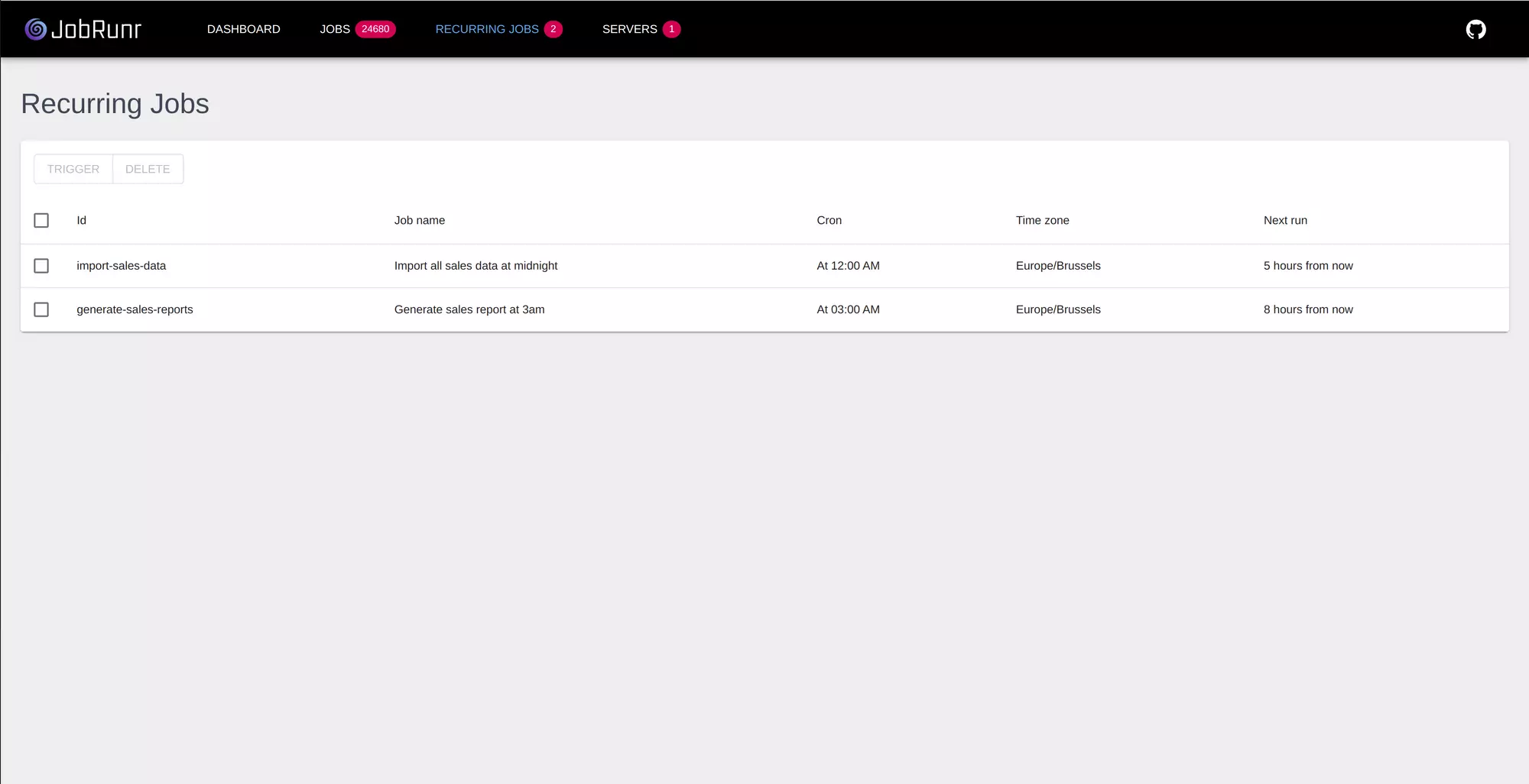
Open /dashboard to see your recurring jobs:
Comparison Table
| Feature | ScheduledExecutor | Spring @Scheduled | Quartz | JobRunr |
|---|---|---|---|---|
| Scheduling | ||||
| Cron expressions | ❌ | ✅ | ✅ | ✅ |
| Fixed intervals | ✅ | ✅ | ✅ | ✅ |
| Dynamic scheduling | ✅ | ❌ | ✅ | ✅ |
| Timezone support | ❌ | ✅ | ✅ | ✅ |
| Reliability | ||||
| Survives restarts | ❌ | ❌ | ✅ | ✅ |
| Multiple instances | ❌ | ❌ | ✅ | ✅ |
| Automatic retries | ❌ | ❌ | ✅ | ✅ |
| Operations | ||||
| Dashboard | ❌ | ❌ | ❌ | ✅ |
| Simple API | ✅ | ✅ | ❌ | ✅ |
| Database tables | 0 | 0 | 11+ | 4 |
| External dependencies | None | Spring | Quartz | JobRunr |
Handling Common Scenarios
“Run at startup, then every hour”
Recurring jobs are scheduled for the next matching time, not immediately. To run once at startup and then hourly:
// Run once immediately
BackgroundJob.enqueue(() -> syncService.sync());

// Then continue on schedule
BackgroundJob.scheduleRecurrently(
    "hourly-sync",
    Cron.hourly(),
    () -> syncService.sync()
);
“Run only on weekdays”
// Monday through Friday at 9 AM
BackgroundJob.scheduleRecurrently(
    "weekday-report",
    "0 9 * * 1-5",
    () -> reportService.generate()
);
“Run every 5 minutes during business hours”
// 9 AM to 5 PM, every 5 minutes, weekdays only
BackgroundJob.scheduleRecurrently(
    "business-hours-check",
    "*/5 9-17 * * 1-5",
    () -> alertService.checkSystems()
);
“Run on the last day of every month”
Standard cron doesn’t support “last day of month” directly. With JobRunr OSS, you can check the date in your code:
BackgroundJob.scheduleRecurrently(
    "month-end-report",
    Cron.daily(23, 59),
    () -> {
        if (isLastDayOfMonth()) {
            reportService.monthEndReport();
        }
    }
);

private boolean isLastDayOfMonth() {
    LocalDate today = LocalDate.now();
    return today.equals(today.withDayOfMonth(today.lengthOfMonth()));
}
JobRunr Pro supports advanced cron expressions with L (last), W (weekday), and # (nth weekday):
// Last day of every month at midnight (Pro only)
BackgroundJob.scheduleRecurrently(
    "month-end-report",
    "0 0 L * *",
    () -> reportService.monthEndReport()
);

// Last Friday of every month at 5 PM
BackgroundJob.scheduleRecurrently(
    "monthly-review",
    "0 17 * * 5L",
    () -> reviewService.monthlyReview()
);
“Run at a specific timezone”
JobRunr uses the server’s timezone by default. For explicit timezone control:
// This runs at 9 AM New York time, regardless of server location
BackgroundJob.scheduleRecurrently(
    "nyc-report",
    "0 9 * * *",
    ZoneId.of("America/New_York"),
    () -> reportService.generate()
);
Cron Expression Cheat Sheet
| Expression | Description |
|---|---|
* * * * * | Every minute |
*/5 * * * * | Every 5 minutes |
0 * * * * | Every hour |
0 */2 * * * | Every 2 hours |
0 9 * * * | Daily at 9:00 AM |
0 9,17 * * * | At 9:00 AM and 5:00 PM |
0 9-17 * * * | Every hour from 9 AM to 5 PM |
0 0 * * * | Daily at midnight |
0 0 * * 0 | Weekly on Sunday |
0 0 * * 1-5 | Weekdays at midnight |
0 0 1 * * | Monthly on the 1st |
0 0 1 1 * | Yearly on January 1st |
What to Use
For local development or simple scripts: JobRunr OSS is a solid choice. Quick to set up, persistent jobs, and a built-in dashboard to see what’s happening.
For production applications: JobRunr OSS handles most use cases well. If you need enterprise features like priority queues, smart queues, advanced cron expressions, or carbon-aware scheduling to run jobs when electricity is greenest, consider JobRunr Pro.
If you’re already using Quartz: Consider migrating to JobRunr. The API is simpler and you get a dashboard.
Build cron expressions visually with our Cron Expression Generator.
Need more than recurring jobs? JobRunr also handles fire and forget, delayed jobs, and job workflows.