
We talk to a lot of Java teams who hit the same wall: they start with a single server, background jobs work great, then they scale to multiple instances and everything falls apart.
Jobs run twice. Jobs get lost when servers restart. There’s no way to see what’s happening. Sound familiar?
This is the distributed job scheduling problem, and we’ve seen dozens of teams try to solve it themselves before giving up. Here’s why it’s harder than it looks, and what actually works.
The Problem
When you have a single server, job scheduling is simple. You use ScheduledExecutorService, a cron job, or a library like Quartz. The jobs run on that one server.
Add a second server and everything breaks.
Problem 1: Duplicate execution. Your recurring job that runs every hour? Now it runs twice. Once on each server.
Problem 2: Lost jobs. Server A picks up a job, then crashes. The job is gone. Or worse, it’s stuck in a “processing” state forever.
Problem 3: Uneven load. Server A is maxed out processing jobs while Server B sits idle. You have no way to distribute work.
Problem 4: No visibility. Where did that job run? Did it succeed? When a customer asks why their email didn’t send, you have no idea where to look.
DIY Approaches (And Why They Fail)
Almost every team tries to build their own solution first. We did too, back in the day. It always starts the same way.
Approach 1: Database Coordination
The idea: use your database as a coordination point. Use an optimistic compare-and-swap to claim jobs.
// Don't do this
@Transactional
public void processJob(Job job) {
    // Try to claim the job with an optimistic update
    int updated = jdbcTemplate.update(
        "UPDATE jobs SET status = 'PROCESSING', worker = ? " +
        "WHERE id = ? AND status = 'PENDING'",
        workerId, job.getId()
    );

    if (updated == 0) {
        // Another worker got it
        return;
    }

    try {
        doWork(job);
        markComplete(job);
    } catch (Exception e) {
        markFailed(job);
    }
}
Why it fails:
- Dead workers leave orphaned jobs stuck in PROCESSING state
- You end up building a state machine for job lifecycle
- Retries, delays, and recurring jobs need more tables and more code
- Polling for available jobs adds constant database load
- No visibility into what’s happening across workers
Within six months, you have 2,000 lines of job scheduling code that nobody wants to touch.
Approach 2: Message Queues
The idea: use RabbitMQ, Kafka, or SQS as your job queue. Workers consume messages.
// Also don't do this for job scheduling
@RabbitListener(queues = "jobs")
public void handleJob(JobMessage message) {
    try {
        processJob(message);
        // Ack happens automatically
    } catch (Exception e) {
        // Message goes back to queue
        throw e;
    }
}
Why it fails for job scheduling:
- Message queues are great for event streaming, not job scheduling
- No built in support for delays (“run this in 2 hours”)
- No built in support for recurring jobs (“run this every day at 9am”)
- No dashboard to see job status
- Failed jobs go to a dead letter queue. Now you need another system to handle retries.
- State management becomes your problem
Message queues solve a different problem. If you need to schedule jobs, you need a job scheduler.
Approach 3: Kubernetes CronJobs
The idea: let Kubernetes handle scheduling. Define CronJobs in YAML.
apiVersion: batch/v1
kind: CronJob
metadata:
  name: daily-report
spec:
  schedule: "0 9 * * *"
  jobTemplate:
    spec:
      template:
        spec:
          containers:
          - name: report
            image: myapp:latest
            command: ["java", "-jar", "app.jar", "--job=report"]
Why it fails:
- Only works for recurring jobs on a schedule
- No fire and forget jobs
- No delayed jobs
- No job chaining
- Limited visibility (kubectl logs, that’s it)
- Scaling is manual
- Each job type needs its own container definition
Kubernetes CronJobs are fine for simple recurring tasks. They’re not a job scheduling system.
What You Actually Need
A proper distributed job scheduler handles:
- Coordination. Only one worker processes each job, guaranteed.
- Persistence. Jobs survive restarts, crashes, and deployments.
- Retries. Failed jobs automatically retry with backoff.
- Visibility. Dashboard showing all jobs, their status, history.
- Scaling. Add workers, work gets distributed automatically.
- Job types. Fire and forget, delayed, recurring, chained.
Building this yourself takes months. Maintaining it takes years.
Modern Solutions
Several libraries handle distributed job scheduling in Java. Here are the main options.
JobRunr
JobRunr is designed for distributed environments from the ground up. Every feature is designed to safely execute with multiple running instances. A new node can be added anytime by connecting to a shared database. See the setup below for how to configure it.
// Create a job from any instance
BackgroundJob.enqueue(() -> sendEmail(userId));

// Schedule for later
BackgroundJob.schedule(Instant.now().plus(Duration.ofHours(2)),
    () -> generateReport(reportId));

// Recurring jobs
BackgroundJob.scheduleRecurrently("daily-cleanup", Cron.daily(),
    () -> cleanupOldData());
How it handles distribution:
- Jobs are stored in your database (PostgreSQL, MySQL, MongoDB, etc.)
- Workers poll for available jobs using
FOR UPDATE SKIP LOCKEDon modern SQL databases, falling back to optimistic locking on databases that don’t support it - Exactly one worker picks up each job
- If a worker dies, the job is automatically rescheduled
- The built in dashboard shows everything
No message broker needed. No additional infrastructure. Just your existing database.
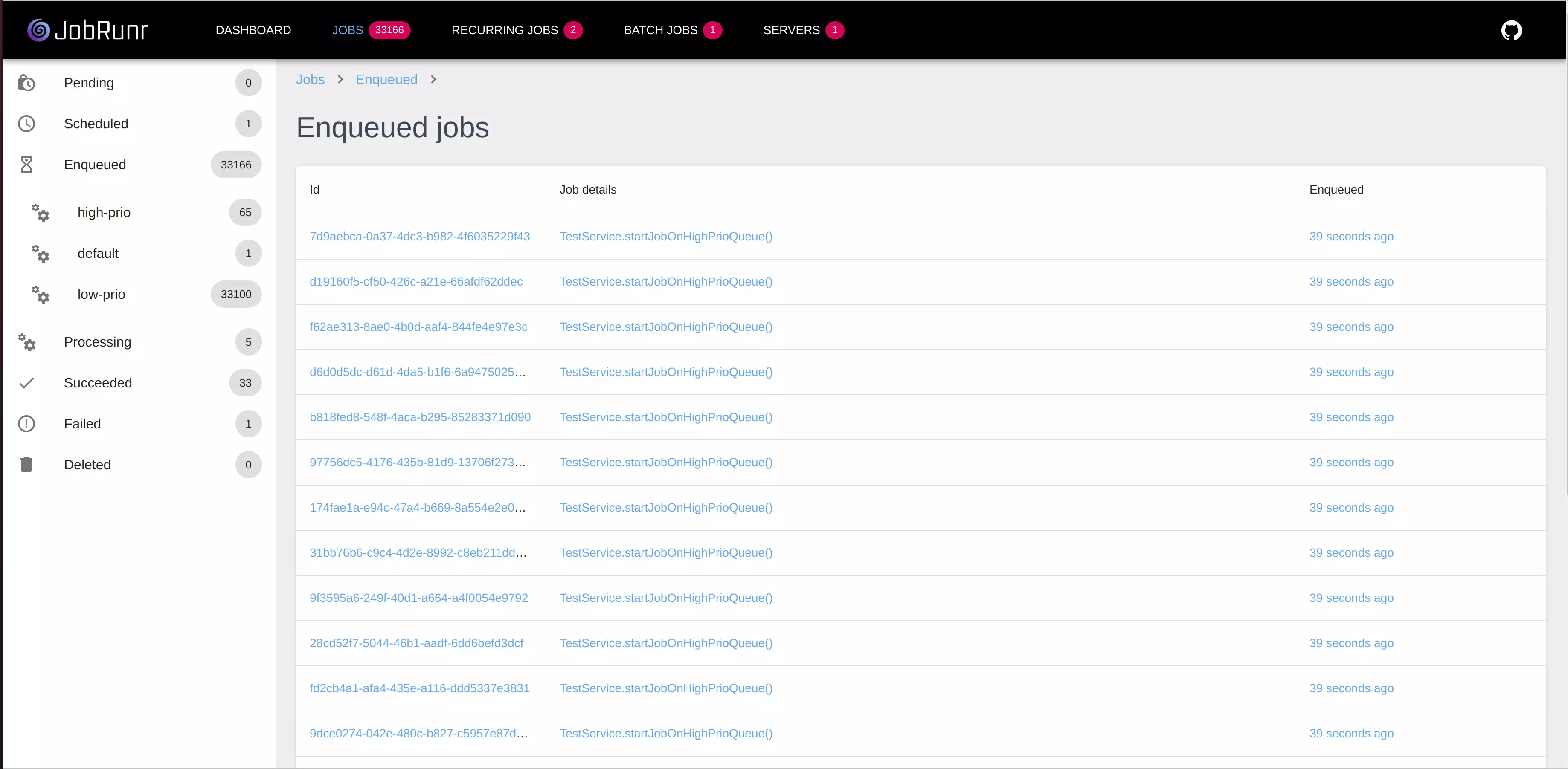
Scaling is automatic. Start a new instance of your application and it joins the worker pool. Jobs distribute across all instances based on available capacity.
db-scheduler
db-scheduler is a lightweight alternative to Quartz. Single table in your database. Minimal API.
scheduler.schedule(
    myTask.instance("task-1"),
    Instant.now().plus(Duration.ofMinutes(5))
);
db-scheduler is great if you need basic scheduling with minimal overhead. It lacks some features (no built in dashboard, limited job types) but it’s rock solid for simple use cases.
Quartz Scheduler
Quartz is the veteran of Java job scheduling, around since 2001. It supports clustering through database-based coordination.
JobDetail job = JobBuilder.newJob(EmailJob.class)
    .withIdentity("sendEmail", "emails")
    .usingJobData("userId", userId)
    .build();

Trigger trigger = TriggerBuilder.newTrigger()
    .withIdentity("emailTrigger", "emails")
    .startNow()
    .build();

scheduler.scheduleJob(job, trigger);
Quartz requires jobs to implement a Job interface and has a steep learning curve with concepts like JobDetail, Trigger, and Scheduler. Its clustering mode feels like an afterthought: it requires manual configuration, depends on 11 database tables, and needs all cluster nodes to have synchronized clocks. It works, but the API shows its age. Modern alternatives like JobRunr accomplish the same with simpler syntax and fewer moving parts. If you’re on Quartz and considering a switch, see our migration guide.
JobRunr in Production
Here’s what distributed job scheduling with JobRunr looks like in a real application.
Setup
Add the dependency:
<dependency>
    <groupId>org.jobrunr</groupId>
    <artifactId>jobrunr</artifactId>
    <version>${jobrunr.version}</version>
</dependency>
<dependency>
    <groupId>org.jobrunr</groupId>
    <artifactId>jobrunr-spring-boot-3-starter</artifactId>
    <version>${jobrunr.version}</version>
</dependency>
<dependency>
    <groupId>org.jobrunr</groupId>
    <artifactId>jobrunr-micronaut-feature</artifactId>
    <version>${jobrunr.version}</version>
</dependency>
<dependency>
    <groupId>org.jobrunr</groupId>
    <artifactId>jobrunr-quarkus-extension</artifactId>
    <version>${jobrunr.version}</version>
</dependency>
Initialize JobRunr:
JobRunr.configure()
    .useStorageProvider(SqlStorageProviderFactory.using(dataSource))
    .useBackgroundJobServer()
    .useDashboard()
    .initialize();
jobrunr.background-job-server.enabled=true
jobrunr.dashboard.enabled=true
jobrunr:
  background-job-server:
    enabled: true
  dashboard:
    enabled: true
quarkus.jobrunr.background-job-server.enabled=true
quarkus.jobrunr.dashboard.enabled=true
That’s it. JobRunr creates the necessary tables automatically.
Define Jobs
Jobs are just Java methods. No special interfaces or annotations required.
@Service
public class EmailService {

    public void sendWelcomeEmail(UUID userId) {
        User user = userRepository.findById(userId);
        emailClient.send(user.getEmail(), "Welcome!", template);
    }

    public void sendDailyDigest() {
        List<User> users = userRepository.findUsersWithDigestEnabled();
        users.forEach(user -> sendDigest(user));
    }
}
Enqueue Jobs
From anywhere in your application:
// Fire and forget
BackgroundJob.enqueue(() -> emailService.sendWelcomeEmail(user.getId()));

// Delayed
BackgroundJob.schedule(
    Instant.now().plus(Duration.ofHours(24)),
    () -> emailService.sendFollowUpEmail(user.getId())
);

// Recurring
BackgroundJob.scheduleRecurrently(
    "daily-digest",
    Cron.daily(9, 0),
    () -> emailService.sendDailyDigest()
);
TipIf you’re using a framework with dependency injection (Spring, Micronaut, Quarkus), prefer the injectable
JobSchedulerover the staticBackgroundJobfacade. It’s easier to test and avoids potential issues when running multiple instances in the same JVM (e.g., in integration tests).
JobRunr also supports a JobRequest / JobRequestHandler pattern as an alternative to lambdas. This is useful when you want to pass a data object instead of a method reference, or when you prefer a more explicit handler-based approach.
Monitor
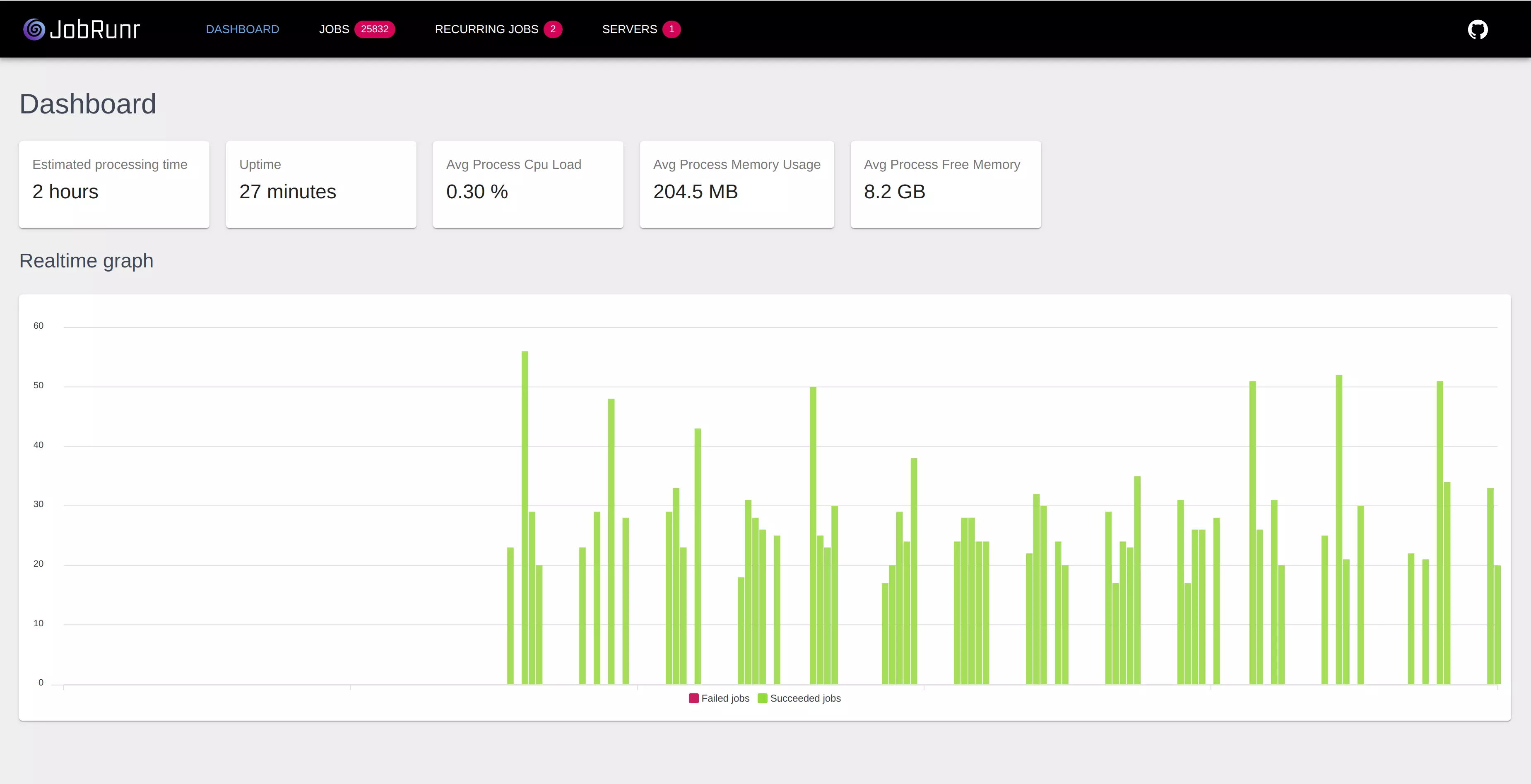
Open the dashboard at /dashboard. You’ll see:
- Active servers in your cluster
- Jobs by status (enqueued, processing, succeeded, failed)
- Processing history
- Detailed logs for each job
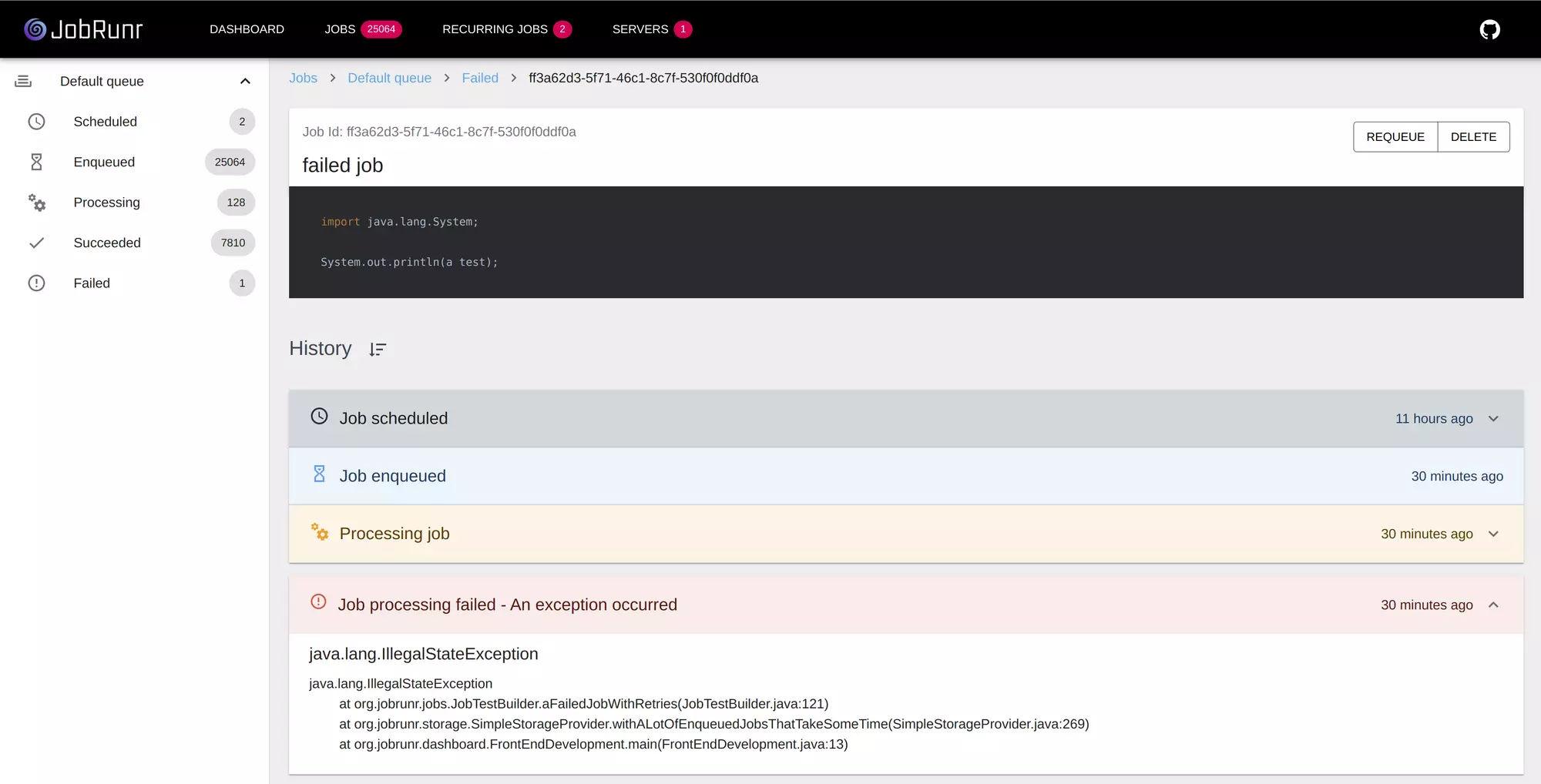
When a job fails, you see the exception, the stack trace, and you can retry with one click.
Scaling Considerations
How Many Workers?
JobRunr automatically determines worker count based on available CPUs. By default, it uses availableProcessors * 8 workers with platform threads. This works well for typical workloads that mix CPU and I/O work.
On Java 21+, JobRunr automatically detects and uses virtual threads, increasing the default to availableProcessors * 16. Since virtual threads have minimal overhead, this allows much higher concurrency for I/O bound workloads.
You can override this based on your workload:
jobrunr:
  background-job-server:
    worker-count: 20
Keep in mind that CPU cores aren’t the only factor. Database connection pool size, available memory, and third party rate limits (e.g., an external API that caps requests per second) all influence how many workers you should configure. Match your worker count to your most constrained resource.
Database Load
JobRunr uses FOR UPDATE SKIP LOCKED on modern SQL databases (PostgreSQL, MySQL, MariaDB) to coordinate workers efficiently. This avoids contention between workers and keeps database overhead minimal.
For most applications, the overhead is negligible. If you’re processing millions of jobs per day, consider:
- Using PostgreSQL for best performance (our testing showed it outperforms other storage backends)
- Enabling SmartQueue (JobRunr Pro) for higher throughput
- Tuning poll intervals
High Availability
Your job scheduler is as available as your database. If your database is replicated and fails over automatically, so do your jobs.
For the dashboard, you can run it on any instance or dedicate a server to it. The data comes from the shared database.
When to Use What
Use JobRunr when:
- You need fire and forget, delayed, and recurring jobs
- You want a dashboard without extra infrastructure
- You’re running multiple application instances
- You need automatic retries with exponential backoff
Use a message queue when:
- You’re doing event driven architecture
- You need pub/sub patterns
- Job scheduling isn’t your primary concern
Use Kubernetes CronJobs when:
- You only have recurring tasks on a schedule
- You’re already deep in the Kubernetes ecosystem
- Simplicity matters more than features
Getting Started
The setup above is all you need to get going. For more details, check out the 5-minute quickstart guide. Deploy multiple instances of your application and watch jobs distribute automatically.
Processing millions of jobs? JobRunr Pro adds priority queues, rate limiting, and multicluster support for enterprise scale.