On this page
Most job queues have a shape: quiet for hours, then a report run or an import lands and your workers are behind for twenty minutes. You can size your fleet for the spike and pay for idle capacity all day, or size it for the average and let the queue build. Neither feels right, which is why “just add another small worker VM” is such a common compromise.
We have been building a third option into JobRunr: cost-aware scaling. When the queue latency crosses a threshold, JobRunr asks a pricing service for the cheapest AWS spot instance that meets your hardware requirements, boots your worker image on it, lets it drain the backlog, and terminates it when the queue is quiet again. Spot capacity is AWS’s spare capacity, sold at a steep discount (AWS itself says up to 90% off on-demand) with the catch that AWS can reclaim it with two minutes’ notice. That catch is exactly why we think background jobs are the perfect workload for it, and later in this post we kill a node mid-run to back that up.
If this sounds familiar, it is the same idea as our carbon-aware scheduling, pointed at a different signal: instead of waiting for the greenest electricity, the scheduler shops for the cheapest compute.
We just ran the feature through a full day of measured experiments: four scenarios, 270 jobs, about 4.6 hours of single-threaded compute. This post is the raw data, what broke, and an honest attempt at answering the question that started the whole test day: at what point is this actually better than just adding another cheap VPS?
NoteCost-aware scaling is in development and not released yet. Everything below ran on our
feat/cost-awarebranch against a real AWS account. The API you see may still change before release.
What it looks like
You configure it next to your background job server. You describe the minimum hardware a worker needs and hand over a Docker image of your application; JobRunr and the cost-aware API figure out which instance type and region is the cheapest way to get it:
JobRunr.configure()
    .useJsonMapper(new JacksonJsonMapper())
    .useStorageProvider(storageProvider)
    .useCostAware(CostAwareConfiguration.usingStandardCostAwareConfiguration(
            new CostAwareAwsEC2ProviderConfiguration(
                    accessKeyId, secretAccessKey, "eu-north-1", "EC2-ECR-Reader"),
            "123456789.dkr.ecr.eu-north-1.amazonaws.com/my-worker-app")
        .andUsingRegions(new String[]{"eu-north-1"})
        .andHardwareConfiguration(1, 2.0, null)   // min vCPU, min memory GiB, GPU
        .andSettlingPeriod(Duration.ofMinutes(5)))
    .useBackgroundJobServer()
    .initialize();
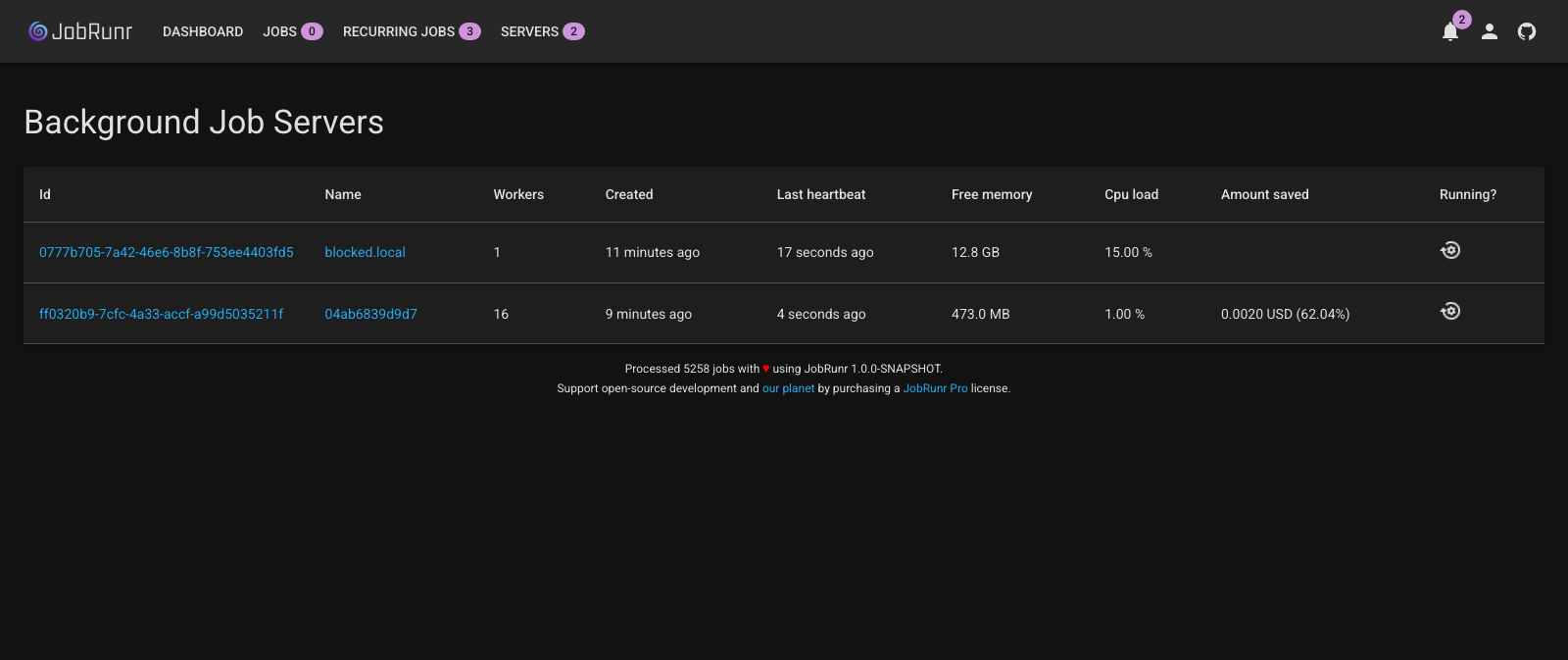
The scaling logic is deliberately boring. Every poll cycle, JobRunr looks at how long the oldest enqueued job has been waiting. Longer than scaleUpLatency (default one minute)? Provision a node, up to a maximum you set. Queue quiet for longer than scaleDownLatency? Terminate the oldest node. A settling period between scaling actions stops it from flapping. The new node is just another JobRunr background job server: it registers itself in your database, polls for jobs like any other instance, and shows up in the dashboard with one new column:
The discount is real, and it grows with instance size
Every price in this post is a live pair we measured: the spot price JobRunr actually paid, and the on-demand price of that same provisioned instance type fetched from the AWS pricing API at provisioning time. One nuance worth knowing: JobRunr targets the cheapest spot pool that satisfies your minimum spec, but if that pool has no capacity at that moment, it provisions a pricier type that does. The discount you see is therefore always measured against the instance you were actually given, not against a hand-picked baseline.
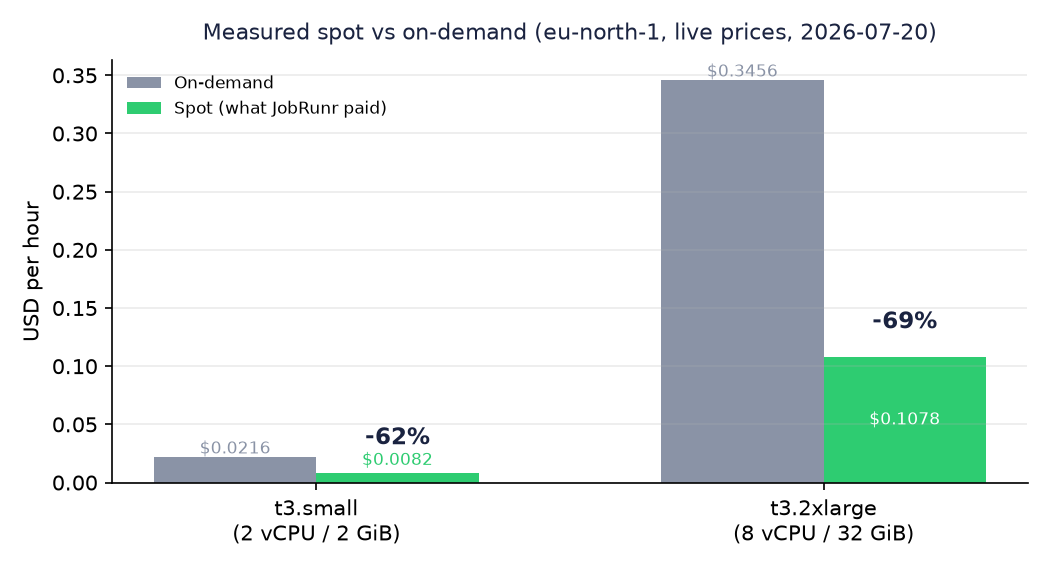
Our small-job experiments landed on a t3.small at $0.0082/hour instead of $0.0216. When we raised the minimum spec to 8 vCPU / 16 GiB, the API picked a t3.2xlarge at $0.1078 instead of $0.3456, which is 69% off. We had expected the discount to shrink on bigger instances; it went the other way.
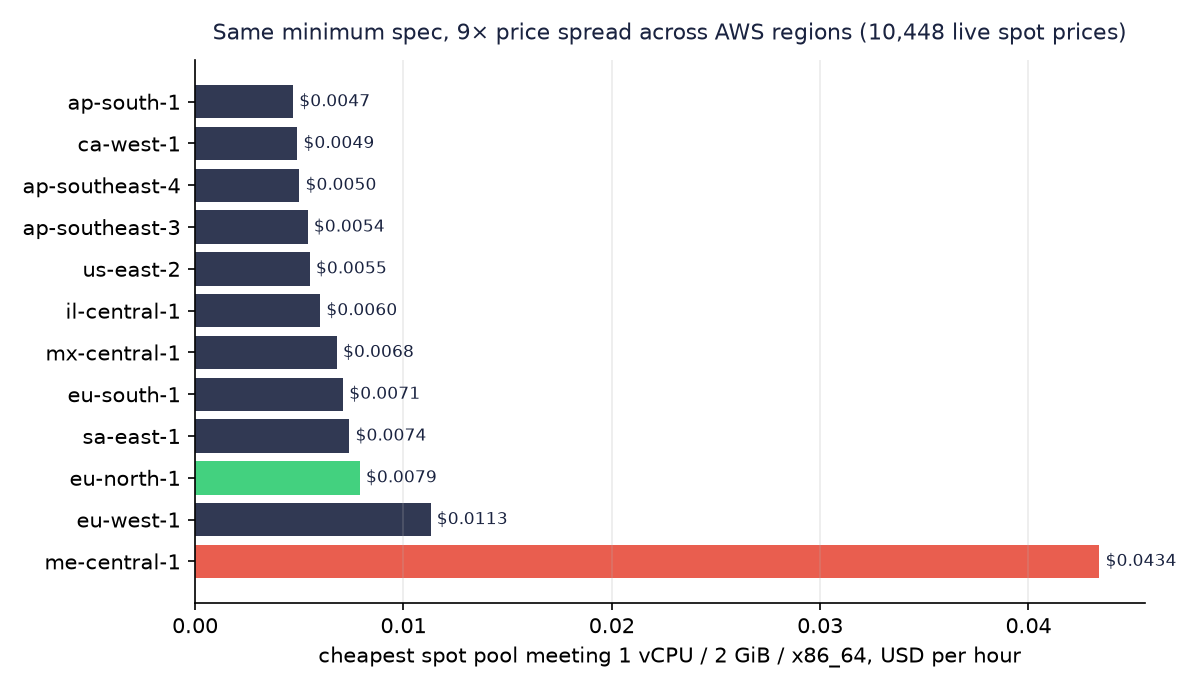
Two more things fell out of the pricing data (the API had collected 10,448 live spot prices by the end of the day). First, the same minimum spec varies 9× in price across AWS regions, from $0.0047/h in ap-south-1 to $0.0434/h in me-central-1, so letting the scheduler choose among a few regions close to your database is a bigger lever than any instance-type tuning. Second, arm64 pools were another ~15% cheaper than x86.
2.5 hours of backlog, gone in 8 minutes, for $0.002
The first real experiment: we enqueued 150 jobs of 61 seconds each (two and a half hours of work) on a deliberately undersized deployment with a single local worker, and then did nothing.
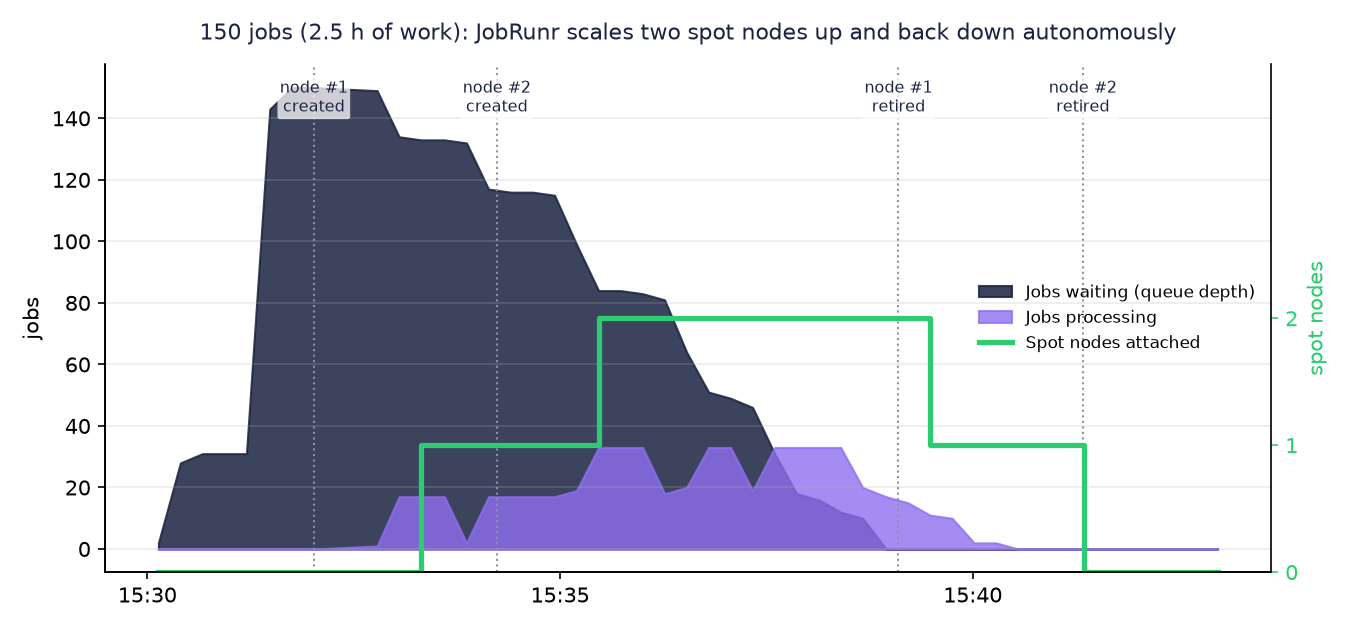
What the timeline shows, with nobody touching anything:
- 6 seconds after startup, JobRunr decided to scale up. The spot instance was fulfilled 5 seconds later.
- ~75 seconds after that, the node had booted, pulled the worker image, and was processing jobs with 16 workers.
- The settling period expired, latency was still high, so it provisioned a second node.
- The backlog was gone 7m58s in. A single worker would have needed 2.5 hours.
- Both nodes were terminated automatically. Total attached time: 14 minutes. Total cost: $0.0019.
That last number is worth staring at. The convenient way to say it: with this feature, an hour of single-threaded compute for your queue costs about a tenth of a cent.
The part everyone worries about: we killed the node mid-run
Spot instances can be reclaimed by AWS at any moment, and that is the reason most teams never try them. So we simulated the worst case ourselves: during a 40-job burst, while the spot node was processing 17 jobs, we terminated the EC2 instance out from under it. No drain, no warning. AWS does announce a real reclaim with a two-minute notice, but JobRunr deliberately does not listen for it: a reclaimed node is handled exactly like any other server crash, so a hard kill with zero warning is precisely the event the design has to survive.
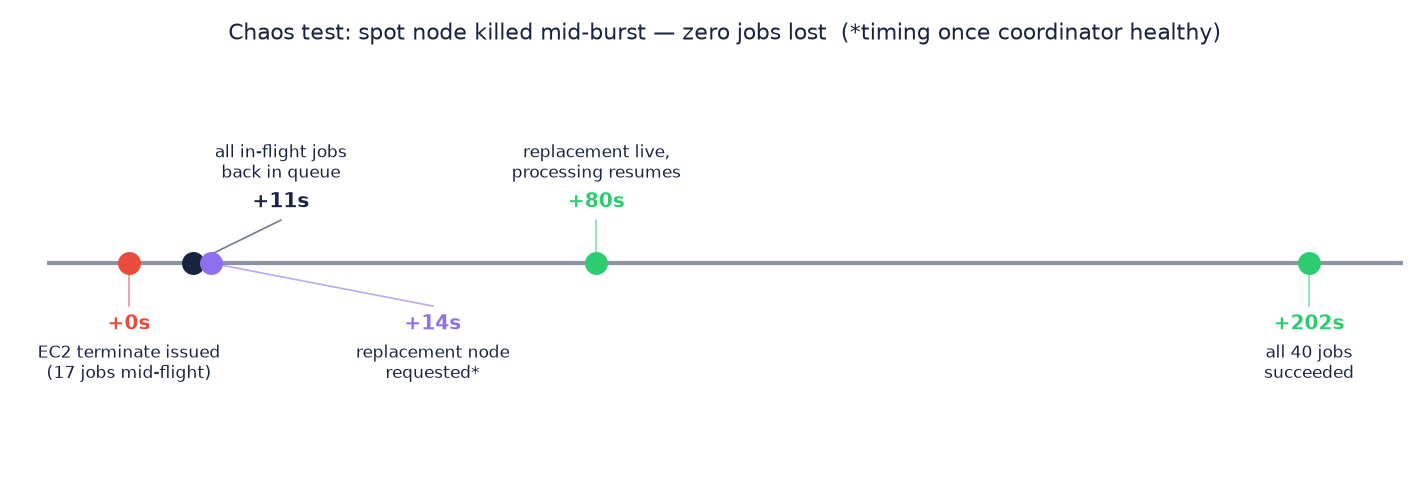
Eleven seconds after the terminate call, all 17 in-flight jobs were back in the queue: the dying container’s JobRunr shut down gracefully and re-queued its own work as Retry 1 of 10. The coordinator noticed the backlog, provisioned a replacement, and every one of the 40 jobs finished. Zero jobs lost. (Full disclosure on the asterisk in the timeline: our test coordinator itself crashed mid-test for an unrelated reason, a database connection issue in our own test harness rather than anything in the scaling feature, so the replacement timings are from after we fixed that.)
There is no magic here, and that is the point. JobRunr executes jobs at-least-once with automatic retries whether your worker dies from a spot reclaim, a deploy, or a kernel panic. Spot interruption is just another server crash, and job schedulers have been surviving those forever. The discipline that remains yours is the same one you already needed: idempotent jobs, because a job that ran halfway will run again.
Bigger spec, same story, more fun
For the last experiment we raised the minimum hardware to 8 vCPU / 16 GiB and enqueued 60 jobs, good for 63 minutes of work. JobRunr’s default worker count is 8 per vCPU, so the t3.2xlarge it rented came up with 64 workers and took all 60 jobs in one gulp:
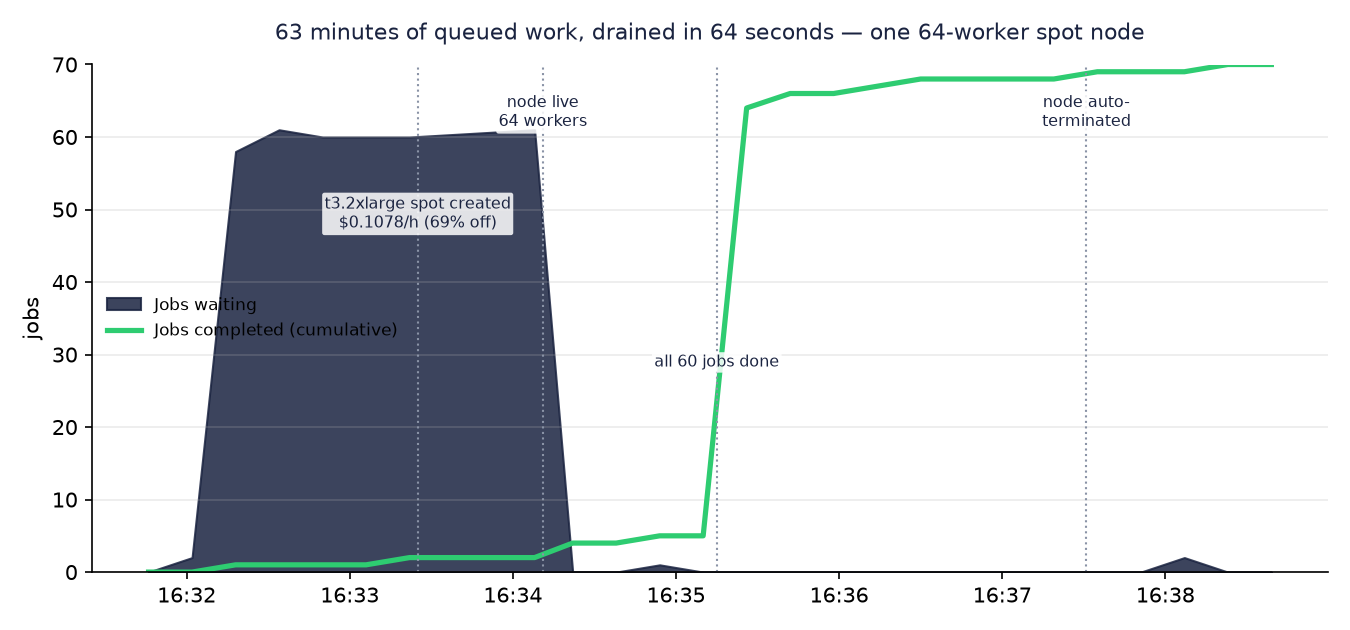
63 minutes of queued work, done 64 seconds after the node came online. The node then idled through its settling window and terminated itself. Attached for 4 minutes, cost $0.0074.
So when is this better than just adding a cheap VPS?
This was the question that started the whole test day, and it deserves a straight answer. The alternative to elastic capacity is a second always-on worker: another AWS instance, or a $4-12/month VPS from Hetzner or DigitalOcean pointed at your database.
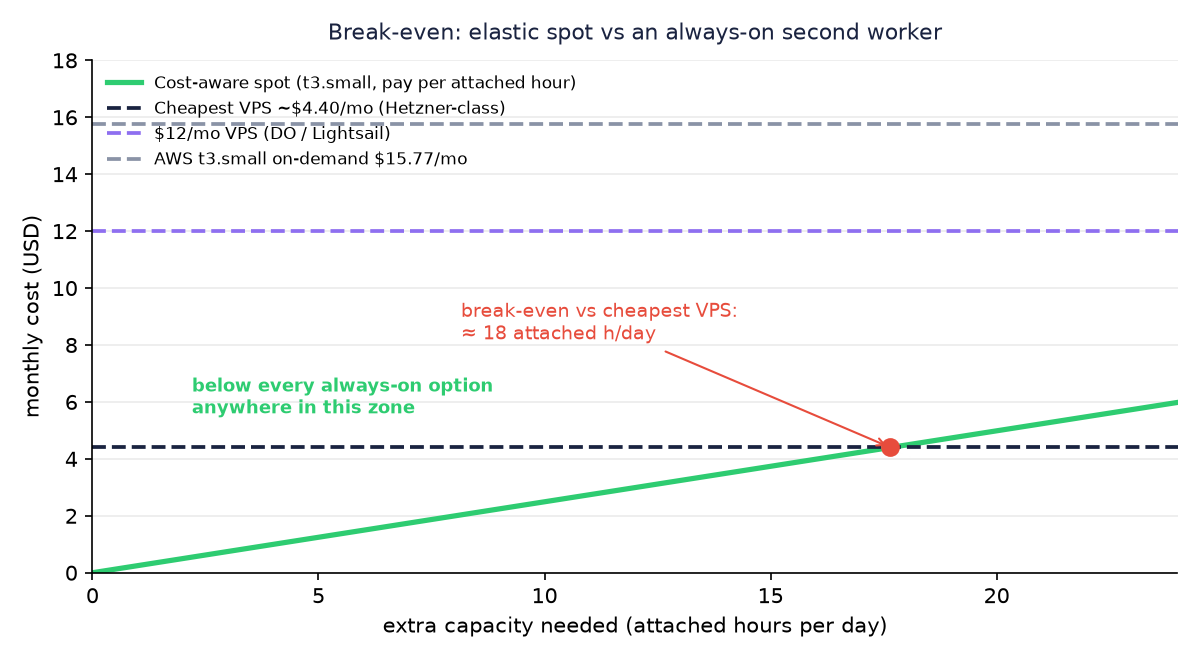
The math is simple because spot capacity only bills while attached. Using our measured t3.small rate of $0.0082/hour:
| Your alternative | Monthly price | Break-even |
|---|---|---|
| Same instance, AWS on-demand | $15.77 | Never: even a 24/7 spot worker costs $5.99 |
| $12/month VPS (DigitalOcean/Lightsail class) | $12.00 | Never: 24/7 spot is still cheaper |
| Budget VPS (Hetzner class, ~$4.50/month list price at time of writing) | ~$4.50 | ≈ 18 attached hours per day |
So where is the break-even? If your infrastructure is on AWS, there is none. The spot worker is the same instance you would have added anyway, at 62-69% off, and you only pay for the hours it is actually attached. An always-on on-demand instance is never the cheaper option.
The only case where anything else wins on raw price is a budget VPS from another provider that you keep busy nearly around the clock. Even there the margin is thin: a spot worker attached 24/7 costs $5.99 per month against roughly $4.50 for the VPS, and for that dollar and a half the VPS gives up elasticity, sits outside AWS so every poll to your job table crosses the internet, and is one more machine you patch and monitor yourself. For every burstier pattern, which is what most real queues look like, spot wins outright.
The overhead of a burst is measurable and small: about a minute of boot time plus a few idle minutes before scale-down, roughly $0.001 per burst at t3.small prices. A nightly half-hour batch comes out around $0.15/month.
Where an always-on worker still wins is latency: capacity that already exists responds in milliseconds, a spot node needs about a minute to appear. If a minute of queue delay hurts you, andSpotInstanceAmount(1, N) keeps one spot worker as a permanent floor, still at the spot discount, and bursts the rest. And if you are on Kubernetes with cluster autoscaling already dialed in, KEDA-style scaling may already cover you; this feature is aimed at teams who do not want to run an orchestration layer to get elasticity.
What we broke and what we learned
A day of deliberately rough testing surfaced real sharp edges, some ours, some yours to hold:
- Set
scaleDownLatencyat least as long as your typical job. Scale-down currently fires when the queue is empty, even if workers are mid-job. Nothing is lost, the jobs re-queue exactly like in the chaos test, but you pay a retry round. Draining a node before terminating it could be a nice refinement someday; for now the retry is the design, so size your scale-down window accordingly. - Your spot image’s worker count is the real throughput dial. The nodes come up with JobRunr’s default of 8 workers per vCPU, which is how one machine swallowed 60 jobs at once. Tune it to what your jobs actually saturate: CPU-bound work wants fewer, IO-bound work wants more.
- A freshly started pricing service is blind for its first minutes. It needs one 5-minute collection cycle of live spot prices before it can rank pools. This one bit us because our test day started from a cold instance; by the time this ships, the service your scheduler talks to will already be warm.
For transparency: the complete test day, every provisioning, the chaos test, the big node and all the tooling included, cost $0.012 in AWS spend.
Try it, and tell us about your queue
Cost-aware scaling will ship in a future JobRunr release; how it lands across OSS and Pro is not final yet, and we will say so plainly when it is. Until then:
- Want to run it against your own workload before release? We are looking for a handful of teams with real bursty queues to try the preview. Enroll here and tell us in a sentence what your workload shape looks like.
- Its already-released sibling, carbon-aware scheduling, uses the same idea with grid carbon intensity instead of price. You can try that today on JobRunr v8 with one line of configuration.
- If you are new to JobRunr entirely, the 5-minute intro is the place to start; everything in this post builds on a plain
BackgroundJob.enqueue().
If there is a scenario you want measured (bigger fleets, GPU pools, sustained overload), say so. Benchmarking this thing is the most fun we have had in a while.